The Email Experience Manager Client API
The Email Experience Manager ClientAPI class, Sitecore.Modules.EmailCampaign.ClientAPI, is used by EXM to handle subscribes and unsubscribes. You can use it to manage subscriptions to lists in the List Manager and send automated email messages.
The methods on the Email Experience Manager ClientAPI class are static. It is important that you use these static methods and not, for example, the instance methods on ClientApiLocal, Sitecore.Modules.EmailCampaign.Core.ClientApiLocal.
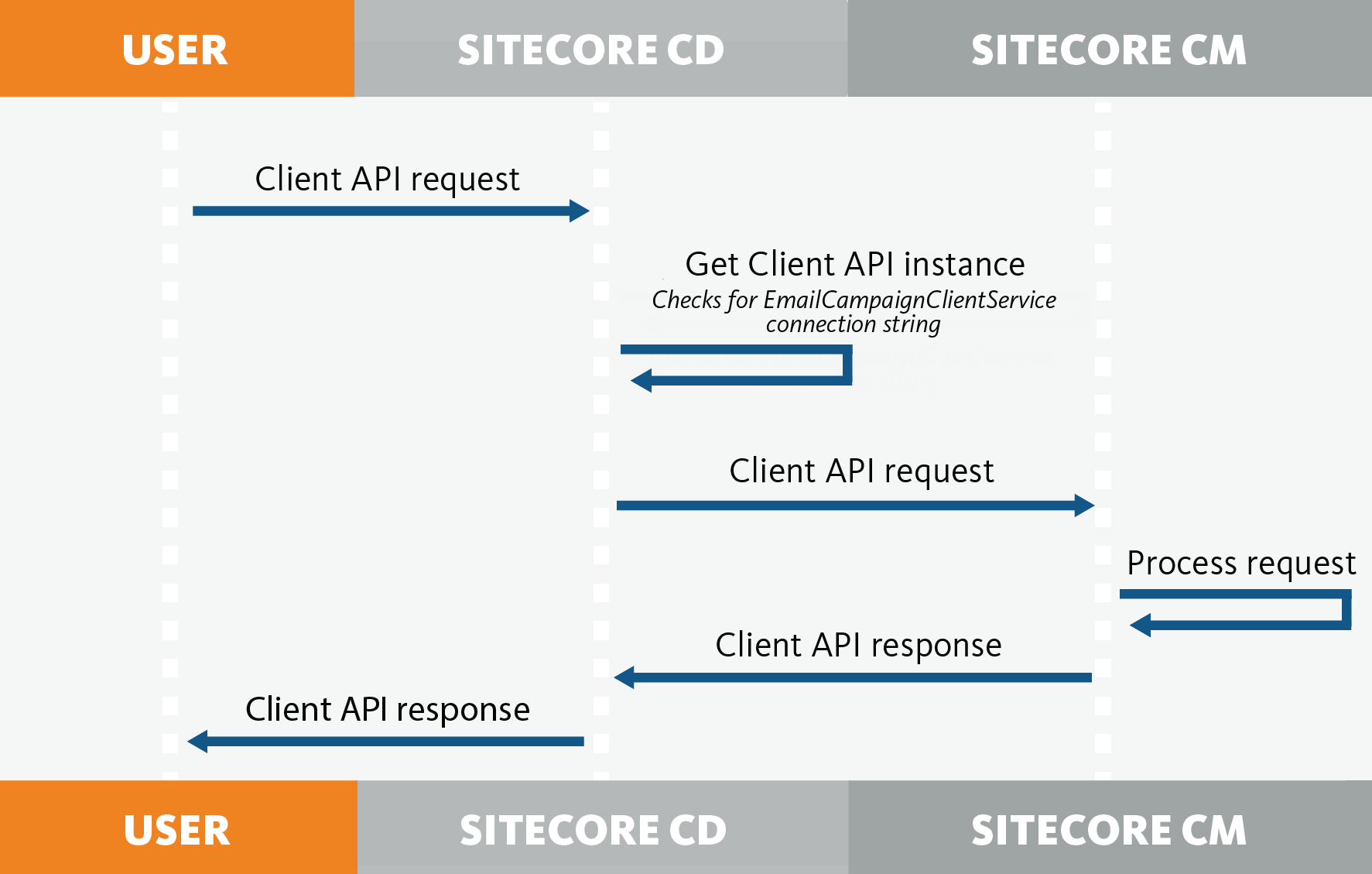
In scaled server setups with, for example, dedicated Content Delivery (CD) and Content Management (CM) instances, the CD server is not configured to add or remove contacts from a List Manager list, or to send EXM campaigns. Therefore, the ClientAPI request must be forwarded to the CM server.
The Client API looks for the EmailCampaignClientService connection string to determine if the request can be carried out locally on the server or if the request must be forwarded to a CM instance.
The following diagram depicts this process:
Methods
Methods
You can use the following public methods to manage the subscriptions:
These methods use a RecipientId to identify the contact that you want to change the subscription for. You can get the contact ID in several ways. For example:
-
To get the contact ID of the currently identified contact:
-
To get the contact ID when you only know the contact identifier:
TrySubscribe
This method adds the contact (recipientId) to the first non-segmented include list defined on the campaign (messageId). If subscriptionConfirmation is set, EXM sends a confirmation email message to the contact, asking them to confirm the subscription before adding them to the list.
In addition, the contact is also removed from the default global opt-out list.
You can extend this functionality by implementing the SubscribeEvent pipeline. See The EXM extensibility points.
Example:
Unsubscribe
This method removes the contact (recipientId) from all the contact lists that are included in the email campaign (messageId).
The method returns the path that is specified on the Final Confirmation Page setting of the Manager Root item. If the path is not specified, the Home Page path is returned.
If the unsubscribing fails, for example, if the contact is not on the list, the API returns the path that is specified for the Already Unsubscribed Page. If the contact is successfully unsubscribed from a list, EXM sends the notification that is defined by the StandardMessages.UnsubscribeNotification setting to the contact.
If the contact could not be removed from any included contact lists or if the contact does not appear in any of the lists, the contact is instead added to the global opt-out list that is defined on the manager root.
You can extend the functionality, if you implement the UnsubscribeEvent pipeline. See The EXM extensibility points.
Example:
UnsubscribeFromAll
This method adds the contact (recipientId) to the global opt-out list that is defined on the email campaign's (messageId) manager root. If the contact is added to the global opt-out list, a notification that is defined by the StandardMessages.UnsubscribeFromAllNotification setting is sent to the contact.
The method returns the path to the Final Confirmation Page. If the setting is not specified, the path to the Home Page is returned.
If the contact cannot be removed, for example, if the contact is already in the global opt-out list, the path to the Already Unsubscribed Page is returned.
You can extend the functionality, if you implement the UnsubscribeFromAllEvent pipeline. See The EXM extensibility points.
Example:
UpdateSubscriptions
This method adds the contact (recipientId) to all the List Manager lists in listsToSubscribe, and removes the contact from all List Manager lists in listsToUnsubscribe.
The method returns the path, defined on the manager root (managerRootId), to either the Email Sent Confirmation Page setting or the Final Confirmation Page setting that is defined on the manager root, depending on whether confirmSubscribtion is set and whether the contact is already subscribed to any lists.
Contacts are added or removed in a similar way to how it is handled in the TrySubscribe and the Unsubscribe methods.
Example:
For more information, see Identifying contacts.
RemoveUserFromGlobalOptOutList
This method removes the contact (recipientId) from the global opt-out list defined on the manager root (managerRootId).
Example:
SendStandardMessage
This method sends an activated automated email campaign (messageId) to the contact (recipientId) using either an asynchronous (async == true) or a synchronous sending manager with the option to specify a set of custom tokens.
Example: