Add a module to an existing tenant or site
When you create a new tenant or site, the wizard lets you select the modules that you want to include. When you have an existing tenant or site and want to add modules later, you can add modules to a specific tenant or site or use the SXA bulk module installer to install modules for multiple tenants or sites.
Add modules to a specific tenant or site
To add modules to a specific tenant or site:
-
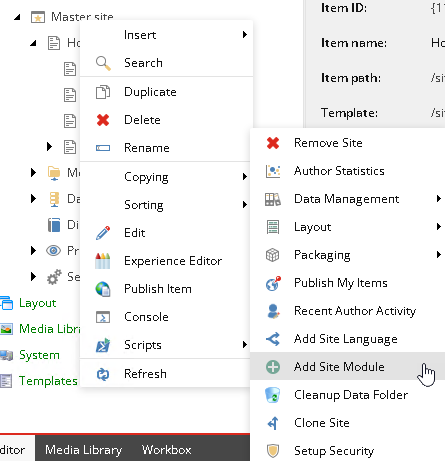
In the Content Editor, right-click the tenant or site, click Scripts , and then click Add Tenant Module or Add Site Module.
-
In the dialog box, the missing modules are listed. Select the modules that you want to add and click OK.
Add modules to multiple tenants and sites using the Bulk module installer
To add a module to multiple tenants or sites:
-
In the Content Editor, navigate to the module that you want to add in /sitecore/System/Settings/Foundation/Headless Experience Accelerator or /sitecore/System/Settings/Feature/Headless Experience Accelerator
-
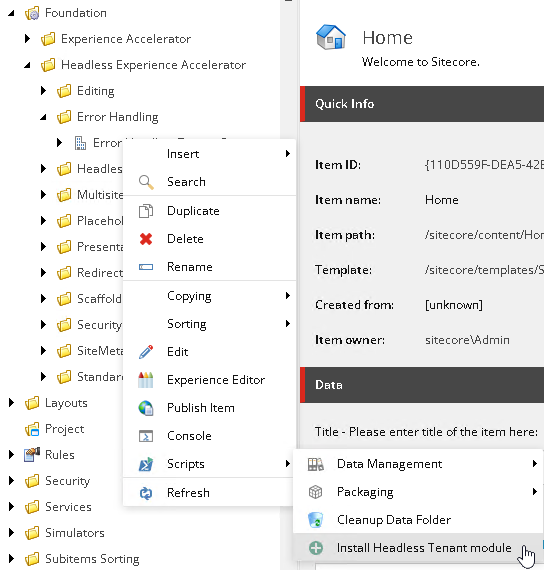
Right-click the module, click Scripts, and click Install Headless Tenant module or Install Headless Site module.
-
In the Add module to site/tenant dialog select the tenants or sites that you want to add the module to and click OK.