The SXA Search service
SXA Search Service is an endpoint used by search components. Most search components available from the SXA toolbox consume data from the endpoint. This topic describes the SXA search API parameters and their purpose.
Service URLs
For each defined site, the SXA Search service registers the routes with the following endpoint URLs. These endpoints correspond to the public methods of the Sitecore.XA.Feature.Search.Controllers.SearchController class.
site/sxa/search/results- gets the search results.site/sxa/search/facets- provides the faceted data.site/sxa/search/suggestions- provides the suggestion data.
Results
The results endpoint runs a search and returns results. You can use the following parameters:
| Query parameter | Description | Example value |
|---|---|---|
| q | query - returns the results with the specified word. | Renderings |
| v | variant - ID of the variant definition item used to render the result. | {A907975A-8C25-4433-A8ED-02B5FC1EBA29} |
| s | scope - ID of the scope definition item that provides predefined filtering. | {A907975A-8C25-4433-A8ED-02B5FC1EBA29} |
| l | language - language versions to include in the search result. | en|pl en,pl |
| o | ordering - sorts the results based on specified facets. | Title,Descending |
| e | offset - excludes a specified amount of elements from the returned result. | 30 |
| p | page size - returns a specified amount of pages. The default value is 20. | 20 |
| g | geolocation - latitude and longitude of the geolocation used for spatial search. | 55.676098|12.568337 |
| sc_site | sitecore site - the name of the context site. | showcase |
| itemid | item ID - the current context item ID. | {A907975A-8C25-4433-A8ED-02B5FC1EBA29} |
| sig | signature - the search results signature. | my_signature_search |
For example:
https://sxa94_003432/playground/sxa/search/results/?s={BAFF04C0-7332-4B72-A108-EE9814C62F16}&itemid={81003E8D-4232-433D-849E-6CA9574B5BD1}&v={2CA6BDE6-69BC-4D2A-AC6B-6DD88E300CF9}&p=20&o=Title,Ascending
Facets
The facets service searches for facets based on their name. You can use the following parameters:
| Query parameter | Description | Example value |
|---|---|---|
| q | query - user string input to search for. | Renderings |
| s | scope - ID of the scope definition item that provides predefined filtering. | {A907975A-8C25-4433-A8ED-02B5FC1EBA29} |
| f | facets - facet item names to return. | Update date, Tags |
| l | language - language versions to include in the search result. | en|pl |
| g | geolocation - latitude and longitude of the geolocation used for spatial search | 55.676098|12.568337 |
| sig | signature - the search results signature | my_signature_search |
For example:
https://sxa94_003432/playground/sxa/search/facets/?f=movie%20type,movie%20rated,movie%20genre&s={BAFF04C0-7332-4B72-A108-EE9814C62F16}&itemid={81003E8D-4232-433D-849E-6CA9574B5BD1}
Suggestions
The suggestions endpoint returns search suggestions. To set this option, in the Experience Editor, in the Search Box rendering, open the Control Properties and, in the Suggestions mode field, select the Show predictions option.
This feature is only available for the Solr search provider when using the sxaSuggester. For more information, see Using Solr auto-suggest.
| Query parameter | Description | Example value |
|---|---|---|
| q | query - returns results with the specified word. | Renderings. |
| v | variant - ID of the variant definition item used to render the result. | {A907975A-8C25-4433-A8ED-02B5FC1EBA29} |
| p | page size - returns a specified amount of pages. The default value is 5. | 5 |
| itemid | item ID - the current context item ID. | {A907975A-8C25-4433-A8ED-02B5FC1EBA29} |
Caching
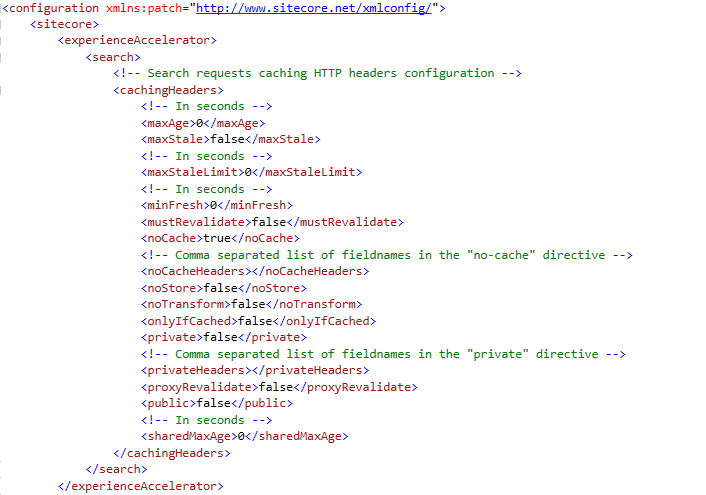
By default, caching for search and facet requests is disabled. You can update the configuration in the Sitecore.XA.Feature.Search.config file: