ウォークスルー
このページの翻訳はAIによって自動的に行われました。可能な限り正確な翻訳を心掛けていますが、原文と異なる表現や解釈が含まれる場合があります。正確で公式な情報については、必ず英語の原文をご参照ください。
このウォークスルーは「 xConnectコレクションのモデルを拡張する」シリーズの第2部です。このウォークスルーを完了するには、まずウォークスルーパート1をクリアする必要があります。
Sitecoreのデフォルトファセットは コレクションモデル参照 ドキュメントに記載されています。
もしファセットにプロパティが必要な場合は、ファセットコンストラクタで渡す必要があります。プロパティがコンストラクタになければ必須ではありません。
このウォークスルーでは、以下の方法を説明します:
- コンタクトにフェイスを設定しましょう
- 相互作用の側面を設定する
!注Sitecore 9.1.0のSitecore.Xdb.Common.Web名前空間では:
Certificate**WebRequest**HandlerModifierOptionsCertificate**HttpClient**HandlerModifierOptionsになった。
Certificate**WebRequest**HandlerModifierCertificate**HttpClient**HandlerModifierになった。
コンタクトにフェイスを設定しましょう
コンタクトのファセットを設定するには:
-
Visual Studio、Solution ExplorerではProgram.csファイルをダブルクリックし、内容を以下のコードに置き換えてください。
using Sitecore.XConnect; using Sitecore.XConnect.Client; using Sitecore.XConnect.Client.WebApi; using Sitecore.XConnect.Collection.Model; using Sitecore.XConnect.Schema; using Sitecore.Xdb.Common.Web; using System; using System.Collections.Generic; using System.Threading.Tasks;
namespace Sitecore.Documentation { public class Program { // From
\App_Config\AppSettings.config const string CERTIFICATE_OPTIONS = "StoreName=My;StoreLocation=LocalMachine;FindType=FindByThumbprint;FindValue=???"; // From your installation const string XCONNECT_URL = "https://???XConnect.local";
private static void Main(string args) { MainAsync(args).ConfigureAwait(false).GetAwaiter().GetResult(); System.Console.ForegroundColor = ConsoleColor.DarkGreen; System.Console.WriteLine(""); Console.WriteLine("END OF PROGRAM."); Console.ReadKey(); }
private static async Task MainAsync(string args) { CertificateHttpClientHandlerModifierOptions options = CertificateHttpClientHandlerModifierOptions.Parse(CERTIFICATE_OPTIONS);
var certificateModifier = new CertificateHttpClientHandlerModifier(options);
List
clientModifiers = new List (); var timeoutClientModifier = new TimeoutHttpClientModifier(new TimeSpan(0, 0, 20)); clientModifiers.Add(timeoutClientModifier); var collectionClient = new CollectionWebApiClient( new Uri(XCONNECT_URL + "/odata"), clientModifiers, new { certificateModifier } );
var searchClient = new SearchWebApiClient( new Uri(XCONNECT_URL + "/odata"), clientModifiers, new { certificateModifier } );
var configurationClient = new ConfigurationWebApiClient( new Uri(XCONNECT_URL + "/configuration"), clientModifiers, new { certificateModifier } );
var cfg = new XConnectClientConfiguration( new XdbRuntimeModel(CollectionModel.Model), collectionClient, searchClient, configurationClient );
try { cfg.Initialize();
// Print xConnect if configuration is valid var arr = new { @" ______ __ ", @" / \ | \ ", @" __ __ | $$$$$$\ ______ _______ _______ ______ _______ _| $$_ ", @"| \ / \| $$ \$$ / \ | \ | \ / \ / \| $$ \ ", @"\$$\/ $$| $$ | $$$$$$\| $$$$$$$\| $$$$$$$\| $$$$$$\| $$$$$$$ \$$$$$$ ", @" >$$ $$ | $$ __ | $$ | $$| $$ | $$| $$ | $$| $$ $$| $$ | $$ __ ", @" / $$$$\ | $$__/ \| $$__/ $$| $$ | $$| $$ | $$| $$$$$$$$| $$_____ | $$| \", @"| $$ \$$\ \$$ $$ \$$ $$| $$ | $$| $$ | $$ \$$ \ \$$ \ \$$ $$", @" \$$ \$$ \$$$$$$ \$$$$$$ \$$ \$$ \$$ \$$ \$$$$$$$ \$$$$$$$ \$$$$ " }; Console.WindowWidth = 160; foreach (string line in arr) Console.WriteLine(line);
} catch (XdbModelConflictException ce) { Console.WriteLine("ERROR:" + ce.Message); return; }
// Initialize a client using the validated configuration using (var client = new XConnectClient(cfg)) { try { var offlineGoal = Guid.Parse("ad8ab7fe-ab48-4ea9-a976-ae7a268ae2f0"); // "Watched demo" goal var channelId = Guid.Parse("110cbf07-6b1a-4743-a398-6749acfcd7aa"); // "Other event" channel
// Identifier for a 'known' contact var identifier = new ContactIdentifier { new ContactIdentifier( "twitter", "myrtlesitecore" + Guid.NewGuid().ToString("N"), ContactIdentifierType.Known ) };
// Print out the identifier that is going to be used Console.WriteLine("Contact Identifier: " + identifier0.Identifier);
// Create a new contact with the identifier Contact knownContact = new Contact(identifier);
PersonalInformation personalInfoFacet = new PersonalInformation();
personalInfoFacet.FirstName = "Myrtle"; personalInfoFacet.LastName = "McSitecore"; personalInfoFacet.JobTitle = "Programmer Writer";
client.SetFacet
( knownContact, PersonalInformation.DefaultFacetKey, personalInfoFacet ); client.AddContact(knownContact);
// Create a new interaction for that contact Interaction interaction = new Interaction(knownContact, InteractionInitiator.Brand, channelId, "");
// Add events - all interactions must have at least one event var xConnectEvent = new Goal(offlineGoal, DateTime.UtcNow); interaction.Events.Add(xConnectEvent);
// Add the contact and interaction client.AddInteraction(interaction);
// Submit contact and interaction - a total of two operations await client.SubmitAsync();
// Get the last batch that was executed var operations = client.LastBatch;
// Loop through operations and check status foreach (var operation in operations) { Console.WriteLine( operation.OperationType
- operation.Target.GetType().ToString()
- " Operation: "
- operation.Status ); }
Console.ReadLine(); } catch (XdbExecutionException ex) { // Deal with exception } } } } }
-
CERTIFICATE_THUMBPRINTとXCONNECT_URL定数を編集してください。
-
Program.csファイルを保存してください。
-
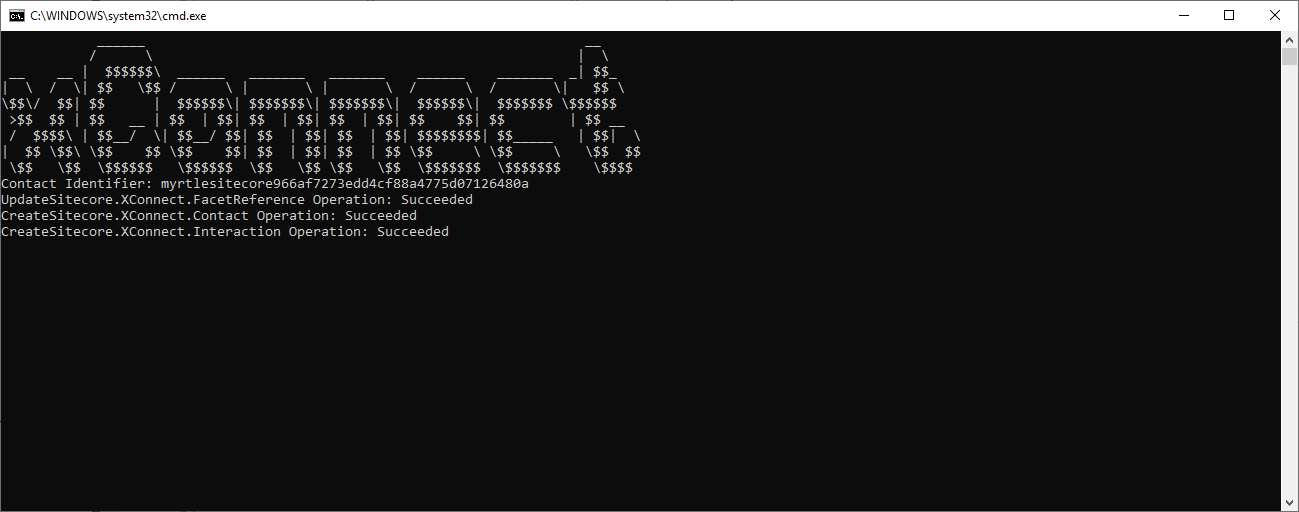
F5を押してアプリを起動します。接続が確立されると、アプリはターミナルに次のように書き込みます:
- 連絡先識別子。
- その側面はコンタクトに設定されていました。
- 連絡先が追加されたということです。
- イベントとのインタラクションが追加されたのです。
相互作用の側面を設定する
相互作用の側面を設定するために:
-
Visual Studio、Solution ExplorerではProgram.csファイルをダブルクリックし、内容を以下のコードに置き換えてください。
using Sitecore.XConnect; using Sitecore.XConnect.Client; using Sitecore.XConnect.Client.WebApi; using Sitecore.XConnect.Collection.Model; using Sitecore.XConnect.Schema; using Sitecore.Xdb.Common.Web; using System; using System.Collections.Generic; using System.Threading.Tasks;
namespace Sitecore.Documentation { public class Program { // From
\App_Config\AppSettings.config const string CERTIFICATE_OPTIONS = "StoreName=My;StoreLocation=LocalMachine;FindType=FindByThumbprint;FindValue=???"; // From your installation const string XCONNECT_URL = "https://???XConnect.local";
private static void Main(string args) { MainAsync(args).ConfigureAwait(false).GetAwaiter().GetResult(); System.Console.ForegroundColor = ConsoleColor.DarkGreen; System.Console.WriteLine(""); Console.WriteLine("END OF PROGRAM."); Console.ReadKey(); }
private static async Task MainAsync(string args) { CertificateHttpClientHandlerModifierOptions options = CertificateHttpClientHandlerModifierOptions.Parse(CERTIFICATE_OPTIONS);
var certificateModifier = new CertificateHttpClientHandlerModifier(options);
List
clientModifiers = new List (); var timeoutClientModifier = new TimeoutHttpClientModifier(new TimeSpan(0, 0, 20)); clientModifiers.Add(timeoutClientModifier); var collectionClient = new CollectionWebApiClient( new Uri(XCONNECT_URL + "/odata"), clientModifiers, new { certificateModifier } );
var searchClient = new SearchWebApiClient( new Uri(XCONNECT_URL + "/odata"), clientModifiers, new { certificateModifier } );
var configurationClient = new ConfigurationWebApiClient( new Uri(XCONNECT_URL + "/configuration"), clientModifiers, new { certificateModifier } );
var cfg = new XConnectClientConfiguration( new XdbRuntimeModel(CollectionModel.Model), collectionClient, searchClient, configurationClient );
try { cfg.Initialize();
// Print xConnect if configuration is valid var arr = new { @" ______ __ ", @" / \ | \ ", @" __ __ | $$$$$$\ ______ _______ _______ ______ _______ _| $$_ ", @"| \ / \| $$ \$$ / \ | \ | \ / \ / \| $$ \ ", @"\$$\/ $$| $$ | $$$$$$\| $$$$$$$\| $$$$$$$\| $$$$$$\| $$$$$$$ \$$$$$$ ", @" >$$ $$ | $$ __ | $$ | $$| $$ | $$| $$ | $$| $$ $$| $$ | $$ __ ", @" / $$$$\ | $$__/ \| $$__/ $$| $$ | $$| $$ | $$| $$$$$$$$| $$_____ | $$| \", @"| $$ \$$\ \$$ $$ \$$ $$| $$ | $$| $$ | $$ \$$ \ \$$ \ \$$ $$", @" \$$ \$$ \$$$$$$ \$$$$$$ \$$ \$$ \$$ \$$ \$$$$$$$ \$$$$$$$ \$$$$ " }; Console.WindowWidth = 160; foreach (string line in arr) Console.WriteLine(line);
} catch (XdbModelConflictException ce) { Console.WriteLine("ERROR:" + ce.Message); return; }
// Initialize a client using the validated configuration using (var client = new XConnectClient(cfg)) { try { var offlineGoal = Guid.Parse("ad8ab7fe-ab48-4ea9-a976-ae7a268ae2f0"); // "Watched demo" goal var channelId = Guid.Parse("110cbf07-6b1a-4743-a398-6749acfcd7aa"); // "Other event" channel
// Identifier for a 'known' contact var identifier = new ContactIdentifier { new ContactIdentifier( "twitter", "myrtlesitecore" + Guid.NewGuid().ToString("N"), ContactIdentifierType.Known ) };
// Print out the identifier that is going to be used Console.WriteLine("Contact Identifier: " + identifier0.Identifier);
// Create a new contact with the identifier Contact knownContact = new Contact(identifier);
PersonalInformation personalInfoFacet = new PersonalInformation();
personalInfoFacet.FirstName = "Myrtle"; personalInfoFacet.LastName = "McSitecore"; personalInfoFacet.JobTitle = "Programmer Writer";
client.SetFacet
( knownContact, PersonalInformation.DefaultFacetKey, personalInfoFacet ); client.AddContact(knownContact);
// Create a new interaction for that contact Interaction interaction = new Interaction(knownContact, InteractionInitiator.Brand, channelId, "");
// Add events - all interactions must have at least one event var xConnectEvent = new Goal(offlineGoal, DateTime.UtcNow); interaction.Events.Add(xConnectEvent);
IpInfo ipInfo = new IpInfo("127.0.0.1"); ipInfo.BusinessName = "Home"; client.SetFacet
(interaction, IpInfo.DefaultFacetKey, ipInfo); // Add the contact and interaction client.AddInteraction(interaction);
// Submit contact and interaction - a total of two operations await client.SubmitAsync();
// Get the last batch that was executed var operations = client.LastBatch;
// Loop through operations and check status foreach (var operation in operations) { Console.WriteLine( operation.OperationType
- operation.Target.GetType().ToString()
- " Operation: "
- operation.Status ); }
Console.ReadLine(); } catch (XdbExecutionException ex) { // Deal with exception } } } } }
-
CERTIFICATE_THUMBPRINTとXCONNECT_URL定数を編集してください。
-
Program.csファイルを保存してください。
-
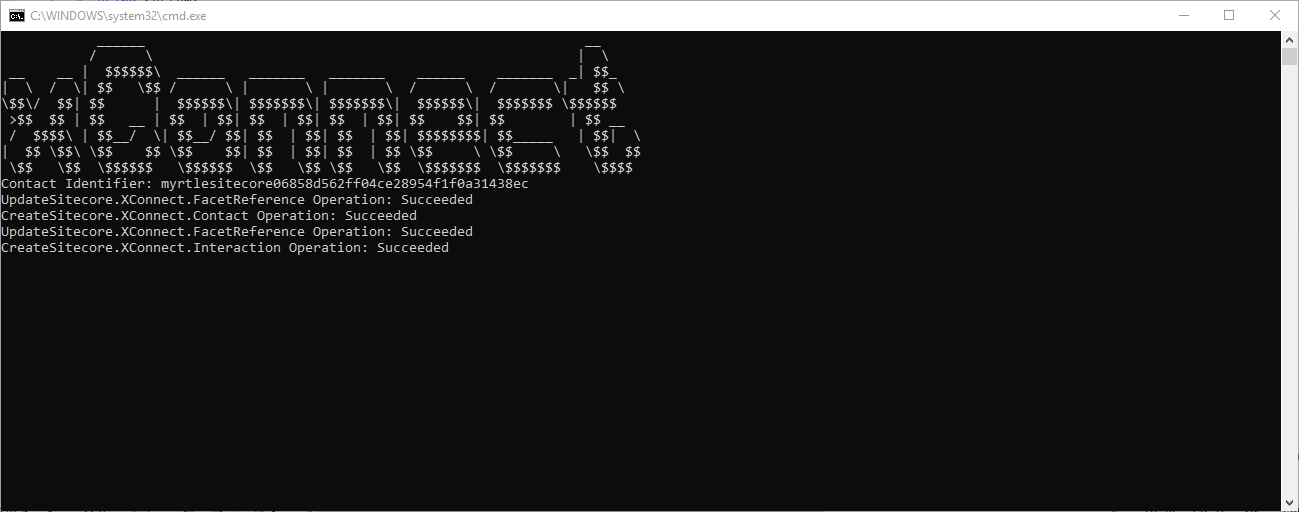
F5を押してアプリを起動します。接続が確立されると、アプリはターミナルに次のように書き込みます:
-
連絡先識別子。
!重要連絡先識別子をメモしておく。次のウォークスルーで必要だ。
-
その側面はコンタクトに設定されていました。
-
連絡先が追加されたということです。
-
その側面は相互作用に設定されていた。
-
イベントとのインタラクションが追加されたのです。
-
次のウォークスルーで 連絡の取る方法を学んでください。