
Delivery APIのクエリ例
このページの翻訳はAIによって自動的に行われました。可能な限り正確な翻訳を心掛けていますが、原文と異なる表現や解釈が含まれる場合があります。正確で公式な情報については、必ず英語の原文をご参照ください。
このトピックでは、一般的なクエリニーズを満たすためにExperience Edge GraphQLスキーマをクエリする方法の例を説明します。
!重要このトピックのほとんどの例クエリはSitecore JSSスタイルガイドのサンプルアプリから派生しています。アイテムIDやパスはインポートやソリューションによって異なります。
!重要もしサイトがフォールバック言語をサポートしている場合は、開始前にExperience Edgeコネクターで 出版言語のフォールバックを有効にし てください。
IDやパスでアイテムを取得する
パスやIDでコンテンツツリー内のどこにでもアイテムをクエリし、フィールドやその他のプロパティを読み取ることができます。インラインフラグメントを使って、アイテムを投影されたデータテンプレートタイプに、フィールドをフィールドタイプにキャストすることもできます。
クエリ
query {
path can be an item tree path or GUID-based id
このページの翻訳はAIによって自動的に行われました。可能な限り正確な翻訳を心掛けていますが、原文と異なる表現や解釈が含まれる場合があります。正確で公式な情報については、必ず英語の原文をご参照ください。
item(path: "/sitecore/content/Experience-Edge/home", language: "en") {
items can be cast to a Template type with inline fragments
このページの翻訳はAIによって自動的に行われました。可能な限り正確な翻訳を心掛けていますが、原文と異なる表現や解釈が含まれる場合があります。正確で公式な情報については、必ず英語の原文をご参照ください。
... on AppRoute { pageTitle { value } }
fields can be cast to a Field type with inline fragments
このページの翻訳はAIによって自動的に行われました。可能な限り正確な翻訳を心掛けていますが、原文と異なる表現や解釈が含まれる場合があります。正確で公式な情報については、必ず英語の原文をご参照ください。
field(name: "pageTitle") { ... on TextField { value } } } }
結果
{ "data": { "item": { "pageTitle": { "value": "Welcome to Sitecore JSS" }, "field": { "value": "Welcome to Sitecore JSS" } } } }
複数のパスでアイテムを絞り込みましょう
複数のパスに基づいてアイテムを絞り込むことができます。このクエリの例は、以下のサイト構造を前提としています:
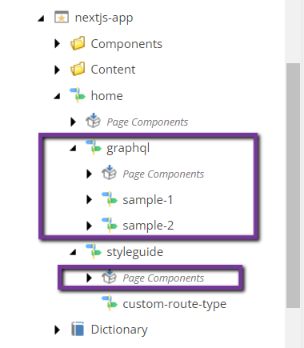
/home/graphqlとhome/styleguide/Page Componentsの項目のUUIDがそれぞれ0C6F4AAF-DD7E-5FAF-B9B0-61070D496055とAB99BA2B-B606-51E3-BAD9-FD8358DE1333を持っていると仮定します。/home/graphqlでない項目と子孫/home、home/styleguide/Page Components、またはその子ノードを取得したいのです。次のクエリでは、NCONTAINS演算子を用いてこれらの項目とその子ノードの経路を結果から除外します。
クエリ
query { pageOne: search( where: { AND: { name: "_path" value: "54C8E9B5-0B2C-5363-8FA6-D32A3A302F51" operator: CONTAINS } { AND: { name: "_path" value: "0C6F4AAF-DD7E-5FAF-B9B0-61070D496055" operator: NCONTAINS } { name: "_path" value: "AB99BA2B-B606-51E3-BAD9-FD8358DE1333" operator: NCONTAINS }
}
}
defaults to 10
このページの翻訳はAIによって自動的に行われました。可能な限り正確な翻訳を心掛けていますが、原文と異なる表現や解釈が含まれる場合があります。正確で公式な情報については、必ず英語の原文をご参照ください。
first: 10 ) { total pageInfo { endCursor hasNext } results { url { path } } } }
結果
検索クエリの結果には、/home/graphqlやhome/styleguide/Page Componentsのパスやその子孫を含む項目は含まれず、/home項目と残りの子項目が返されます。
{ "data": { "pageOne": { "total": 5, "pageInfo": { "endCursor": "NQ==", "hasNext": false }, "results": { "url": { "path": "/styleguide/custom-route-type" } }, { "url": { "path": "/styleguide" } }, { "url": { "path": "/Page-Components/home-jss-main-ContentBlock-1" } }, { "url": { "path": "/Page-Components" } }, { "url": { "path": "/" } }
} } }
URL用のアイテムレイアウトを取得する
Headless SDKで最もよく使われるもので、サイト名とHTTPアドレスでアイテムを見つけ、フレームワーク固有のSitecoreプレースホルダー実装でレンダリングするためのレイアウトサービスの出力を取得できます。
クエリ
query { layout(site: "experienceedge", routePath: "/", language: "en") { item { rendered } } }
結果
{ "data": { "layout": { "item": { "rendered": { "sitecore": { "context": { "pageEditing": false, "site": { "name": "experienceedge" }, "pageState": "normal", "language": "en", "itemPath": "/" }, "route": { "name": "home", "displayName": "home", "fields": { "pageTitle": { "value": "Welcome to Sitecore JSS" } }, "deviceId": "fe5d7fdf-89c0-4d99-9aa3-b5fbd009c9f3", "itemId": "2bde2083-5542-5569-ac5e-f1f42e29f75a", "itemLanguage": "en", "itemVersion": 1, "layoutId": "714096fc-3998-52cf-b87a-951fc7ce39d3", "templateId": "e34d8c4f-7e6c-560c-be24-e4d1fcdb16d8", "templateName": "AppRoute", "placeholders": { "jss-main": { "uid": "2c4a53cc-9da8-5f51-9d79-6ee2fc671b2d", "componentName": "ContentBlock", "dataSource": "{CC3A044C-776B-5423-9BEA-CC5C2EDA8C9B}", "fields": { "heading": { "value": "Welcome to Sitecore JSS" }, "content": { "value": "
Thanks for using JSS!! Here are some resources to get you started:
\n\n<a href=\"https://jss.sitecore.net\\" rel=\"noopener noreferrer\">Documentation
\nThe official JSS documentation can help you with any JSS task from getting started to advanced techniques.
\n\n<a href=\"/styleguide\">Styleguide
\nThe JSS styleguide is a living example of how to use JSS, hosted right in this app.\nIt demonstrates most of the common patterns that JSS implementations may need to use,\nas well as useful architectural patterns.
\n\n<a href=\"/graphql\">GraphQL
\nJSS features integration with the Sitecore GraphQL API to enable fetching non-route data from Sitecore - or from other internal backends as an API aggregator or proxy.\nThis route is a living example of how to use an integrate with GraphQL data in a JSS app.
\n\n<div class=\"alert alert-dark\">\nThis app is a boilerplate
\n The JSS samples are a boilerplate, not a library. That means that any code in this app is meant for you to own and customize to your own requirements.
\nWant to change the lint settings? Do it. Want to read manifest data from a MongoDB database? Go for it. This app is yours.
\n\n\n<div class=\"alert alert-dark\">\nHow to start with an empty app
\n To remove all of the default sample content (the Styleguide and GraphQL routes) and start out with an empty JSS app:
\n- \n
- Delete
/src/components/Styleguide*and/src/components/GraphQL*\n - Delete
/sitecore/definitions/components/Styleguide*,/sitecore/definitions/templates/Styleguide*, and/sitecore/definitions/components/GraphQL*\n - Delete
/data/component-content/Styleguide\n - Delete
/data/content/Styleguide\n - Delete
/data/routes/styleguideand/data/routes/graphql\n - Delete
/data/dictionary/*.yml\n
} } } } } } } }
アイテムバケット内のアイテムをページ化
Sitecoreのアイテムバケットを扱う際、一般的な要件として、特定のテンプレートから派生するすべてのアイテムをそのバケット内にページ付けすることが求められます。以下の検索クエリはこれらのユースケースに役立ちます。
クエリ
fragment bucketItemFields on Item { ... on AppRoute { pageTitle { value } } url { path } }
query { search( where: { AND: { name: "_templates" value: "0929f436c3f3500a9f8bd1c57a67a192" operator: CONTAINS } { name: "_path" value: "7ab00eca411249818420666fc9110faf" operator: CONTAINS }
} first: 5 orderBy: { name: "pageTitle", direction: ASC } ) { results { ...bucketItemFields } pageInfo { endCursor hasNext } total } }
結果
{ "data": { "search": { "results": { "pageTitle": { "value": "Route A" }, "url": { "path": "/bucket/2021/05/13/13/12/Route-A" } }, { "pageTitle": { "value": "Route B" }, "url": { "path": "/bucket/2021/05/13/13/12/Route-B" } }, { "pageTitle": { "value": "Route C" }, "url": { "path": "/bucket/2021/05/13/13/12/Route-C" } }, { "pageTitle": { "value": "Route D" }, "url": { "path": "/bucket/2021/05/13/13/12/Route-D" } }, { "pageTitle": { "value": "Route E" }, "url": { "path": "/bucket/2021/05/13/13/13/Route-E" } } , "pageInfo": { "endCursor": "NQ==", "hasNext": true }, "total": 26 } } }
サイトのルート項目を取得します
Experience Edgeスキーマは現在、サイトとそのルートアイテムのクエリを許可していませんが、layoutクエリを使ってサイトのルートアイテムを見つけることは可能です。
クエリ
query { layout(site: "experienceedge", routePath: "/", language: "en") { item { homeItemPath: path contentRoot: parent { id path } } } }
結果
{ "data": { "layout": { "item": { "homeItemPath": "/sitecore/content/Experience-Edge/home", "contentRoot": { "id": "5AAA894246145088B7AD604B4D177B39", "path": "/sitecore/content/Experience-Edge" } } } } }
すべてのサイトパス/ページを取得してください
siteクエリを使って、そのサイトのレイアウトデータやプレゼンテーションの詳細を含む特定の言語のすべての項目を見つけることができます。例えば、静的なサイトジェネレーターのパス取得に役立ちます。ルート結果はページ付きで、デフォルトでは10件のみの結果を返します。結果をページ化するには、firstとafterクエリ引数を付けたendCursorプロパティを使わなければなりません。
クエリ
query { site { siteInfo(site: "example") { routes(language: "en") { results { route{ id } routePath } total pageInfo { endCursor hasNext } } } } }
結果
{ "data": { "site": { "siteInfo": { "routes": { "routesResult": { "route": { "id": "31FB4D08F5E14B4C9AA4EFE8F486B87D" }, "routePath": "/Page-B" }, { "route": { "id": "49195BCAB09241A3BC30311F00B7DDC8" }, "routePath": "/Page-A" }, { "route": { "id": "BCDA1741BF0D4CA695519FEAE634FFFF" }, "routePath": "/" } , "total": 3, "pageInfo": { "endCursor": "Mw==", "hasNext": false } } } } } }
建設現場ナビゲーション
このサンプルクエリは 、サイトのルートを見つける こととアイテムの子をトラバースする機能を組み合わせています。 hasLayout引数を使ってレイアウト(ナビゲート可能なページ)を持つアイテムのみを見つけ、includeTemplateIds引数を使って(ベースの)データテンプレートでフィルタリングできます。
クエリ
fragment navigationFields on Item { ... on AppRoute { pageTitle { value } } url { path } }
query { layout(site: "experienceedge", routePath: "/", language: "en") { item { ...navigationFields children(hasLayout: true, includeTemplateIDs: "e34d8c4f7e6c560cbe24e4d1fcdb16d8") { results { ...navigationFields children(hasLayout: true, includeTemplateIDs: "e34d8c4f7e6c560cbe24e4d1fcdb16d8") { results { ...navigationFields } } } } } } }
結果
{ "data": { "layout": { "item": { "pageTitle": { "value": "Welcome to Sitecore JSS" }, "url": { "path": "/" }, "children": { "results": { "pageTitle": { "value": "GraphQL | Sitecore JSS" }, "url": { "path": "/graphql" }, "children": { "results": { "pageTitle": { "value": "Sample 1 Page Title" }, "url": { "path": "/graphql/sample-1" } }, { "pageTitle": { "value": "Sample 2 Page Title" }, "url": { "path": "/graphql/sample-2" } }
} }, { "pageTitle": { "value": "Styleguide | Sitecore JSS" }, "url": { "path": "/styleguide" }, "children": { "results": { "pageTitle": { "value": "Custom Route Type | Sitecore JSS" }, "url": { "path": "/styleguide/custom-route-type" } }
} }
} } } } }
ページを作ってみる
アイテムグラフタイプのancestorsフィールドを使ってパンくずナビゲーションを作成できます。 hasLayoutの引数を使ってレイアウト(ナビゲート可能なページ)を持つアイテムのみを見つけ、(ベースの)データテンプレートでフィルタリングincludeTemplateIdsします。
クエリ
fragment breadcrumbFields on Item { ... on AppRoute { pageTitle { value } } url { path } }
query {
Assume the item id is available on the page
このページの翻訳はAIによって自動的に行われました。可能な限り正確な翻訳を心掛けていますが、原文と異なる表現や解釈が含まれる場合があります。正確で公式な情報については、必ず英語の原文をご参照ください。
item(path: "e2c5c62f42a95b17bc0e71bc9193db9a", language: "en") { ...breadcrumbFields ancestors( hasLayout: true includeTemplateIDs: "e34d8c4f7e6c560cbe24e4d1fcdb16d8" ) { ...breadcrumbFields } } }
結果
{ "data": { "item": { "pageTitle": { "value": "Custom Route Type | Sitecore JSS" }, "url": { "path": "/styleguide/custom-route-type" }, "ancestors": { "pageTitle": { "value": "Styleguide | Sitecore JSS" }, "url": { "path": "/styleguide" } }, { "pageTitle": { "value": "Welcome to Sitecore JSS" }, "url": { "path": "/" } }
} } }
Sitecore Headless SDKでアイテムフィールドを使いましょう
Sitecoreの各種ヘッドレスSDKには、フィールド値のレンダリング用のヘルパーが含まれています。これらのヘルパーは、複雑なフィールド(画像やリンクなど)やインライン編集の文脈で編集可能な値のレンダリングを支援します。Experience Edgeスキーマ内のアイテムフィールドには、これらのフィールドヘルパーと互換性のある形式でフィールドを出力するものjsonValueが含まれます。
例えば、以下のリンクフィールドはLinkフィールドヘルパーを使ってReactまたはNext.jsでレンダリングできます。
クエリ
query { richTextFieldExample: item(path: "d979794f76fd51829f3ece48d16dc36c", language: "en") { displayName ... on StyleguideFieldUsageRichText { sample { jsonValue } } } imageFieldExample: item(path: "c05be0b464885343b5670145b6815d03", language: "en") { displayName ... on StyleguideFieldUsageImage {dic sample1 { jsonValue } } } linkFieldExample: item(path: "d299e65e1f6c5ea3b71381c8e2f85baf", language: "en") { displayName ... on StyleguideFieldUsageLink { externalLink { jsonValue } } } }
結果
{ "data": { "richTextFieldExample": { "displayName": "Styleguide-FieldUsage-RichText-3", "sample": { "jsonValue": { "value": "
This is a sample rich text field. HTML is always supported. In Sitecore, editors will see a WYSIWYG editor for these fields.
" } } }, "imageFieldExample": { "displayName": "Styleguide-FieldUsage-Image-4", "sample1": { "jsonValue": { "value": { "src": "https://cm.experience\_edge.localhost/-/media/experienceedge/data/media/img/sc\_logo.png?iar=0&hash=F4F969FF95009AE0A80FA094C497ED25", "alt": "Sitecore Logo" } } } }, "linkFieldExample": { "displayName": "Styleguide-FieldUsage-Link-9", "externalLink": { "jsonValue": { "value": { "href": "https://www.sitecore.com", "text": "Link to Sitecore", "url": "https://www.sitecore.com", "linktype": "external" } } } } } }すべてのコンテンツサイトに関する情報を得ることができます
siteクエリ内のすべてのコンテンツサイトに関する情報は、siteInfoCollectionフィールドを使って取得できます。例えば、利用可能なすべてのサイトの名前とルートパスを取得するには、以下のクエリを使用します。
クエリ
query { site { siteInfoCollection{ name rootPath } } }
結果
{ "data": { "site": { "siteInfoCollection": { "name": "example", "rootPath": "/sitecore/content/sxa/example" }, { "name": "website", "rootPath": "/sitecore/content" }
} } }
特定のコンテンツサイトに関する情報を得る
siteクエリのsiteInfoフィールドを使って、特定のコンテンツサイトに関する情報を得ることができます。例えば、次のクエリはサイト名とルートパスを返します。
クエリ
query { site { siteInfo(site: “example”) { name rootPath } } }
結果
{ "data": { "site": { "siteInfo": { "name": "example", "rootPath": "/sitecore/content/sxa/example" } } } }
リストリダイレクトルール
特定のサイトに関する情報を問い合わせる際、リダイレクトルールのリストを要求できます。以下の例クエリでは、リダイレクトの種類、ターゲット、パターン、そしてリダイレクトがクエリ文字列のパラメータを保持しているかどうかを回答に含みます。
クエリ
query { site { siteInfo(site: “example”) { name rootPath redirects { redirectType isQueryStringPreserved target pattern } } } }
結果
{ "data": { "site": { "siteInfo": { "name": "example", "rootPath": "/sitecore/content/sxa/example", "redirects": { "redirectType": "REDIRECT_302", "isQueryStringPreserved": true, "target": "/page C", "pattern": "/page b/" }
} } } }
エラー処理ページを入手してください
特定のサイトに関する情報を問い合わせる際、エラー処理プロセスに関わるすべてのページの情報を請求できます。その結果、必要なエラーコードがすべて処理されているかどうか、またどのページで処理されているかを判断するのに役立ちます。
クエリ
query { site { siteInfo(site: “example”) { errorHandling(language: “en”) { notFoundPage { id path field (name: "Title") { name value } }, notFoundPagePath, serverErrorPage { id name path field (name: "Title") { name value } }, serverErrorPagePath } } } }
結果
{ "data": { "site": { "siteInfo": { "errorHandling": { "notFoundPage": { "id": "7AC72838792444A389BDD10D63A30FA6", "path": "/sitecore/content/sxa/example/Home/custom-404-error-page", "field": { "name": "Title", "value": "custom-404-error-page" } }, "notFoundPagePath": "/custom-404-error-page", "serverErrorPage": { "id": "846C9D39299740D0A25235ECA3F5B202", "name": "custom-500-error-page", "path": "/sitecore/content/sxa/example/Home/custom-500-error-page", "field": { "name": "Title", "value": "custom-500-error-page" } }, "serverErrorPagePath": "/custom-500-error-page" } } } } }
ロボット情報を取得する
siteクエリを使って、どの検索エンジンクローラーがサイトにアクセスできるかの情報を請求できます。
クエリ
query { site { siteInfo(site: “example”) { robots } } }
結果
{ "data": { "site": { "siteInfo": { "robots": "google, bing\r\nSitemap: https://xmcloudcm.localhost/sitemap.xml\\r\\n" } } } }
SXAサイトのサイトマップを入手してください
SXAのサイトマップで生成されたメディアアイテムへのパスをクエリできます。
クエリ
query { site { siteInfo(site: “example”) { sitemap } } }
結果
{ "data": { "site": { "siteInfo": { "sitemap": " /-/media/Project/sxa/example/Sitemaps/sitemap.xml" } } } }
辞書の項目を取得
siteクエリを使うことで、サイトの個別辞書エントリーを取得することができます。カーソル引数を組み合わせて結果にページングを適用することもできます。それらが提供されていない場合、デフォルトはfirstページサイズ500となります。
クエリ
query { site { siteInfo(site: "example") { name dictionary(language:"en",first
, after:"eyJzZWFyY2hBZnRlciI6WyJrZXkyIiwiZGVtb3NpdGUtMzVjZDg5NjJjNzE4NDI4Nzk2YzBmYTU2YmY2ZjRmMjIta2V5Mi11ay11YSJdLCJjb3VudCI6Mn0=") { total pageInfo{ hasNext endCursor } results { key value } } } } }結果
"data": { "site": { "siteInfo": { "name": "example", "dictionary": { "total": 2, "pageInfo": { "hasNext": false, "endCursor": "eyJzZWFyY2hBZnRlciI6WyJ0ZXN0MiIsIm5ldyBzaXRlLWU1MmU1ZjBiZmMxMzQ0Mzc5YWQ4YzcyMjY2NzIzZmI0LXRlc3QyLWVuIl0sImNvdW50IjoyfQ==" }, "results": { "key": "key1", "value": "value1" }, { "key": "key2", "value": "value2" }
} } } } }