Rules and parameters for Device Detection
Version:
There are a number of rules and parameters that are currently available in the Rule Set Editor for Sitecore Device Detection. You can use these to further customize your Sitecore sites and optimize the presentation of your website on different devices for your visitors.
Sitecore Device Detection rules
Sitecore Device Detection rules
You can find the rules for Device Detection in the Device rule group in the Rule Set Editor. They are as follows:
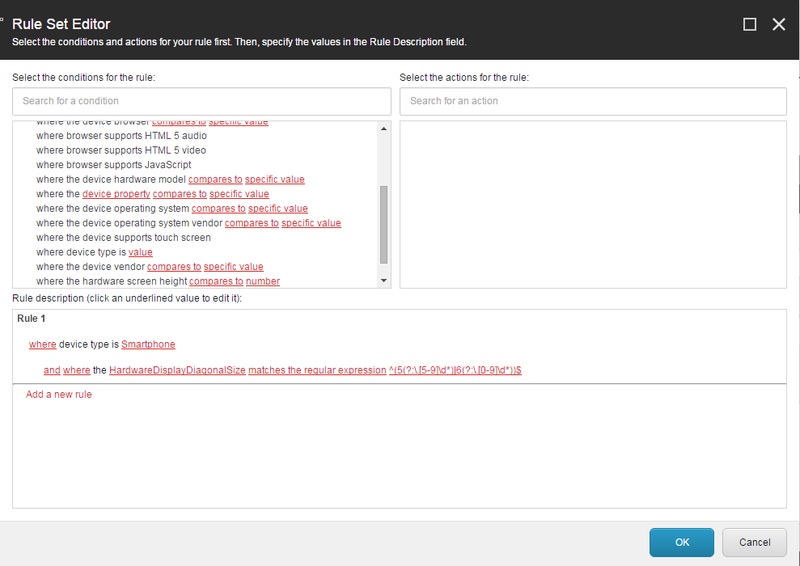
The Device rule group (Rule group: Device).
| Rule | Description |
|---|---|
| where the query string matches value | Compares the query string with the defined value. |
| where the user agent compares to value | Compares the user agent string with the defined value. |
| where the device browser compares to specific value | Matches the device browser model and version with the specified value, for example: Chrome42 |
| where browser supports HTML 5 audio | True when the visitor's browser supports HTML 5 audio playback. |
| where browser supports HTML 5 video | True when the visitor's browser supports HTML 5 video playback. |
| where browser supports JavaScript | True when the visitor's browser supports JavaScript. |
| where the device hardware model compares to specific value | Compares the device model and version with the defined value, for example: SamsungS4. |
| where the device property compares to specific value | Compares any device property in the database with the defined value. |
| where the device operating system compares to specific value | Compares the operating system (OS) name and version of the device with the defined value, for example: Android4.2.1. |
| where the device operating system vendor compares to specific value | Compares the device OS vendor with the specified value, for example Microsoft. |
| where the device supports touch screen | True when the visitor's device is enabled with touchscreen. |
| where device type is value | Compares the device type to the specified value, such as Smartphone or Tablet. |
| where the device vendor compares to specific value | Compares the company who made the device with the specified value, for example Apple Inc. |
| where the hardware screen height compares to number | Compares the display height of the device in pixels with the specified value. |
| where the hardware screen width compares to number | Compares device the display width of the device in pixels with the specified value. |
If you have suggestions for improving this article, let us know!