Adding the Sitecore Marketer MCP to Marketplace apps
The Sitecore Marketer MCP server securely connects AI agents to marketing tools in Sitecore, enabling marketers to perform common activities in natural language, such as creating pages, managing assets, and optimizing campaigns.
This guide is for Marketplace app developers who want to integrate the Sitecore Marketer MCP into a custom, full‑stack Marketplace app.
Benefits of using the Marketer MCP
By adding the Marketer MCP to your Marketplace app, you can build agentic, context-aware, natural-language experiences for Sitecore product users.
Marketplace apps that use the Marketer MCP have the following advantages:
-
Tool calling - the LLM-powered agent in your app can dynamically decide which Marketer MCP tools to call based on user input and context, such as
create_pageandupdate_content. -
Scalable architecture - you don't need to hardcode API requests directly in your source code. Instead, the agent in your app can discover and call the existing MCP tools. This also means you won't have to rewrite the source code when new tools or resources become available to the MCP.
-
Model-agnostic - MCP is an open standard, so apps that use it will remain compatible with new LLMs, tools, and services.
Ideas for apps
Consider adding the Marketer MCP to your Marketplace app to enable marketers and content authors to manage content with the help of LLM-powered agents, using natural language. This includes functionalities such as creating content, generating pages, querying databases, and running multi-step workflows.
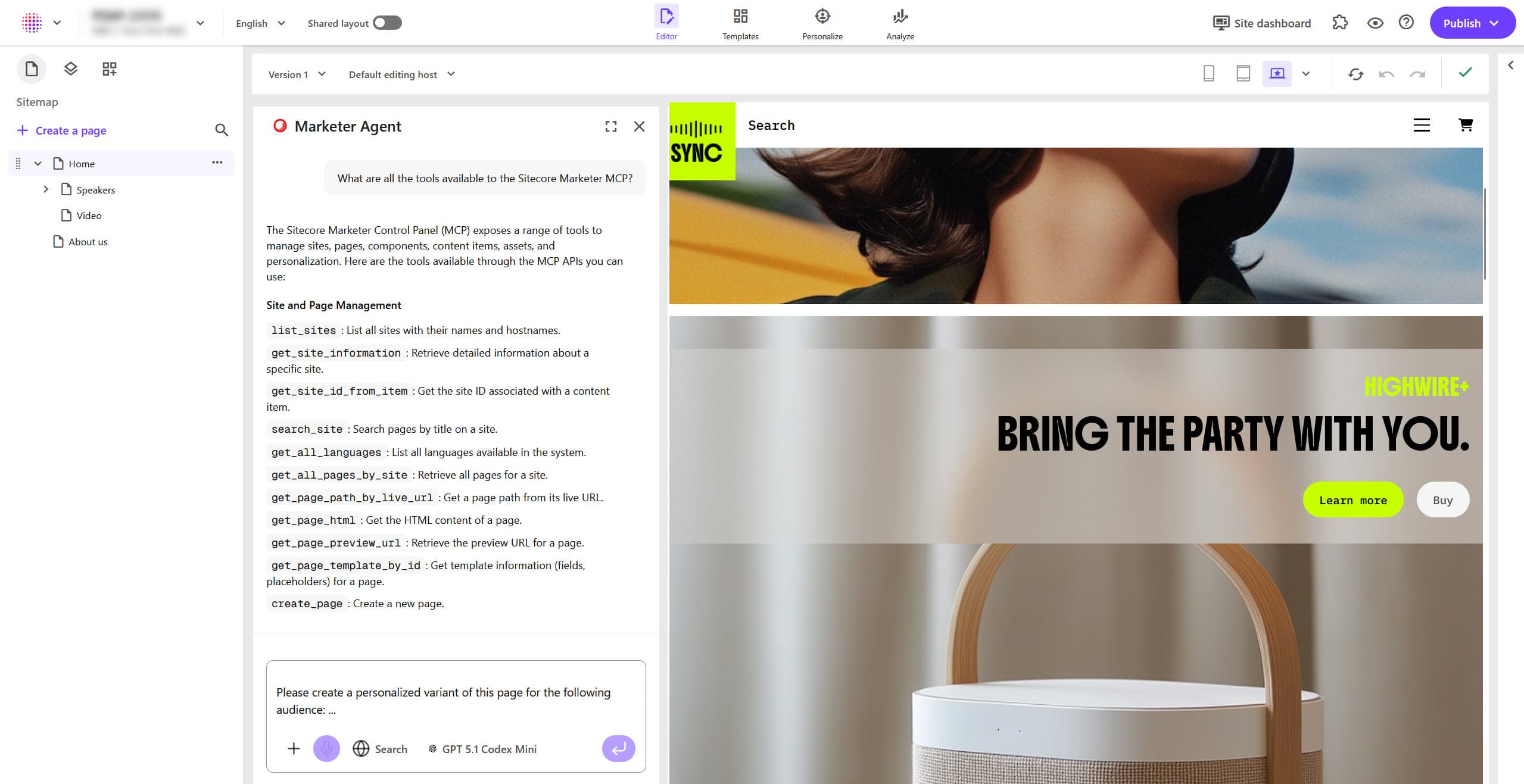
For example, consider an agentic content creation app that can call the available Marketer MCP tools to create and update content. The Marketplace app user can interact with the agent in a chat user interface and prompt it to, for example, create a landing page for Black Friday including a hero image, a title, and a summary. Then, the LLM analyzes the prompt, selects the correct tools, and runs them in the correct order. A new page is created in Sitecore and displayed to the marketer.
Requirements for using the Marketer MCP
The Sitecore Marketer MCP is a server-side tool, and it requires a bearer token for identifying the user, and a Context ID for routing to the correct Sitecore environment and resources. MCP calls are never made directly from the browser. All calls to the Marketer MCP must be performed server-side within your Marketplace app. Therefore, to be able to use the MCP in your Marketplace app, your app must meet the following requirements:
-
App architecture and authorization - you need a full-stackfull-stack Marketplace app with custom authorizationcustom authorization. If you don't have such an app yet, create one by completing the SDK CLI quick start. You only need the Marketplace SDK
clientpackage. No other SDK packages are required.ImportantA full-stack app is required for making server-side requests to the Marketer MCP. This means you cannot use the Marketer MCP in client-side Marketplace apps.
Custom authorization is required so your app can provide a bearer token to the Marketer MCP. Your Marketplace app must send both the bearer token and the Context ID in the request header from the client to the server.
-
API access - your Marketplace app needs to access SitecoreAI APIs so it can interact with the Agent API, which powers the Marketer MCP.
-
Third-party agent SDK - your app also needs a chat functionality, including a chat user interface. This is where the marketer interacts with an LLM that can use the tools made available by the Marketer MCP. For your app's chat functionality, you could use a third-party SDK for building agents. Popular options include the Claude Agent SDK, the OpenAI Agents SDK, and the Vercel AI SDK.
Example integration workflow
Consider a full-stack Marketplace app with custom authorization that you scaffold by completing the SDK CLI quick start. Next, you complete the AI SDK and AI elements chatbot tutorial to add chat functionality to your app. At this point, your app has:
-
components/chatbot.tsx- a chat user interface on the client side. It manages the chat UI state, sends messages, and consumes streamed responses. -
app/api/chat/route.ts- a chat route on the server side. It runs the LLM, streams output to the client, and enables MCP tool calling.
To add the Marketer MCP to your app, you need to update both the client-side and the server-side code:
-
On the client side, in
chatbot.tsx, include the bearer token and the Context ID in the request header of every chat message sent to the server. You can access these values using the Marketplace SDK. -
On the server side, in
route.ts, create an MCP client and include the bearer token and the Context ID in the headers.
When a user sends a chat message, the LLM can securely invoke the Marketer MCP tools through the server-side integration in your Marketplace app.