Use GraphQL to fetch component-level data in JSS Next.js apps
The Next.js sample app supports two methods for component-level data fetching with GraphQL:
- Connected GraphQL, which enables you to query GraphQL endpoints from your component code.
- Integrated GraphQL (IGQL), which involves adding queries to rendering items in SitecoreAI.
If you include secrets or sensitive information in component-level getStaticProps and getServerSideProps functions, that information will only be included in the client-side bundle in development mode.
Component-level data fetching with connected GraphQL
The sample application provided in the JSS Next.js starter kit includes a GraphiQL interface for exploring the schema, testing queries, and identifying which GraphQL types can be used by your components. The default path for this premade interface is ${SITECORE_API_HOST}/sitecore/api/graph/edge/ui?sc_apikey=${SITECORE_API_KEY}.
The graphql-let library provides the same information about types in the corresponding .graphq.d.ts files.
To use component-level data fetching with connected GraphQL:
-
In a
GraphQL-ConnectedDemo.dynamic.graphqlfile, define a GraphQL query. For example:The library
graphql-letgenerates a file namedGraphQLDemoQuery.graphql.d.ts. -
In your component file, add the following import statements:
-
If needed, update your introspection data to have access to the latest GraphQL types.
-
Import your GraphQL query and GraphQL types:
-
Define your TypeScript types and the
GraphQLDemocomponent: -
In your component, define
getStaticPropsorgetServerSidePropsfunctions. The following example implements thegetStaticPropsfunction. Because GraphQL does not work in disconnected mode, you must exit the function if the app runs in disconnected mode. You must also create a new GraphQL client using thegraphqlClientFactoryproperty fromlib/graphql-client-factory. For example: -
Perform the request and return the result:
-
Export your component, wrapped in the
withDatasourceCheckhigher-order component:
To help make sure you've configured your application correctly, you can compare it to the connected GraphQL component included in the Sitecore sample app.
If you're building a very large website using SitecoreAI, you might have to enable retries for requests to the SitecoreAI Experience Edge GraphQL endpoint for the build process to complete.
Component-level data fetching with integrated GraphQL
Integrated GraphQL (IGQL) directly affects the layout data shape returned for a specific component by the Experience Edge layout response.
A GraphQL query can be defined on the rendering item that shapes the data returned by the layout service, and can be used from the props.fields object in the same way as a standard response. This gives you more control over the shape of the data being returned.
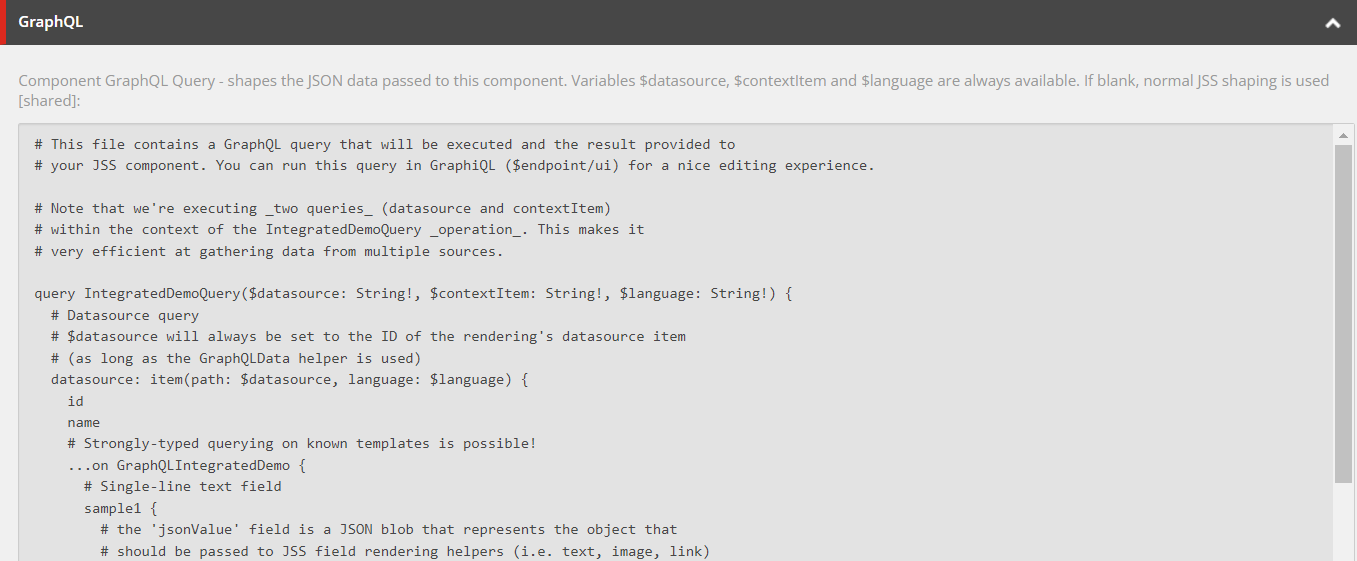
To add IGQL to a component, you can enter the query in the Component GraphQL Query field on the rendering item of the component.
Refer to the following sources for more information:
-
Integrated GraphQL component in the Sitecore sample app - for configuration and implementation guidance.
-
Integrated GraphQL in JSS apps - for recommendations on when to use Integrated GraphQL and when to avoid it.