Sitecore Search events
Version:
Sitecore Search events track when the site visitor interacts with a search experience. All the event data becomes available in Sitecore Search. You can set up event capturing in search experiences using the Cloud SDK search package.
Important
To use the search package, you also have to install and initialize the events package.
Overview of events
Here's an overview of the Sitecore Search events you can send:
| Event type | Description |
|---|---|
| widget view | A standard event that tracks when the site visitor views a widget in your app. Client-side tracking function: widgetViewServer-side tracking function: widgetView |
| widget item click | A standard event that tracks when the site visitor clicks a search result. Client-side tracking function: widgetItemClickServer-side tracking function: widgetItemClick |
| facet click | A standard event that tracks when the site visitor clicks a facet value. Client-side tracking function: widgetFacetClickServer-side tracking function: widgetFacetClick |
| navigation click | A standard event that tracks when the site visitor clicks a navigation item, typically on a search results page. Client-side tracking function: widgetNavigationClickServer-side tracking function: widgetNavigationClick |
| suggestion click | A standard event that tracks when the site visitor clicks a search suggestion. Client-side tracking function: widgetSuggestionClickServer-side tracking function: widgetSuggestionClick |
| entity view | A standard event that tracks when the site visitor views the details of an index document. Client-side tracking function: entityViewServer-side tracking function: entityView |
Sequence of events
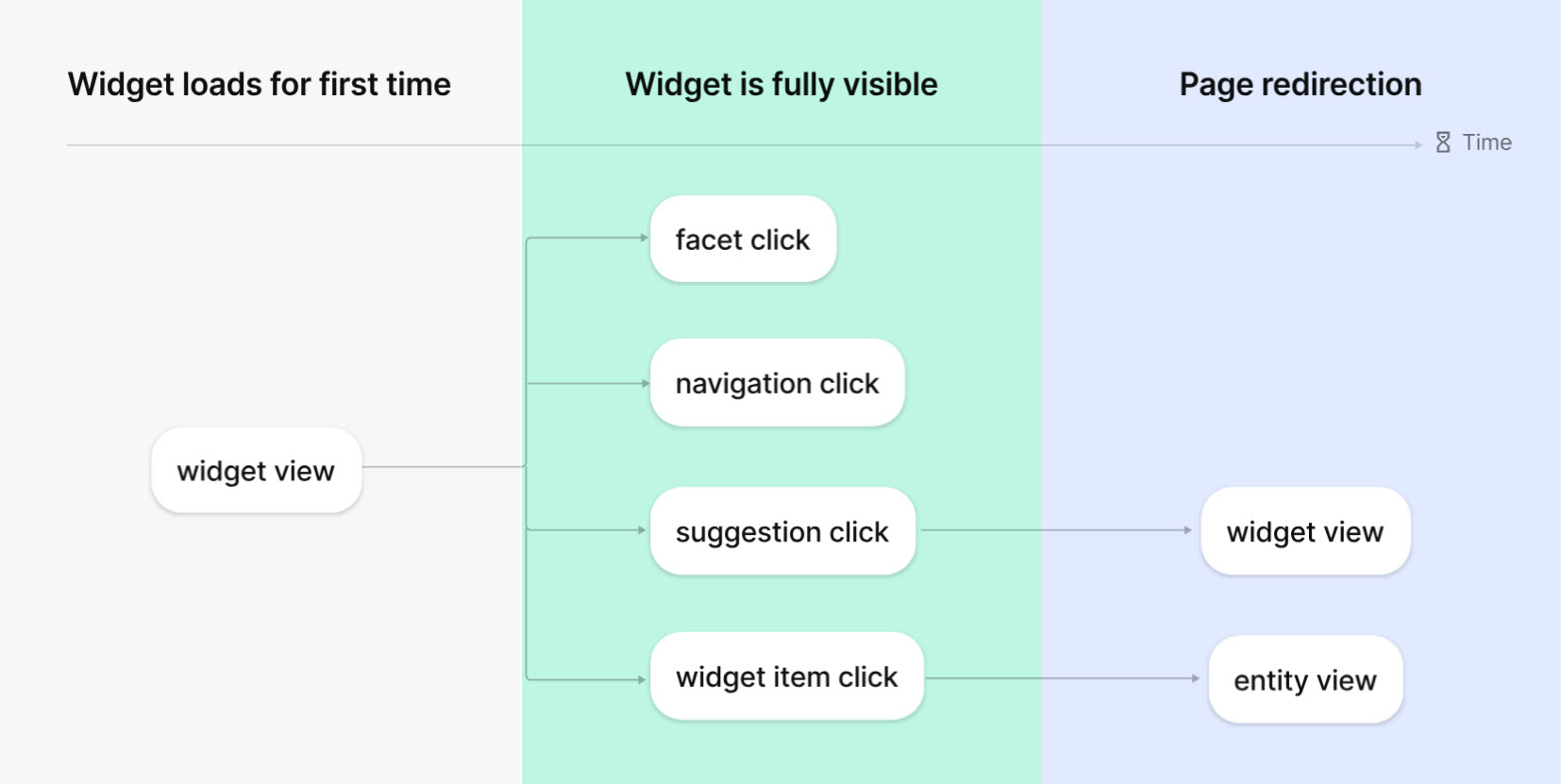
Typically, a site visitor interacts with a search experience in a certain sequence. This sequence defines the order in which you will send events:
- First, when the search experience displays to the site visitor, send a widget view event.
- Next, when the site visitor clicks an index document inside the search experience, send the applicable click event, depending on what was clicked.
- Finally, some clicks will result in a new page loading. For example, when a page with the details of the index document displays to the site visitor, send an entity view event.
Examples
Consider the following examples of how the site visitor interacts with a search experience:
- Performing a search on your site - first, when the search results display, send a widget view event. Next, when the site visitor clicks one of the search results, send a widget item click event. Finally, when the webpage describing the details of the clicked search result loads, send an entity view event.
- Interacting with a search suggestion - first, after the site visitor clicks inside a search field, a list of search suggestions displays. At this point, send a widget view event. Next, when the site visitor clicks one of the suggested index documents, send a suggestion click event. Depending on your search implementation, you might reload the page, this time displaying the clicked suggestion as the search term in the search field. In this scenario, send another widget view event.
If you have suggestions for improving this article, let us know!