1. Recommendation

The carousel recommendation widget template

A carousel recommendation widget displays recommendations with pagination controls.
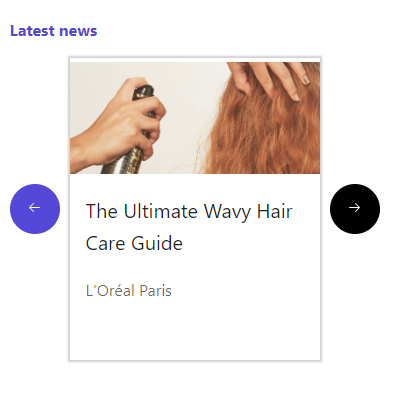
Screenshot of a carousel recommendation widget.

The following sections describe the carousel recommendation widget template, and contains an API reference, and instructions on how to create code blocks that you can add to the WidgetsProvider in your React project using Search JS SDK for React. The widget uses the search results query hook to request and retrieve data.

To create a widget component, you can choose to use Search UI components CLI, a command line interface, or copy and paste code blocks manually.

Generate or create the component

This component is available in the plain or unstyled, styled, CSS-styled, and CSS module-styled variants. The following sections are instructions to generate or manually create the component in Typescript and JavaScript.

Important

Remember to adjust the entity model in the widget template to match your implementation.

Plain component

Plain widget templates are unstyled and ready to be customized with CSS styles or a theme. You have complete control over the design and content of the component.

TS CLI

With the Sitecore Search CLI you can replicate all necessary files of the widget template in your React project. The following procedure includes instructions for installing the CLI in your project and specifying the location where widget components are created.

If you have previously installed the CLI in your project and have a location defined in a file called .sc-search-settings.json, you can proceed directly to step 3.

To install the UI Components CLI in your project:

  1. To install the Search UI Components CLI, open the terminal of your IDE or command prompt and run the following command:

    npx install --save-dev @sitecore-search/cli
  2. To define the location of where widget components will be created, at the root of your project, in a file called .sc-search-settings.json, specify the location as shown in the following code block.

    {
        "components-path": "src-test/components"
    }
  3. To create the widget component, go to the location you defined in the .sc-search-settings.json file then open the terminal of your IDE or command prompt and run the following command:

    npx sc-search new-widget --language typescript --template recommendation-carousel --entity content --styling plain

TS manual

When you manually create widget templates in your React project, you need to ensure that you install any required dependencies and create all necessary files.

if you have previously installed the required NPM packages, you can skip the dependency installation steps.

To create the widget component using this widget template in your project:

  1. In your project, to install the development dependency, open the terminal of your IDE or command prompt and run the following command:

    npm install @radix-ui/react-icons@^1.3.0
  2. In a folder for the widget component, create a file called index.tsx then in the file, paste following code block.

    // index.tsx
    import { ChevronLeftIcon, ChevronRightIcon } from '@radix-ui/react-icons';
    import type { RecommendationInitialState } from '@sitecore-search/react';
    import { WidgetDataType, useRecommendation, widget } from '@sitecore-search/react';
    import { ArticleCard, Carousel, Presence } from '@sitecore-search/ui';
    
    type ArticleModel = {
      id: string;
      name: string;
      author?: string;
      url?: string;
      image_url?: string;
      source_id?: string;
    };
    type RecommendationCarouselProps = {
      title?: string;
      itemsToDisplay?: number;
    };
    type InitialState = RecommendationInitialState<'itemsPerPage'>;
    const DEFAULT_IMG_URL = 'https://placehold.co/500x300?text=No%20Image'; // TODO: Update with corresponding fallback image
    
    export const RecommendationCarouselComponent = ({ title = '', itemsToDisplay = 6 }: RecommendationCarouselProps) => {
      const {
        widgetRef,
        actions: { onNavigationNext, onNavigationPrev, onItemClick },
        queryResult: { isLoading, isFetching, data: { content: articles = [] } = {} },
      } = useRecommendation<ArticleModel, InitialState>({
        state: {
          itemsPerPage: itemsToDisplay,
        },
      });
      const loading = isLoading || isFetching;
      return (
        <div>
          <Presence present={loading}>
            <div>
              <svg aria-busy={loading} aria-hidden={!loading} focusable="false" role="progressbar" viewBox="0 0 20 20">
                <path d="M7.229 1.173a9.25 9.25 0 1 0 11.655 11.412 1.25 1.25 0 1 0-2.4-.698 6.75 6.75 0 1 1-8.506-8.329 1.25 1.25 0 1 0-.75-2.385z" />
              </svg>
            </div>
          </Presence>
          {!loading && articles.length > 0 && (
            <>
              {title && <h3>{title}</h3>}
              <Carousel.Root onNavigationNext={onNavigationNext} onNavigationPrev={onNavigationPrev} ref={widgetRef}>
                <Carousel.Slides>
                  {articles.map((item, index) => (
                    <Carousel.Slide key={item.id}>
                      <ArticleCard.Root key={item.id}>
                        <div>
                          <ArticleCard.Image src={item?.image_url || DEFAULT_IMG_URL} />
                        </div>
                        <div>
                          <a
                            href={item.url}
                            onClick={(event) => {
                              event.preventDefault();
                              onItemClick({
                                id: item.id,
                                index,
                                sourceId: item.source_id,
                              });
                            }}
                          >
                            <ArticleCard.Title>{item.name}</ArticleCard.Title>
                            <ArticleCard.Subtitle>{item.author}</ArticleCard.Subtitle>
                          </a>
                        </div>
                      </ArticleCard.Root>
                    </Carousel.Slide>
                  ))}
                </Carousel.Slides>
    
                <Carousel.Previous aria-label="Show previous demo" tabIndex={-1}>
                  <ChevronLeftIcon />
                </Carousel.Previous>
    
                <Carousel.Next aria-label="Show next demo" tabIndex={-1}>
                  <ChevronRightIcon />
                </Carousel.Next>
              </Carousel.Root>
            </>
          )}
        </div>
      );
    };
    const RecommendationCarouselWidget = widget(RecommendationCarouselComponent, WidgetDataType.RECOMMENDATION, 'content');
    export default RecommendationCarouselWidget;

JS CLI

With the Sitecore Search CLI you can replicate all necessary files of the widget template in your React project. The following procedure includes instructions for installing the CLI in your project and specifying the location where widget components are created.

If you have previously installed the CLI in your project and have a location defined in a file called .sc-search-settings.json, you can proceed directly to step 3.

To install the UI Components CLI in your project:

  1. To install the Search UI Components CLI, open the terminal of your IDE or command prompt and run the following command:

    npx install --save-dev @sitecore-search/cli
  2. To define the location of where widget components will be created, at the root of your project, in a file called .sc-search-settings.json, specify the location as shown in the following code block.

    {
        "components-path": "src-test/components"
    }
  3. At the location listed in .sc-search-settings.json, to create the widget component in an index.jsx file, paste the following command in the terminal of your IDE.

    npx sc-search new-widget --language javascript --template recommendation-carousel --entity content --styling plain

JS manual

When you manually create widget templates in your React project, you need to ensure that you install any required dependencies and create all necessary files.

if you have previously installed the required NPM packages, you can skip the dependency installation steps.

To create the widget component using this widget template in your project:

  1. In your project, to install the development dependency, open the terminal of your IDE or command prompt and run the following command:

    npm install @radix-ui/react-icons@^1.3.0
  2. In a folder for the widget component, create a file called index.jsx then in the file, paste following code block.

    // index.jsx
    import { ChevronLeftIcon, ChevronRightIcon } from '@radix-ui/react-icons';
    import { WidgetDataType, useRecommendation, widget } from '@sitecore-search/react';
    import { ArticleCard, Carousel, Presence } from '@sitecore-search/ui';
    
    const DEFAULT_IMG_URL = 'https://placehold.co/500x300?text=No%20Image'; // TODO: Update with corresponding fallback image
    
    export const RecommendationCarouselComponent = ({ title = '', itemsToDisplay = 6 }) => {
      const {
        widgetRef,
        actions: { onNavigationNext, onNavigationPrev, onItemClick },
        queryResult: { isLoading, isFetching, data: { content: articles = [] } = {} },
      } = useRecommendation({
        state: {
          itemsPerPage: itemsToDisplay,
        },
      });
      const loading = isLoading || isFetching;
      return (
        <div>
          <Presence present={loading}>
            <div>
              <svg aria-busy={loading} aria-hidden={!loading} focusable="false" role="progressbar" viewBox="0 0 20 20">
                <path d="M7.229 1.173a9.25 9.25 0 1 0 11.655 11.412 1.25 1.25 0 1 0-2.4-.698 6.75 6.75 0 1 1-8.506-8.329 1.25 1.25 0 1 0-.75-2.385z" />
              </svg>
            </div>
          </Presence>
          {!loading && articles.length > 0 && (
            <>
              {title && <h3>{title}</h3>}
              <Carousel.Root onNavigationNext={onNavigationNext} onNavigationPrev={onNavigationPrev} ref={widgetRef}>
                <Carousel.Slides>
                  {articles.map((item, index) => (
                    <Carousel.Slide key={item.id}>
                      <ArticleCard.Root key={item.id}>
                        <div>
                          <ArticleCard.Image src={item?.image_url || DEFAULT_IMG_URL} />
                        </div>
                        <div>
                          <a
                            href={item.url}
                            onClick={(event) => {
                              event.preventDefault();
                              onItemClick({
                                id: item.id,
                                index,
                                sourceId: item.source_id,
                              });
                            }}
                          >
                            <ArticleCard.Title>{item.name}</ArticleCard.Title>
                            <ArticleCard.Subtitle>{item.author}</ArticleCard.Subtitle>
                          </a>
                        </div>
                      </ArticleCard.Root>
                    </Carousel.Slide>
                  ))}
                </Carousel.Slides>
    
                <Carousel.Previous aria-label="Show previous demo" tabIndex={-1}>
                  <ChevronLeftIcon />
                </Carousel.Previous>
    
                <Carousel.Next aria-label="Show next demo" tabIndex={-1}>
                  <ChevronRightIcon />
                </Carousel.Next>
              </Carousel.Root>
            </>
          )}
        </div>
      );
    };
    const RecommendationCarouselWidget = widget(RecommendationCarouselComponent, WidgetDataType.RECOMMENDATION, 'content');
    export default RecommendationCarouselWidget;

Styled component

Styled widget templates are built with styled UI primitives. To customize them, you need to edit the styled component. You can control the design and content of the component in the styled file.

TS CLI

With the Sitecore Search CLI you can replicate all necessary files of the widget template in your React project. The following procedure includes instructions for installing the CLI in your project and specifying the location where widget components are created.

If you have previously installed the CLI in your project and have a location defined in a file called .sc-search-settings.json, you can proceed directly to step 3.

To install the UI Components CLI in your project:

  1. To install the Search UI Components CLI, open the terminal of your IDE or command prompt and run the following command:

    npx install --save-dev @sitecore-search/cli
  2. To define the location of where widget components will be created, at the root of your project, in a file called .sc-search-settings.json, specify the location as shown in the following code block.

    {
        "components-path": "src-test/components"
    }
  3. To create the widget component in index.tsx and styled.ts files, go to the location you defined in the .sc-search-settings.json file then open the terminal of your IDE or command prompt and run the following command:

    npx sc-search new-widget --language typescript --template recommendation-carousel --entity content --styling styled

TS manual

When you manually create widget templates in your React project, you need to ensure that you install any required dependencies and create all necessary files.

if you have previously installed the required NPM packages, you can skip the dependency installation steps.

To create the widget component using this widget template in your project:

  1. In your project, to install development dependencies, open the terminal of your IDE or command prompt and run the following command:

    npm install styled-components@^6.1.0 @radix-ui/react-icons@^1.3.0
  2. In your project, to install the development dependency, open the terminal of your IDE or command prompt and run the following command:

    npm install --save-dev @types/styled-components@^5.1.29
  3. In a folder for the widget component, create files called index.tsx and styled.ts then in respective files, paste following code blocks.

    // index.tsx
    import type { RecommendationInitialState } from '@sitecore-search/react';
    import { WidgetDataType, useRecommendation, widget } from '@sitecore-search/react';
    import { Presence } from '@sitecore-search/ui';
    
    import {
      ArticleCardStyled,
      CarouselContainer,
      LeftIcon,
      LoaderAnimation,
      LoaderContainer,
      NextButton,
      PrevButton,
      RecommendationContainer,
      RightIcon,
      Slide,
      SliderList,
      TitleStyled,
    } from './styled';
    
    type ArticleModel = {
      id: string;
      name: string;
      author?: string;
      url?: string;
      image_url?: string;
      source_id?: string;
    };
    
    type RecommendationCarouselProps = {
      title?: string;
      itemsToDisplay?: number;
    };
    
    type InitialState = RecommendationInitialState<'itemsPerPage'>;
    
    const DEFAULT_IMG_URL = 'https://placehold.co/500x300?text=No%20Image'; // TODO: Update with corresponding fallback image
    
    export const RecommendationCarouselComponent = ({ title = '', itemsToDisplay = 6 }: RecommendationCarouselProps) => {
      const {
        widgetRef,
        actions: { onNavigationNext, onNavigationPrev, onItemClick },
        queryResult: { isLoading, isFetching, data: { content: articles = [] } = {} },
      } = useRecommendation<ArticleModel, InitialState>({
        state: {
          itemsPerPage: itemsToDisplay,
        },
      });
    
      const loading = isLoading || isFetching;
    
      return (
        <RecommendationContainer>
          <Presence present={loading}>
            <LoaderContainer>
              <LoaderAnimation
                aria-busy={loading}
                aria-hidden={!loading}
                focusable="false"
                role="progressbar"
                viewBox="0 0 20 20"
              >
                <path d="M7.229 1.173a9.25 9.25 0 1 0 11.655 11.412 1.25 1.25 0 1 0-2.4-.698 6.75 6.75 0 1 1-8.506-8.329 1.25 1.25 0 1 0-.75-2.385z" />
              </LoaderAnimation>
            </LoaderContainer>
          </Presence>
          {!loading && articles.length > 0 && (
            <>
              {title && <TitleStyled>{title}</TitleStyled>}
              <CarouselContainer onNavigationNext={onNavigationNext} onNavigationPrev={onNavigationPrev} ref={widgetRef}>
                <SliderList>
                  {articles.map((item, index) => (
                    <Slide key={item.id}>
                      <ArticleCardStyled.Root key={item.id}>
                        <ArticleCardStyled.ImageWrapper>
                          <ArticleCardStyled.Image src={item?.image_url || DEFAULT_IMG_URL} />
                        </ArticleCardStyled.ImageWrapper>
                        <ArticleCardStyled.Content>
                          <ArticleCardStyled.Link
                            href={item.url}
                            onClick={(event) => {
                              event.preventDefault();
                              onItemClick({ id: item.id, index, sourceId: item.source_id });
                            }}
                          >
                            <ArticleCardStyled.Title>{item.name}</ArticleCardStyled.Title>
                            <ArticleCardStyled.Subtitle>{item.author}</ArticleCardStyled.Subtitle>
                          </ArticleCardStyled.Link>
                        </ArticleCardStyled.Content>
                      </ArticleCardStyled.Root>
                    </Slide>
                  ))}
                </SliderList>
    
                <PrevButton aria-label="Show previous demo" tabIndex={-1}>
                  <LeftIcon />
                </PrevButton>
    
                <NextButton aria-label="Show next demo" tabIndex={-1}>
                  <RightIcon />
                </NextButton>
              </CarouselContainer>
            </>
          )}
        </RecommendationContainer>
      );
    };
    
    const RecommendationCarouselWidget = widget(RecommendationCarouselComponent, WidgetDataType.RECOMMENDATION, 'content');
    export default RecommendationCarouselWidget;
    // styled.ts
    import styled, { css, keyframes } from 'styled-components';
    
    import { ChevronLeftIcon, ChevronRightIcon } from '@radix-ui/react-icons';
    import { ArticleCard, Carousel, theme } from '@sitecore-search/ui';
    
    // Article
    const ArticleCardRootStyled = styled(ArticleCard.Root)`
      cursor: pointer;
      box-sizing: border-box;
      box-shadow: 0 0 2px 2px ${theme.vars.palette.grey['400']};
      background: #fff;
      position: relative;
      -webkit-transition: 0.3s all ease;
      transition: 0.15s all ease;
      width: 250px;
    
      &:focus-within {
        box-shadow: 0 0 8px 3px rgba(0, 0, 0, 0.15);
        transform: scale(1.025);
        opacity: 1;
        transition: 0.35s all ease;
      }
    
      &:hover {
        box-shadow: 0 0 8px 3px rgba(0, 0, 0, 0.15);
        transform: scale(1.025);
        opacity: 1;
        transition: 0.35s all ease;
      }
    `;
    
    const ArticleCardContentStyled = styled.div`
      padding: ${theme.vars.spacing.m};
    `;
    
    const ArticleCardLinkStyled = styled.a`
      color: ${theme.vars.palette.text.primary};
      font-size: ${theme.vars.typography.fontSize3.fontSize};
      text-decoration: none;
    
      &:hover {
        text-decoration: none;
      }
    
      &:focus {
        text-decoration: none;
      }
      &::after {
        position: absolute;
        inset: 0;
        display: block;
        content: ' ';
      }
    `;
    
    const ArticleCardImageStyled = styled(ArticleCard.Image)`
      width: 100%;
    `;
    
    const ArticleCardImageWrapperStyled = styled.div`
      position: relative;
      height: 120px;
      display: flex;
      justify-content: center;
      align-items: center;
      overflow: hidden;
    `;
    
    const ArticleCardTitleStyled = styled(ArticleCard.Title)`
      color: ${theme.vars.palette.text.primary};
      font-family: ${theme.vars.typography.fontFamilySystem};
      font-size: ${theme.vars.typography.h3.fontSize};
      font-weight: ${theme.vars.typography.h3.fontWeight};
      line-height: ${theme.vars.typography.h3.lineHeight};
      margin: 0 0 ${theme.vars.spacing.m};
    `;
    
    const ArticleCardSubtitleStyled = styled(ArticleCard.Subtitle)`
      color: ${theme.vars.palette.text.secondary};
      font-family: ${theme.vars.typography.fontFamilySystem};
      font-size: ${theme.vars.typography.fontSize3.fontSize};
      font-weight: ${theme.vars.typography.fontSize3.fontWeight};
      line-height: ${theme.vars.typography.fontSize3.lineHeight};
      margin: 0 0 ${theme.vars.spacing.m};
    `;
    
    // misc
    export const TitleStyled = styled.h3`
      color: ${theme.vars.palette.primary.main};
      font-family: ${theme.vars.typography.fontFamilySystem};
      font-size: ${theme.vars.typography.fontSize3.fontSize};
    `;
    
    export const LoaderContainer = styled.div`
      align-items: center;
      display: flex;
      min-height: 50vh;
    `;
    
    const Rotate = keyframes`
      from {
          transform: rotate(0deg);
      }
      to {
          transform: rotate(360deg);
      }
    `;
    
    export const LoaderAnimation = styled.svg`
      animation: ${Rotate} 2s linear infinite;
      display: block;
      fill: ${theme.vars.palette.primary.main};
      height: 50px;
      margin: auto;
      width: 50px;
    `;
    
    export const ArticleCardStyled = {
      Root: ArticleCardRootStyled,
      Content: ArticleCardContentStyled,
      Link: ArticleCardLinkStyled,
      Image: ArticleCardImageStyled,
      ImageWrapper: ArticleCardImageWrapperStyled,
      Title: ArticleCardTitleStyled,
      Subtitle: ArticleCardSubtitleStyled,
    };
    
    /** Carousel styles  */
    const containerWidth = '1145px';
    
    export const RecommendationContainer = styled.div`
      display: inline-block;
      width: 100%;
    `;
    
    export const CarouselContainer = styled(Carousel.Root)`
      position: relative;
      max-width: ${containerWidth};
      width: 100%;
    `;
    export const SliderList = styled(Carousel.Slides)`
      padding: 8px;
      display: grid;
      grid-auto-flow: column;
      grid-auto-columns: min-content;
      overflow-x: auto;
      overflow-y: hidden;
      -webkit-overflow-scrolling: touch;
      gap: ${theme.vars.spacing.l};
      // calculate the left padding to apply to the scrolling list
      // so that the carousel starts aligned with the container component
      scroll-padding: max(${theme.vars.spacing.l}, calc((100% - ${containerWidth}) / 2 + ${theme.vars.spacing.l}));
      -ms-overflow-style: none;
      scrollbar-width: none;
      &::-webkit-scrollbar {
        display: none;
      }
    `;
    
    export const Slide = styled(Carousel.Slide)`
      display: flex;
      flex-flow: row wrap;
    `;
    
    const arrows = css`
      color: ${theme.vars.palette.grey['900']};
      height: 30px;
      vertical-align: middle;
      width: 30px;
    `;
    
    const controlButton = css`
      cursor: pointer;
      background-color: ${theme.vars.palette.common.white};
      border: none;
      box-shadow: 0 1px 3px ${theme.vars.palette.grey['400']};
      height: 100px;
      line-height: 100px;
      position: absolute;
      text-align: center;
      top: calc(50% - 50px);
      width: 45px;
    
      &[aria-disabled='true'] {
        filter: opacity(0.5);
        cursor: not-allowed;
      }
    
      &:hover:not([aria-disabled='true']) svg {
        color: ${theme.vars.palette.primary.main};
      }
    `;
    
    export const NextButton = styled(Carousel.Next)`
      ${controlButton}
      border-radius: ${theme.vars.border.radius} 0 0 ${theme.vars.border.radius};
      clip: rect(-10px, 45px, 110px, -10px);
      padding-left: ${theme.vars.spacing.xs};
      right: 0;
    `;
    export const PrevButton = styled(Carousel.Previous)`
      ${controlButton}
      border-radius: 0 ${theme.vars.border.radius} ${theme.vars.border.radius} 0;
      clip: rect(-10px, 55px, 110px, 0);
      left: 0;
      padding-right: ${theme.vars.spacing.xs};
    `;
    
    export const LeftIcon = styled(ChevronLeftIcon)`
      ${arrows}
    `;
    export const RightIcon = styled(ChevronRightIcon)`
      ${arrows}
    `;

JS CLI

With the Sitecore Search CLI you can replicate all necessary files of the widget template in your React project. The following procedure includes instructions for installing the CLI in your project and specifying the location where widget components are created.

If you have previously installed the CLI in your project and have a location defined in a file called .sc-search-settings.json, you can proceed directly to step 3.

To install the UI Components CLI in your project:

  1. To install the Search UI Components CLI, open the terminal of your IDE or command prompt and run the following command:

    npx install --save-dev @sitecore-search/cli
  2. To define the location of where widget components will be created, at the root of your project, in a file called .sc-search-settings.json, specify the location as shown in the following code block.

    {
        "components-path": "src-test/components"
    }
  3. To create the widget component in index.jsx and styled.js files, go to the location you defined in the .sc-search-settings.json file then open the terminal of your IDE or command prompt and run the following command:

    npx sc-search new-widget --language javascript --template recommendation-carousel --entity content --styling styled

JS manual

When you manually create widget templates in your React project, you need to ensure that you install any required dependencies and create all necessary files.

if you have previously installed the required NPM packages, you can skip the dependency installation steps.

To create the widget component using this widget template in your project:

  1. In your project, to install development dependencies, open the terminal of your IDE or command prompt and run the following command:

    npm install styled-components@^6.1.0 @radix-ui/react-icons@^1.3.0
  2. In your project, to install the development dependency, open the terminal of your IDE or command prompt and run the following command:

    npm install --save-dev @types/styled-components@^5.1.29
  3. In a folder for the widget component, create files called index.jsx and styled.js then in respective files, paste following code blocks.

    // index.jsx
    import { WidgetDataType, useRecommendation, widget } from '@sitecore-search/react';
    import { Presence } from '@sitecore-search/ui';
    
    import {
      ArticleCardStyled,
      CarouselContainer,
      LeftIcon,
      LoaderAnimation,
      LoaderContainer,
      NextButton,
      PrevButton,
      RecommendationContainer,
      RightIcon,
      Slide,
      SliderList,
      TitleStyled,
    } from './styled';
    
    const DEFAULT_IMG_URL = 'https://placehold.co/500x300?text=No%20Image'; // TODO: Update with corresponding fallback image
    
    export const RecommendationCarouselComponent = ({ title = '', itemsToDisplay = 6 }) => {
      const {
        widgetRef,
        actions: { onNavigationNext, onNavigationPrev, onItemClick },
        queryResult: { isLoading, isFetching, data: { content: articles = [] } = {} },
      } = useRecommendation({
        state: {
          itemsPerPage: itemsToDisplay,
        },
      });
      const loading = isLoading || isFetching;
      return (
        <RecommendationContainer>
          <Presence present={loading}>
            <LoaderContainer>
              <LoaderAnimation
                aria-busy={loading}
                aria-hidden={!loading}
                focusable="false"
                role="progressbar"
                viewBox="0 0 20 20"
              >
                <path d="M7.229 1.173a9.25 9.25 0 1 0 11.655 11.412 1.25 1.25 0 1 0-2.4-.698 6.75 6.75 0 1 1-8.506-8.329 1.25 1.25 0 1 0-.75-2.385z" />
              </LoaderAnimation>
            </LoaderContainer>
          </Presence>
          {!loading && articles.length > 0 && (
            <>
              {title && <TitleStyled>{title}</TitleStyled>}
              <CarouselContainer onNavigationNext={onNavigationNext} onNavigationPrev={onNavigationPrev} ref={widgetRef}>
                <SliderList>
                  {articles.map((item, index) => (
                    <Slide key={item.id}>
                      <ArticleCardStyled.Root key={item.id}>
                        <ArticleCardStyled.ImageWrapper>
                          <ArticleCardStyled.Image src={item?.image_url || DEFAULT_IMG_URL} />
                        </ArticleCardStyled.ImageWrapper>
                        <ArticleCardStyled.Content>
                          <ArticleCardStyled.Link
                            href={item.url}
                            onClick={(event) => {
                              event.preventDefault();
                              onItemClick({
                                id: item.id,
                                index,
                                sourceId: item.source_id,
                              });
                            }}
                          >
                            <ArticleCardStyled.Title>{item.name}</ArticleCardStyled.Title>
                            <ArticleCardStyled.Subtitle>{item.author}</ArticleCardStyled.Subtitle>
                          </ArticleCardStyled.Link>
                        </ArticleCardStyled.Content>
                      </ArticleCardStyled.Root>
                    </Slide>
                  ))}
                </SliderList>
    
                <PrevButton aria-label="Show previous demo" tabIndex={-1}>
                  <LeftIcon />
                </PrevButton>
    
                <NextButton aria-label="Show next demo" tabIndex={-1}>
                  <RightIcon />
                </NextButton>
              </CarouselContainer>
            </>
          )}
        </RecommendationContainer>
      );
    };
    const RecommendationCarouselWidget = widget(RecommendationCarouselComponent, WidgetDataType.RECOMMENDATION, 'content');
    export default RecommendationCarouselWidget;
    // styled.js
    import styled, { css, keyframes } from 'styled-components';
    
    import { ChevronLeftIcon, ChevronRightIcon } from '@radix-ui/react-icons';
    import { ArticleCard, Carousel, theme } from '@sitecore-search/ui';
    
    // Article
    const ArticleCardRootStyled = styled(ArticleCard.Root)`
      cursor: pointer;
      box-sizing: border-box;
      box-shadow: 0 0 2px 2px ${theme.vars.palette.grey['400']};
      background: #fff;
      position: relative;
      -webkit-transition: 0.3s all ease;
      transition: 0.15s all ease;
      width: 250px;
    
      &:focus-within {
        box-shadow: 0 0 8px 3px rgba(0, 0, 0, 0.15);
        transform: scale(1.025);
        opacity: 1;
        transition: 0.35s all ease;
      }
    
      &:hover {
        box-shadow: 0 0 8px 3px rgba(0, 0, 0, 0.15);
        transform: scale(1.025);
        opacity: 1;
        transition: 0.35s all ease;
      }
    `;
    const ArticleCardContentStyled = styled.div`
      padding: ${theme.vars.spacing.m};
    `;
    const ArticleCardLinkStyled = styled.a`
      color: ${theme.vars.palette.text.primary};
      font-size: ${theme.vars.typography.fontSize3.fontSize};
      text-decoration: none;
    
      &:hover {
        text-decoration: none;
      }
    
      &:focus {
        text-decoration: none;
      }
      &::after {
        position: absolute;
        inset: 0;
        display: block;
        content: ' ';
      }
    `;
    const ArticleCardImageStyled = styled(ArticleCard.Image)`
      width: 100%;
    `;
    const ArticleCardImageWrapperStyled = styled.div`
      position: relative;
      height: 120px;
      display: flex;
      justify-content: center;
      align-items: center;
      overflow: hidden;
    `;
    const ArticleCardTitleStyled = styled(ArticleCard.Title)`
      color: ${theme.vars.palette.text.primary};
      font-family: ${theme.vars.typography.fontFamilySystem};
      font-size: ${theme.vars.typography.h3.fontSize};
      font-weight: ${theme.vars.typography.h3.fontWeight};
      line-height: ${theme.vars.typography.h3.lineHeight};
      margin: 0 0 ${theme.vars.spacing.m};
    `;
    const ArticleCardSubtitleStyled = styled(ArticleCard.Subtitle)`
      color: ${theme.vars.palette.text.secondary};
      font-family: ${theme.vars.typography.fontFamilySystem};
      font-size: ${theme.vars.typography.fontSize3.fontSize};
      font-weight: ${theme.vars.typography.fontSize3.fontWeight};
      line-height: ${theme.vars.typography.fontSize3.lineHeight};
      margin: 0 0 ${theme.vars.spacing.m};
    `;
    
    // misc
    export const TitleStyled = styled.h3`
      color: ${theme.vars.palette.primary.main};
      font-family: ${theme.vars.typography.fontFamilySystem};
      font-size: ${theme.vars.typography.fontSize3.fontSize};
    `;
    export const LoaderContainer = styled.div`
      align-items: center;
      display: flex;
      min-height: 50vh;
    `;
    const Rotate = keyframes`
      from {
          transform: rotate(0deg);
      }
      to {
          transform: rotate(360deg);
      }
    `;
    export const LoaderAnimation = styled.svg`
      animation: ${Rotate} 2s linear infinite;
      display: block;
      fill: ${theme.vars.palette.primary.main};
      height: 50px;
      margin: auto;
      width: 50px;
    `;
    export const ArticleCardStyled = {
      Root: ArticleCardRootStyled,
      Content: ArticleCardContentStyled,
      Link: ArticleCardLinkStyled,
      Image: ArticleCardImageStyled,
      ImageWrapper: ArticleCardImageWrapperStyled,
      Title: ArticleCardTitleStyled,
      Subtitle: ArticleCardSubtitleStyled,
    };
    
    /** Carousel styles  */
    const containerWidth = '1145px';
    export const RecommendationContainer = styled.div`
      display: inline-block;
      width: 100%;
    `;
    export const CarouselContainer = styled(Carousel.Root)`
      position: relative;
      max-width: ${containerWidth};
      width: 100%;
    `;
    export const SliderList = styled(Carousel.Slides)`
      padding: 8px;
      display: grid;
      grid-auto-flow: column;
      grid-auto-columns: min-content;
      overflow-x: auto;
      overflow-y: hidden;
      -webkit-overflow-scrolling: touch;
      gap: ${theme.vars.spacing.l};
      // calculate the left padding to apply to the scrolling list
      // so that the carousel starts aligned with the container component
      scroll-padding: max(${theme.vars.spacing.l}, calc((100% - ${containerWidth}) / 2 + ${theme.vars.spacing.l}));
      -ms-overflow-style: none;
      scrollbar-width: none;
      &::-webkit-scrollbar {
        display: none;
      }
    `;
    export const Slide = styled(Carousel.Slide)`
      display: flex;
      flex-flow: row wrap;
    `;
    const arrows = css`
      color: ${theme.vars.palette.grey['900']};
      height: 30px;
      vertical-align: middle;
      width: 30px;
    `;
    const controlButton = css`
      cursor: pointer;
      background-color: ${theme.vars.palette.common.white};
      border: none;
      box-shadow: 0 1px 3px ${theme.vars.palette.grey['400']};
      height: 100px;
      line-height: 100px;
      position: absolute;
      text-align: center;
      top: calc(50% - 50px);
      width: 45px;
    
      &[aria-disabled='true'] {
        filter: opacity(0.5);
        cursor: not-allowed;
      }
    
      &:hover:not([aria-disabled='true']) svg {
        color: ${theme.vars.palette.primary.main};
      }
    `;
    export const NextButton = styled(Carousel.Next)`
      ${controlButton}
      border-radius: ${theme.vars.border.radius} 0 0 ${theme.vars.border.radius};
      clip: rect(-10px, 45px, 110px, -10px);
      padding-left: ${theme.vars.spacing.xs};
      right: 0;
    `;
    export const PrevButton = styled(Carousel.Previous)`
      ${controlButton}
      border-radius: 0 ${theme.vars.border.radius} ${theme.vars.border.radius} 0;
      clip: rect(-10px, 55px, 110px, 0);
      left: 0;
      padding-right: ${theme.vars.spacing.xs};
    `;
    export const LeftIcon = styled(ChevronLeftIcon)`
      ${arrows}
    `;
    export const RightIcon = styled(ChevronRightIcon)`
      ${arrows}
    `;

CSS styled component

CSS styled widget templates use UI primitives which are styled using a styles.css. To customize, you can edit the component and CSS.

TS CLI

With the Sitecore Search CLI you can replicate all necessary files of the widget template in your React project. The following procedure includes instructions for installing the CLI in your project and specifying the location where widget components are created.

If you have previously installed the CLI in your project and have a location defined in a file called .sc-search-settings.json, you can proceed directly to step 3.

To install the UI Components CLI in your project:

  1. To install the Search UI Components CLI, open the terminal of your IDE or command prompt and run the following command:

    npx install --save-dev @sitecore-search/cli
  2. To define the location of where widget components will be created, at the root of your project, in a file called .sc-search-settings.json, specify the location as shown in the following code block.

    {
        "components-path": "src-test/components"
    }
  3. To create the widget component in index.tsx and styles.css files, go to the location you defined in the .sc-search-settings.json file then open the terminal of your IDE or command prompt and run the following command:

    npx sc-search new-widget --language typescript --template recommendation-carousel --entity content --styling css

TS manual

When you manually create widget templates in your React project, you need to ensure that you install any required dependencies and create all necessary files.

To create the widget component using this widget template in your project:

  1. In your project, to install the development dependency, open the terminal of your IDE or command prompt and run the following command:

    npm install @radix-ui/react-icons@^1.3.0
  2. In a folder for the widget component, create files called index.tsx and styles.css then in respective files, paste following code blocks.

    // index.tsx
    import { ChevronLeftIcon, ChevronRightIcon } from '@radix-ui/react-icons';
    import type { RecommendationInitialState } from '@sitecore-search/react';
    import { WidgetDataType, useRecommendation, widget } from '@sitecore-search/react';
    import { ArticleCard, Carousel, Presence } from '@sitecore-search/ui';
    
    import './styles.css';
    
    type ArticleModel = {
      id: string;
      name: string;
      author?: string;
      url?: string;
      image_url?: string;
      source_id?: string;
    };
    type RecommendationCarouselProps = {
      title?: string;
      itemsToDisplay?: number;
    };
    type InitialState = RecommendationInitialState<'itemsPerPage'>;
    const DEFAULT_IMG_URL = 'https://placehold.co/500x300?text=No%20Image'; // TODO: Update with corresponding fallback image
    
    export const RecommendationCarouselComponent = ({ title = '', itemsToDisplay = 6 }: RecommendationCarouselProps) => {
      const {
        widgetRef,
        actions: { onNavigationNext, onNavigationPrev, onItemClick },
        queryResult: { isLoading, isFetching, data: { content: articles = [] } = {} },
      } = useRecommendation<ArticleModel, InitialState>({
        state: {
          itemsPerPage: itemsToDisplay,
        },
      });
      const loading = isLoading || isFetching;
      return (
        <div className="sitecore-recommendation-container">
          <Presence present={loading}>
            <div className="sitecore-loader-container">
              <svg
                aria-busy={loading}
                aria-hidden={!loading}
                focusable="false"
                role="progressbar"
                viewBox="0 0 20 20"
                className="sitecore-loader-animation"
              >
                <path d="M7.229 1.173a9.25 9.25 0 1 0 11.655 11.412 1.25 1.25 0 1 0-2.4-.698 6.75 6.75 0 1 1-8.506-8.329 1.25 1.25 0 1 0-.75-2.385z" />
              </svg>
            </div>
          </Presence>
          {!loading && articles.length > 0 && (
            <>
              {title && <h3 className="sitecore-title">{title}</h3>}
              <Carousel.Root
                onNavigationNext={onNavigationNext}
                onNavigationPrev={onNavigationPrev}
                ref={widgetRef}
                className="sitecore-carousel-container"
              >
                <Carousel.Slides className="sitecore-slider-list">
                  {articles.map((item, index) => (
                    <Carousel.Slide key={item.id} className="sitecore-slide">
                      <ArticleCard.Root key={item.id} className="sitecore-article-card-root">
                        <div className="sitecore-article-card-image-wrapper">
                          <ArticleCard.Image
                            src={item?.image_url || DEFAULT_IMG_URL}
                            className="sitecore-article-card-image"
                          />
                        </div>
                        <div className="sitecore-article-card-content">
                          <a
                            href={item.url}
                            onClick={(event) => {
                              event.preventDefault();
                              onItemClick({
                                id: item.id,
                                index,
                                sourceId: item.source_id,
                              });
                            }}
                            className="sitecore-article-card-link"
                          >
                            <ArticleCard.Title className="sitecore-article-card-title">{item.name}</ArticleCard.Title>
                            <ArticleCard.Subtitle className="sitecore-article-card-subtitle">
                              {item.author}
                            </ArticleCard.Subtitle>
                          </a>
                        </div>
                      </ArticleCard.Root>
                    </Carousel.Slide>
                  ))}
                </Carousel.Slides>
    
                <Carousel.Previous aria-label="Show previous demo" tabIndex={-1} className="sitecore-prev-button">
                  <ChevronLeftIcon className="sitecore-left-icon" />
                </Carousel.Previous>
    
                <Carousel.Next aria-label="Show next demo" tabIndex={-1} className="sitecore-next-button">
                  <ChevronRightIcon className="sitecore-right-icon" />
                </Carousel.Next>
              </Carousel.Root>
            </>
          )}
        </div>
      );
    };
    const RecommendationCarouselWidget = widget(RecommendationCarouselComponent, WidgetDataType.RECOMMENDATION, 'content');
    export default RecommendationCarouselWidget;
    // styles.css
    @keyframes rotate-animation {
      from {
        transform: rotate(0deg);
      }
      to {
        transform: rotate(360deg);
      }
    }
    
    /* ArticleCardRoot */
    .sitecore-article-card-root {
      cursor: pointer;
      box-sizing: border-box;
      box-shadow: 0 0 2px 2px var(--sdc-palette-grey-400);
      background: #fff;
      position: relative;
      transition: 0.15s all ease;
      width: 250px;
    }
    
    .sitecore-article-card-root:focus-within {
      box-shadow: 0 0 8px 3px rgb(0 0 0 / 15%);
      transform: scale(1.025);
      opacity: 1;
      transition: 0.35s all ease;
    }
    
    .sitecore-article-card-root:hover {
      box-shadow: 0 0 8px 3px rgb(0 0 0 / 15%);
      transform: scale(1.025);
      opacity: 1;
      transition: 0.35s all ease;
    }
    
    /* ArticleCardContent */
    .sitecore-article-card-content {
      padding: var(--sdc-spacing-m);
    }
    
    /* ArticleCardLink */
    .sitecore-article-card-link {
      color: var(--sdc-palette-text-primary);
      font-size: var(--sdc-typography-fontSize3-fontSize);
      text-decoration: none;
    }
    
    .sitecore-article-card-link:hover {
      text-decoration: none;
    }
    
    .sitecore-article-card-link:focus {
      text-decoration: none;
    }
    
    .sitecore-article-card-link::after {
      position: absolute;
      inset: 0;
      display: block;
      content: ' ';
    }
    
    /* ArticleCardImage */
    .sitecore-article-card-image {
      width: 100%;
    }
    
    /* ArticleCardImageWrapper */
    .sitecore-article-card-image-wrapper {
      position: relative;
      height: 120px;
      display: flex;
      justify-content: center;
      align-items: center;
      overflow: hidden;
    }
    
    /* ArticleCardTitle */
    .sitecore-article-card-title {
      color: var(--sdc-palette-text-primary);
      font-family: var(--sdc-typography-fontFamilySystem);
      font-size: var(--sdc-typography-h3-fontSize);
      font-weight: var(--sdc-typography-h3-fontWeight);
      line-height: var(--sdc-typography-h3-lineHeight);
      margin: 0 0 var(--sdc-spacing-m);
    }
    
    /* ArticleCardSubtitle */
    .sitecore-article-card-subtitle {
      color: var(--sdc-palette-text-secondary);
      font-family: var(--sdc-typography-fontFamilySystem);
      font-size: var(--sdc-typography-fontSize3-fontSize);
      font-weight: var(--sdc-typography-fontSize3-fontWeight);
      line-height: var(--sdc-typography-fontSize3-lineHeight);
      margin: 0 0 var(--sdc-spacing-m);
    }
    
    /* Title */
    .sitecore-title {
      color: var(--sdc-palette-primary-main);
      font-family: var(--sdc-typography-fontFamilySystem);
      font-size: var(--sdc-typography-fontSize3-fontSize);
    }
    
    /* LoaderContainer */
    .sitecore-loader-container {
      align-items: center;
      display: flex;
      min-height: 50vh;
    }
    
    /* LoaderAnimation */
    .sitecore-loader-animation {
      animation: rotate-animation 2s linear infinite;
      display: block;
      fill: var(--sdc-palette-primary-main);
      height: 50px;
      margin: auto;
      width: 50px;
    }
    
    /* RecommendationContainer */
    .sitecore-recommendation-container {
      display: inline-block;
      width: 100%;
    }
    
    /* CarouselContainer */
    .sitecore-carousel-container {
      position: relative;
      max-width: 1145px;
      width: 100%;
    }
    
    /* SliderList */
    .sitecore-slider-list {
      padding: 8px;
      display: grid;
      grid-auto-flow: column;
      grid-auto-columns: min-content;
      overflow-x: auto;
      overflow-y: hidden;
      -webkit-overflow-scrolling: touch;
      gap: var(--sdc-spacing-l);
      scroll-padding: max(var(--sdc-spacing-l), calc((100% - 1145px) / 2 + var(--sdc-spacing-l)));
      -ms-overflow-style: none;
      scrollbar-width: none;
    }
    
    .sitecore-slider-list::-webkit-scrollbar {
      display: none;
    }
    
    /* Slide */
    .sitecore-slide {
      display: flex;
      flex-flow: row wrap;
    }
    
    /* NextButton */
    .sitecore-next-button {
      cursor: pointer;
      background-color: var(--sdc-palette-common-white);
      border: none;
      box-shadow: 0 1px 3px var(--sdc-palette-grey-400);
      height: 100px;
      line-height: 100px;
      position: absolute;
      text-align: center;
      top: calc(50% - 50px);
      width: 45px;
      border-radius: var(--sdc-border-radius) 0 0 var(--sdc-border-radius);
      clip: rect(-10px, 45px, 110px, -10px);
      padding-left: var(--sdc-spacing-xs);
      right: 0;
    }
    
    .sitecore-next-button[aria-disabled='true'] {
      filter: opacity(0.5);
      cursor: not-allowed;
    }
    
    .sitecore-next-button:hover:not([aria-disabled='true']) svg {
      color: var(--sdc-palette-primary-main);
    }
    
    /* PrevButton */
    .sitecore-prev-button {
      cursor: pointer;
      background-color: var(--sdc-palette-common-white);
      border: none;
      box-shadow: 0 1px 3px var(--sdc-palette-grey-400);
      height: 100px;
      line-height: 100px;
      position: absolute;
      text-align: center;
      top: calc(50% - 50px);
      width: 45px;
      border-radius: 0 var(--sdc-border-radius) var(--sdc-border-radius) 0;
      clip: rect(-10px, 55px, 110px, 0);
      left: 0;
      padding-right: var(--sdc-spacing-xs);
    }
    
    .sitecore-prev-button[aria-disabled='true'] {
      filter: opacity(0.5);
      cursor: not-allowed;
    }
    
    .sitecore-prev-button:hover:not([aria-disabled='true']) svg {
      color: var(--sdc-palette-primary-main);
    }
    
    /* LeftIcon */
    .sitecore-left-icon {
      color: var(--sdc-palette-grey-900);
      height: 30px;
      vertical-align: middle;
      width: 30px;
    }
    
    /* RightIcon */
    .sitecore-right-icon {
      color: var(--sdc-palette-grey-900);
      height: 30px;
      vertical-align: middle;
      width: 30px;
    }

JS CLI

With the Sitecore Search CLI you can replicate all necessary files of the widget template in your React project. The following procedure includes instructions for installing the CLI in your project and specifying the location where widget components are created.

If you have previously installed the CLI in your project and have a location defined in a file called .sc-search-settings.json, you can proceed directly to step 3.

To install the UI Components CLI in your project:

  1. To install the Search UI Components CLI, open the terminal of your IDE or command prompt and run the following command:

    npx install --save-dev @sitecore-search/cli
  2. To define the location of where widget components will be created, at the root of your project, in a file called .sc-search-settings.json, specify the location as shown in the following code block.

    {
        "components-path": "src-test/components"
    }
  3. To create the widget component in index.jsx and styles.css files, go to the location you defined in the .sc-search-settings.json file then open the terminal of your IDE or command prompt and run the following command:

    npx sc-search new-widget --language javascript --template recommendation-carousel --entity content --styling css

JS manual

When you manually create widget templates in your React project, you need to ensure that you install any required dependencies and create all necessary files.

To create the widget component using this widget template in your project:

  1. In your project, to install the development dependency, open the terminal of your IDE or command prompt and run the following command:

    npm install @radix-ui/react-icons@^1.3.0
  2. In a folder for the widget component, create files called index.jsx and styles.css then in respective files, paste following code blocks.

    // index.jsx
    import { ChevronLeftIcon, ChevronRightIcon } from '@radix-ui/react-icons';
    import { WidgetDataType, useRecommendation, widget } from '@sitecore-search/react';
    import { ArticleCard, Carousel, Presence } from '@sitecore-search/ui';
    
    import './styles.css';
    
    const DEFAULT_IMG_URL = 'https://placehold.co/500x300?text=No%20Image'; // TODO: Update with corresponding fallback image
    
    export const RecommendationCarouselComponent = ({ title = '', itemsToDisplay = 6 }) => {
      const {
        widgetRef,
        actions: { onNavigationNext, onNavigationPrev, onItemClick },
        queryResult: { isLoading, isFetching, data: { content: articles = [] } = {} },
      } = useRecommendation({
        state: {
          itemsPerPage: itemsToDisplay,
        },
      });
      const loading = isLoading || isFetching;
      return (
        <div className="sitecore-recommendation-container">
          <Presence present={loading}>
            <div className="sitecore-loader-container">
              <svg
                aria-busy={loading}
                aria-hidden={!loading}
                focusable="false"
                role="progressbar"
                viewBox="0 0 20 20"
                className="sitecore-loader-animation"
              >
                <path d="M7.229 1.173a9.25 9.25 0 1 0 11.655 11.412 1.25 1.25 0 1 0-2.4-.698 6.75 6.75 0 1 1-8.506-8.329 1.25 1.25 0 1 0-.75-2.385z" />
              </svg>
            </div>
          </Presence>
          {!loading && articles.length > 0 && (
            <>
              {title && <h3 className="sitecore-title">{title}</h3>}
              <Carousel.Root
                onNavigationNext={onNavigationNext}
                onNavigationPrev={onNavigationPrev}
                ref={widgetRef}
                className="sitecore-carousel-container"
              >
                <Carousel.Slides className="sitecore-slider-list">
                  {articles.map((item, index) => (
                    <Carousel.Slide key={item.id} className="sitecore-slide">
                      <ArticleCard.Root key={item.id} className="sitecore-article-card-root">
                        <div className="sitecore-article-card-image-wrapper">
                          <ArticleCard.Image
                            src={item?.image_url || DEFAULT_IMG_URL}
                            className="sitecore-article-card-image"
                          />
                        </div>
                        <div className="sitecore-article-card-content">
                          <a
                            href={item.url}
                            onClick={(event) => {
                              event.preventDefault();
                              onItemClick({
                                id: item.id,
                                index,
                                sourceId: item.source_id,
                              });
                            }}
                            className="sitecore-article-card-link"
                          >
                            <ArticleCard.Title className="sitecore-article-card-title">{item.name}</ArticleCard.Title>
                            <ArticleCard.Subtitle className="sitecore-article-card-subtitle">
                              {item.author}
                            </ArticleCard.Subtitle>
                          </a>
                        </div>
                      </ArticleCard.Root>
                    </Carousel.Slide>
                  ))}
                </Carousel.Slides>
    
                <Carousel.Previous aria-label="Show previous demo" tabIndex={-1} className="sitecore-prev-button">
                  <ChevronLeftIcon className="sitecore-left-icon" />
                </Carousel.Previous>
    
                <Carousel.Next aria-label="Show next demo" tabIndex={-1} className="sitecore-next-button">
                  <ChevronRightIcon className="sitecore-right-icon" />
                </Carousel.Next>
              </Carousel.Root>
            </>
          )}
        </div>
      );
    };
    const RecommendationCarouselWidget = widget(RecommendationCarouselComponent, WidgetDataType.RECOMMENDATION, 'content');
    export default RecommendationCarouselWidget;
    // styles.css
    @keyframes rotate-animation {
      from {
        transform: rotate(0deg);
      }
      to {
        transform: rotate(360deg);
      }
    }
    
    /* ArticleCardRoot */
    .sitecore-article-card-root {
      cursor: pointer;
      box-sizing: border-box;
      box-shadow: 0 0 2px 2px var(--sdc-palette-grey-400);
      background: #fff;
      position: relative;
      transition: 0.15s all ease;
      width: 250px;
    }
    
    .sitecore-article-card-root:focus-within {
      box-shadow: 0 0 8px 3px rgb(0 0 0 / 15%);
      transform: scale(1.025);
      opacity: 1;
      transition: 0.35s all ease;
    }
    
    .sitecore-article-card-root:hover {
      box-shadow: 0 0 8px 3px rgb(0 0 0 / 15%);
      transform: scale(1.025);
      opacity: 1;
      transition: 0.35s all ease;
    }
    
    /* ArticleCardContent */
    .sitecore-article-card-content {
      padding: var(--sdc-spacing-m);
    }
    
    /* ArticleCardLink */
    .sitecore-article-card-link {
      color: var(--sdc-palette-text-primary);
      font-size: var(--sdc-typography-fontSize3-fontSize);
      text-decoration: none;
    }
    
    .sitecore-article-card-link:hover {
      text-decoration: none;
    }
    
    .sitecore-article-card-link:focus {
      text-decoration: none;
    }
    
    .sitecore-article-card-link::after {
      position: absolute;
      inset: 0;
      display: block;
      content: ' ';
    }
    
    /* ArticleCardImage */
    .sitecore-article-card-image {
      width: 100%;
    }
    
    /* ArticleCardImageWrapper */
    .sitecore-article-card-image-wrapper {
      position: relative;
      height: 120px;
      display: flex;
      justify-content: center;
      align-items: center;
      overflow: hidden;
    }
    
    /* ArticleCardTitle */
    .sitecore-article-card-title {
      color: var(--sdc-palette-text-primary);
      font-family: var(--sdc-typography-fontFamilySystem);
      font-size: var(--sdc-typography-h3-fontSize);
      font-weight: var(--sdc-typography-h3-fontWeight);
      line-height: var(--sdc-typography-h3-lineHeight);
      margin: 0 0 var(--sdc-spacing-m);
    }
    
    /* ArticleCardSubtitle */
    .sitecore-article-card-subtitle {
      color: var(--sdc-palette-text-secondary);
      font-family: var(--sdc-typography-fontFamilySystem);
      font-size: var(--sdc-typography-fontSize3-fontSize);
      font-weight: var(--sdc-typography-fontSize3-fontWeight);
      line-height: var(--sdc-typography-fontSize3-lineHeight);
      margin: 0 0 var(--sdc-spacing-m);
    }
    
    /* Title */
    .sitecore-title {
      color: var(--sdc-palette-primary-main);
      font-family: var(--sdc-typography-fontFamilySystem);
      font-size: var(--sdc-typography-fontSize3-fontSize);
    }
    
    /* LoaderContainer */
    .sitecore-loader-container {
      align-items: center;
      display: flex;
      min-height: 50vh;
    }
    
    /* LoaderAnimation */
    .sitecore-loader-animation {
      animation: rotate-animation 2s linear infinite;
      display: block;
      fill: var(--sdc-palette-primary-main);
      height: 50px;
      margin: auto;
      width: 50px;
    }
    
    /* RecommendationContainer */
    .sitecore-recommendation-container {
      display: inline-block;
      width: 100%;
    }
    
    /* CarouselContainer */
    .sitecore-carousel-container {
      position: relative;
      max-width: 1145px;
      width: 100%;
    }
    
    /* SliderList */
    .sitecore-slider-list {
      padding: 8px;
      display: grid;
      grid-auto-flow: column;
      grid-auto-columns: min-content;
      overflow-x: auto;
      overflow-y: hidden;
      -webkit-overflow-scrolling: touch;
      gap: var(--sdc-spacing-l);
      scroll-padding: max(var(--sdc-spacing-l), calc((100% - 1145px) / 2 + var(--sdc-spacing-l)));
      -ms-overflow-style: none;
      scrollbar-width: none;
    }
    
    .sitecore-slider-list::-webkit-scrollbar {
      display: none;
    }
    
    /* Slide */
    .sitecore-slide {
      display: flex;
      flex-flow: row wrap;
    }
    
    /* NextButton */
    .sitecore-next-button {
      cursor: pointer;
      background-color: var(--sdc-palette-common-white);
      border: none;
      box-shadow: 0 1px 3px var(--sdc-palette-grey-400);
      height: 100px;
      line-height: 100px;
      position: absolute;
      text-align: center;
      top: calc(50% - 50px);
      width: 45px;
      border-radius: var(--sdc-border-radius) 0 0 var(--sdc-border-radius);
      clip: rect(-10px, 45px, 110px, -10px);
      padding-left: var(--sdc-spacing-xs);
      right: 0;
    }
    
    .sitecore-next-button[aria-disabled='true'] {
      filter: opacity(0.5);
      cursor: not-allowed;
    }
    
    .sitecore-next-button:hover:not([aria-disabled='true']) svg {
      color: var(--sdc-palette-primary-main);
    }
    
    /* PrevButton */
    .sitecore-prev-button {
      cursor: pointer;
      background-color: var(--sdc-palette-common-white);
      border: none;
      box-shadow: 0 1px 3px var(--sdc-palette-grey-400);
      height: 100px;
      line-height: 100px;
      position: absolute;
      text-align: center;
      top: calc(50% - 50px);
      width: 45px;
      border-radius: 0 var(--sdc-border-radius) var(--sdc-border-radius) 0;
      clip: rect(-10px, 55px, 110px, 0);
      left: 0;
      padding-right: var(--sdc-spacing-xs);
    }
    
    .sitecore-prev-button[aria-disabled='true'] {
      filter: opacity(0.5);
      cursor: not-allowed;
    }
    
    .sitecore-prev-button:hover:not([aria-disabled='true']) svg {
      color: var(--sdc-palette-primary-main);
    }
    
    /* LeftIcon */
    .sitecore-left-icon {
      color: var(--sdc-palette-grey-900);
      height: 30px;
      vertical-align: middle;
      width: 30px;
    }
    
    /* RightIcon */
    .sitecore-right-icon {
      color: var(--sdc-palette-grey-900);
      height: 30px;
      vertical-align: middle;
      width: 30px;
    }

CSS module styled component

CSS module styled widget templates use UI primitives which are styled using a CSS module. To customize, you can edit the component and CSS module.

TS CLI

With the Sitecore Search CLI you can replicate all necessary files of the widget template in your React project. The following procedure includes instructions for installing the CLI in your project and specifying the location where widget components are created.

If you have previously installed the CLI in your project and have a location defined in a file called .sc-search-settings.json, you can proceed directly to step 3.

To install the UI Components CLI in your project:

  1. To install the Search UI Components CLI, open the terminal of your IDE or command prompt and run the following command:

    npx install --save-dev @sitecore-search/cli
  2. To define the location of where widget components will be created, at the root of your project, in a file called .sc-search-settings.json, specify the location as shown in the following code block.

    {
        "components-path": "src-test/components"
    }
  3. To create the widget component in index.tsx and styles.module.css files, go to the location you defined in the .sc-search-settings.json file then open the terminal of your IDE or command prompt and run the following command:

    npx sc-search new-widget --language typescript --template recommendation-carousel --entity content --styling cssModule

TS manual

When you manually create widget templates in your React project, you need to ensure that you install any required dependencies and create all necessary files.

To create the widget component using this widget template in your project:

  1. In your project, to install the development dependency, open the terminal of your IDE or command prompt and run the following command:

    npm install @radix-ui/react-icons@^1.3.0
  2. In a folder for the widget component, create files called index.tsx and styles.module.css then in respective files, paste following code blocks.

    // index.tsx
    import { ChevronLeftIcon, ChevronRightIcon } from '@radix-ui/react-icons';
    import type { RecommendationInitialState } from '@sitecore-search/react';
    import { WidgetDataType, useRecommendation, widget } from '@sitecore-search/react';
    import { ArticleCard, Carousel, Presence } from '@sitecore-search/ui';
    
    import styles from './styles.module.css';
    
    type ArticleModel = {
      id: string;
      name: string;
      author?: string;
      url?: string;
      image_url?: string;
      source_id?: string;
    };
    type RecommendationCarouselProps = {
      title?: string;
      itemsToDisplay?: number;
    };
    type InitialState = RecommendationInitialState<'itemsPerPage'>;
    const DEFAULT_IMG_URL = 'https://placehold.co/500x300?text=No%20Image'; // TODO: Update with corresponding fallback image
    
    export const RecommendationCarouselComponent = ({ title = '', itemsToDisplay = 6 }: RecommendationCarouselProps) => {
      const {
        widgetRef,
        actions: { onNavigationNext, onNavigationPrev, onItemClick },
        queryResult: { isLoading, isFetching, data: { content: articles = [] } = {} },
      } = useRecommendation<ArticleModel, InitialState>({
        state: {
          itemsPerPage: itemsToDisplay,
        },
      });
      const loading = isLoading || isFetching;
      return (
        <div className={styles['sitecore-recommendation-container']}>
          <Presence present={loading}>
            <div className={styles['sitecore-loader-container']}>
              <svg
                aria-busy={loading}
                aria-hidden={!loading}
                focusable="false"
                role="progressbar"
                viewBox="0 0 20 20"
                className={styles['sitecore-loader-animation']}
              >
                <path d="M7.229 1.173a9.25 9.25 0 1 0 11.655 11.412 1.25 1.25 0 1 0-2.4-.698 6.75 6.75 0 1 1-8.506-8.329 1.25 1.25 0 1 0-.75-2.385z" />
              </svg>
            </div>
          </Presence>
          {!loading && articles.length > 0 && (
            <>
              {title && <h3 className={styles['sitecore-title']}>{title}</h3>}
              <Carousel.Root
                onNavigationNext={onNavigationNext}
                onNavigationPrev={onNavigationPrev}
                ref={widgetRef}
                className={styles['sitecore-carousel-container']}
              >
                <Carousel.Slides className={styles['sitecore-slider-list']}>
                  {articles.map((item, index) => (
                    <Carousel.Slide key={item.id} className={styles['sitecore-slide']}>
                      <ArticleCard.Root key={item.id} className={styles['sitecore-article-card-root']}>
                        <div className={styles['sitecore-article-card-image-wrapper']}>
                          <ArticleCard.Image
                            src={item?.image_url || DEFAULT_IMG_URL}
                            className={styles['sitecore-article-card-image']}
                          />
                        </div>
                        <div className={styles['sitecore-article-card-content']}>
                          <a
                            href={item.url}
                            onClick={(event) => {
                              event.preventDefault();
                              onItemClick({
                                id: item.id,
                                index,
                                sourceId: item.source_id,
                              });
                            }}
                            className={styles['sitecore-article-card-link']}
                          >
                            <ArticleCard.Title className={styles['sitecore-article-card-title']}>
                              {item.name}
                            </ArticleCard.Title>
                            <ArticleCard.Subtitle className={styles['sitecore-article-card-subtitle']}>
                              {item.author}
                            </ArticleCard.Subtitle>
                          </a>
                        </div>
                      </ArticleCard.Root>
                    </Carousel.Slide>
                  ))}
                </Carousel.Slides>
    
                <Carousel.Previous aria-label="Show previous demo" tabIndex={-1} className={styles['sitecore-prev-button']}>
                  <ChevronLeftIcon className={styles['sitecore-left-icon']} />
                </Carousel.Previous>
    
                <Carousel.Next aria-label="Show next demo" tabIndex={-1} className={styles['sitecore-next-button']}>
                  <ChevronRightIcon className={styles['sitecore-right-icon']} />
                </Carousel.Next>
              </Carousel.Root>
            </>
          )}
        </div>
      );
    };
    const RecommendationCarouselWidget = widget(RecommendationCarouselComponent, WidgetDataType.RECOMMENDATION, 'content');
    export default RecommendationCarouselWidget;
    // styles.module.css
    @keyframes rotate-animation {
      from {
        transform: rotate(0deg);
      }
      to {
        transform: rotate(360deg);
      }
    }
    
    /* ArticleCardRoot */
    .sitecore-article-card-root {
      cursor: pointer;
      box-sizing: border-box;
      box-shadow: 0 0 2px 2px var(--sdc-palette-grey-400);
      background: #fff;
      position: relative;
      transition: 0.15s all ease;
      width: 250px;
    }
    
    .sitecore-article-card-root:focus-within {
      box-shadow: 0 0 8px 3px rgb(0 0 0 / 15%);
      transform: scale(1.025);
      opacity: 1;
      transition: 0.35s all ease;
    }
    
    .sitecore-article-card-root:hover {
      box-shadow: 0 0 8px 3px rgb(0 0 0 / 15%);
      transform: scale(1.025);
      opacity: 1;
      transition: 0.35s all ease;
    }
    
    /* ArticleCardContent */
    .sitecore-article-card-content {
      padding: var(--sdc-spacing-m);
    }
    
    /* ArticleCardLink */
    .sitecore-article-card-link {
      color: var(--sdc-palette-text-primary);
      font-size: var(--sdc-typography-fontSize3-fontSize);
      text-decoration: none;
    }
    
    .sitecore-article-card-link:hover {
      text-decoration: none;
    }
    
    .sitecore-article-card-link:focus {
      text-decoration: none;
    }
    
    .sitecore-article-card-link::after {
      position: absolute;
      inset: 0;
      display: block;
      content: ' ';
    }
    
    /* ArticleCardImage */
    .sitecore-article-card-image {
      width: 100%;
    }
    
    /* ArticleCardImageWrapper */
    .sitecore-article-card-image-wrapper {
      position: relative;
      height: 120px;
      display: flex;
      justify-content: center;
      align-items: center;
      overflow: hidden;
    }
    
    /* ArticleCardTitle */
    .sitecore-article-card-title {
      color: var(--sdc-palette-text-primary);
      font-family: var(--sdc-typography-fontFamilySystem);
      font-size: var(--sdc-typography-h3-fontSize);
      font-weight: var(--sdc-typography-h3-fontWeight);
      line-height: var(--sdc-typography-h3-lineHeight);
      margin: 0 0 var(--sdc-spacing-m);
    }
    
    /* ArticleCardSubtitle */
    .sitecore-article-card-subtitle {
      color: var(--sdc-palette-text-secondary);
      font-family: var(--sdc-typography-fontFamilySystem);
      font-size: var(--sdc-typography-fontSize3-fontSize);
      font-weight: var(--sdc-typography-fontSize3-fontWeight);
      line-height: var(--sdc-typography-fontSize3-lineHeight);
      margin: 0 0 var(--sdc-spacing-m);
    }
    
    /* Title */
    .sitecore-title {
      color: var(--sdc-palette-primary-main);
      font-family: var(--sdc-typography-fontFamilySystem);
      font-size: var(--sdc-typography-fontSize3-fontSize);
    }
    
    /* LoaderContainer */
    .sitecore-loader-container {
      align-items: center;
      display: flex;
      min-height: 50vh;
    }
    
    /* LoaderAnimation */
    .sitecore-loader-animation {
      animation: rotate-animation 2s linear infinite;
      display: block;
      fill: var(--sdc-palette-primary-main);
      height: 50px;
      margin: auto;
      width: 50px;
    }
    
    /* RecommendationContainer */
    .sitecore-recommendation-container {
      display: inline-block;
      width: 100%;
    }
    
    /* CarouselContainer */
    .sitecore-carousel-container {
      position: relative;
      max-width: 1145px;
      width: 100%;
    }
    
    /* SliderList */
    .sitecore-slider-list {
      padding: 8px;
      display: grid;
      grid-auto-flow: column;
      grid-auto-columns: min-content;
      overflow-x: auto;
      overflow-y: hidden;
      -webkit-overflow-scrolling: touch;
      gap: var(--sdc-spacing-l);
      scroll-padding: max(var(--sdc-spacing-l), calc((100% - 1145px) / 2 + var(--sdc-spacing-l)));
      -ms-overflow-style: none;
      scrollbar-width: none;
    }
    
    .sitecore-slider-list::-webkit-scrollbar {
      display: none;
    }
    
    /* Slide */
    .sitecore-slide {
      display: flex;
      flex-flow: row wrap;
    }
    
    /* NextButton */
    .sitecore-next-button {
      cursor: pointer;
      background-color: var(--sdc-palette-common-white);
      border: none;
      box-shadow: 0 1px 3px var(--sdc-palette-grey-400);
      height: 100px;
      line-height: 100px;
      position: absolute;
      text-align: center;
      top: calc(50% - 50px);
      width: 45px;
      border-radius: var(--sdc-border-radius) 0 0 var(--sdc-border-radius);
      clip: rect(-10px, 45px, 110px, -10px);
      padding-left: var(--sdc-spacing-xs);
      right: 0;
    }
    
    .sitecore-next-button[aria-disabled='true'] {
      filter: opacity(0.5);
      cursor: not-allowed;
    }
    
    .sitecore-next-button:hover:not([aria-disabled='true']) svg {
      color: var(--sdc-palette-primary-main);
    }
    
    /* PrevButton */
    .sitecore-prev-button {
      cursor: pointer;
      background-color: var(--sdc-palette-common-white);
      border: none;
      box-shadow: 0 1px 3px var(--sdc-palette-grey-400);
      height: 100px;
      line-height: 100px;
      position: absolute;
      text-align: center;
      top: calc(50% - 50px);
      width: 45px;
      border-radius: 0 var(--sdc-border-radius) var(--sdc-border-radius) 0;
      clip: rect(-10px, 55px, 110px, 0);
      left: 0;
      padding-right: var(--sdc-spacing-xs);
    }
    
    .sitecore-prev-button[aria-disabled='true'] {
      filter: opacity(0.5);
      cursor: not-allowed;
    }
    
    .sitecore-prev-button:hover:not([aria-disabled='true']) svg {
      color: var(--sdc-palette-primary-main);
    }
    
    /* LeftIcon */
    .sitecore-left-icon {
      color: var(--sdc-palette-grey-900);
      height: 30px;
      vertical-align: middle;
      width: 30px;
    }
    
    /* RightIcon */
    .sitecore-right-icon {
      color: var(--sdc-palette-grey-900);
      height: 30px;
      vertical-align: middle;
      width: 30px;
    }

JS CLI

With the Sitecore Search CLI you can replicate all necessary files of the widget template in your React project. The following procedure includes instructions for installing the CLI in your project and specifying the location where widget components are created.

If you have previously installed the CLI in your project and have a location defined in a file called .sc-search-settings.json, you can proceed directly to step 3.

To install the UI Components CLI in your project:

  1. To install the Search UI Components CLI, open the terminal of your IDE or command prompt and run the following command:

    npx install --save-dev @sitecore-search/cli
  2. To define the location of where widget components will be created, at the root of your project, in a file called .sc-search-settings.json, specify the location as shown in the following code block.

    {
        "components-path": "src-test/components"
    }
  3. To create the widget component in index.jsx and styles.module.css files, go to the location you defined in the .sc-search-settings.json file then open the terminal of your IDE or command prompt and run the following command:

    npx sc-search new-widget --language javascript --template recommendation-carousel --entity content --styling cssModule

JS manual

When you manually create widget templates in your React project, you need to ensure that you install any required dependencies and create all necessary files.

To create the widget component using this widget template in your project:

  1. In your project, to install the development dependency, open the terminal of your IDE or command prompt and run the following command:

    npm install @radix-ui/react-icons@^1.3.0
  2. In a folder for the widget component, create files called index.jsx and styles.module.css then in respective files, paste following code blocks.

    // index.jsx
    import { ChevronLeftIcon, ChevronRightIcon } from '@radix-ui/react-icons';
    import { WidgetDataType, useRecommendation, widget } from '@sitecore-search/react';
    import { ArticleCard, Carousel, Presence } from '@sitecore-search/ui';
    
    import styles from './styles.module.css';
    
    const DEFAULT_IMG_URL = 'https://placehold.co/500x300?text=No%20Image'; // TODO: Update with corresponding fallback image
    
    export const RecommendationCarouselComponent = ({ title = '', itemsToDisplay = 6 }) => {
      const {
        widgetRef,
        actions: { onNavigationNext, onNavigationPrev, onItemClick },
        queryResult: { isLoading, isFetching, data: { content: articles = [] } = {} },
      } = useRecommendation({
        state: {
          itemsPerPage: itemsToDisplay,
        },
      });
      const loading = isLoading || isFetching;
      return (
        <div className={styles['sitecore-recommendation-container']}>
          <Presence present={loading}>
            <div className={styles['sitecore-loader-container']}>
              <svg
                aria-busy={loading}
                aria-hidden={!loading}
                focusable="false"
                role="progressbar"
                viewBox="0 0 20 20"
                className={styles['sitecore-loader-animation']}
              >
                <path d="M7.229 1.173a9.25 9.25 0 1 0 11.655 11.412 1.25 1.25 0 1 0-2.4-.698 6.75 6.75 0 1 1-8.506-8.329 1.25 1.25 0 1 0-.75-2.385z" />
              </svg>
            </div>
          </Presence>
          {!loading && articles.length > 0 && (
            <>
              {title && <h3 className={styles['sitecore-title']}>{title}</h3>}
              <Carousel.Root
                onNavigationNext={onNavigationNext}
                onNavigationPrev={onNavigationPrev}
                ref={widgetRef}
                className={styles['sitecore-carousel-container']}
              >
                <Carousel.Slides className={styles['sitecore-slider-list']}>
                  {articles.map((item, index) => (
                    <Carousel.Slide key={item.id} className={styles['sitecore-slide']}>
                      <ArticleCard.Root key={item.id} className={styles['sitecore-article-card-root']}>
                        <div className={styles['sitecore-article-card-image-wrapper']}>
                          <ArticleCard.Image
                            src={item?.image_url || DEFAULT_IMG_URL}
                            className={styles['sitecore-article-card-image']}
                          />
                        </div>
                        <div className={styles['sitecore-article-card-content']}>
                          <a
                            href={item.url}
                            onClick={(event) => {
                              event.preventDefault();
                              onItemClick({
                                id: item.id,
                                index,
                                sourceId: item.source_id,
                              });
                            }}
                            className={styles['sitecore-article-card-link']}
                          >
                            <ArticleCard.Title className={styles['sitecore-article-card-title']}>
                              {item.name}
                            </ArticleCard.Title>
                            <ArticleCard.Subtitle className={styles['sitecore-article-card-subtitle']}>
                              {item.author}
                            </ArticleCard.Subtitle>
                          </a>
                        </div>
                      </ArticleCard.Root>
                    </Carousel.Slide>
                  ))}
                </Carousel.Slides>
    
                <Carousel.Previous aria-label="Show previous demo" tabIndex={-1} className={styles['sitecore-prev-button']}>
                  <ChevronLeftIcon className={styles['sitecore-left-icon']} />
                </Carousel.Previous>
    
                <Carousel.Next aria-label="Show next demo" tabIndex={-1} className={styles['sitecore-next-button']}>
                  <ChevronRightIcon className={styles['sitecore-right-icon']} />
                </Carousel.Next>
              </Carousel.Root>
            </>
          )}
        </div>
      );
    };
    const RecommendationCarouselWidget = widget(RecommendationCarouselComponent, WidgetDataType.RECOMMENDATION, 'content');
    export default RecommendationCarouselWidget;
    // styles.module.css
    @keyframes rotate-animation {
      from {
        transform: rotate(0deg);
      }
      to {
        transform: rotate(360deg);
      }
    }
    
    /* ArticleCardRoot */
    .sitecore-article-card-root {
      cursor: pointer;
      box-sizing: border-box;
      box-shadow: 0 0 2px 2px var(--sdc-palette-grey-400);
      background: #fff;
      position: relative;
      transition: 0.15s all ease;
      width: 250px;
    }
    
    .sitecore-article-card-root:focus-within {
      box-shadow: 0 0 8px 3px rgb(0 0 0 / 15%);
      transform: scale(1.025);
      opacity: 1;
      transition: 0.35s all ease;
    }
    
    .sitecore-article-card-root:hover {
      box-shadow: 0 0 8px 3px rgb(0 0 0 / 15%);
      transform: scale(1.025);
      opacity: 1;
      transition: 0.35s all ease;
    }
    
    /* ArticleCardContent */
    .sitecore-article-card-content {
      padding: var(--sdc-spacing-m);
    }
    
    /* ArticleCardLink */
    .sitecore-article-card-link {
      color: var(--sdc-palette-text-primary);
      font-size: var(--sdc-typography-fontSize3-fontSize);
      text-decoration: none;
    }
    
    .sitecore-article-card-link:hover {
      text-decoration: none;
    }
    
    .sitecore-article-card-link:focus {
      text-decoration: none;
    }
    
    .sitecore-article-card-link::after {
      position: absolute;
      inset: 0;
      display: block;
      content: ' ';
    }
    
    /* ArticleCardImage */
    .sitecore-article-card-image {
      width: 100%;
    }
    
    /* ArticleCardImageWrapper */
    .sitecore-article-card-image-wrapper {
      position: relative;
      height: 120px;
      display: flex;
      justify-content: center;
      align-items: center;
      overflow: hidden;
    }
    
    /* ArticleCardTitle */
    .sitecore-article-card-title {
      color: var(--sdc-palette-text-primary);
      font-family: var(--sdc-typography-fontFamilySystem);
      font-size: var(--sdc-typography-h3-fontSize);
      font-weight: var(--sdc-typography-h3-fontWeight);
      line-height: var(--sdc-typography-h3-lineHeight);
      margin: 0 0 var(--sdc-spacing-m);
    }
    
    /* ArticleCardSubtitle */
    .sitecore-article-card-subtitle {
      color: var(--sdc-palette-text-secondary);
      font-family: var(--sdc-typography-fontFamilySystem);
      font-size: var(--sdc-typography-fontSize3-fontSize);
      font-weight: var(--sdc-typography-fontSize3-fontWeight);
      line-height: var(--sdc-typography-fontSize3-lineHeight);
      margin: 0 0 var(--sdc-spacing-m);
    }
    
    /* Title */
    .sitecore-title {
      color: var(--sdc-palette-primary-main);
      font-family: var(--sdc-typography-fontFamilySystem);
      font-size: var(--sdc-typography-fontSize3-fontSize);
    }
    
    /* LoaderContainer */
    .sitecore-loader-container {
      align-items: center;
      display: flex;
      min-height: 50vh;
    }
    
    /* LoaderAnimation */
    .sitecore-loader-animation {
      animation: rotate-animation 2s linear infinite;
      display: block;
      fill: var(--sdc-palette-primary-main);
      height: 50px;
      margin: auto;
      width: 50px;
    }
    
    /* RecommendationContainer */
    .sitecore-recommendation-container {
      display: inline-block;
      width: 100%;
    }
    
    /* CarouselContainer */
    .sitecore-carousel-container {
      position: relative;
      max-width: 1145px;
      width: 100%;
    }
    
    /* SliderList */
    .sitecore-slider-list {
      padding: 8px;
      display: grid;
      grid-auto-flow: column;
      grid-auto-columns: min-content;
      overflow-x: auto;
      overflow-y: hidden;
      -webkit-overflow-scrolling: touch;
      gap: var(--sdc-spacing-l);
      scroll-padding: max(var(--sdc-spacing-l), calc((100% - 1145px) / 2 + var(--sdc-spacing-l)));
      -ms-overflow-style: none;
      scrollbar-width: none;
    }
    
    .sitecore-slider-list::-webkit-scrollbar {
      display: none;
    }
    
    /* Slide */
    .sitecore-slide {
      display: flex;
      flex-flow: row wrap;
    }
    
    /* NextButton */
    .sitecore-next-button {
      cursor: pointer;
      background-color: var(--sdc-palette-common-white);
      border: none;
      box-shadow: 0 1px 3px var(--sdc-palette-grey-400);
      height: 100px;
      line-height: 100px;
      position: absolute;
      text-align: center;
      top: calc(50% - 50px);
      width: 45px;
      border-radius: var(--sdc-border-radius) 0 0 var(--sdc-border-radius);
      clip: rect(-10px, 45px, 110px, -10px);
      padding-left: var(--sdc-spacing-xs);
      right: 0;
    }
    
    .sitecore-next-button[aria-disabled='true'] {
      filter: opacity(0.5);
      cursor: not-allowed;
    }
    
    .sitecore-next-button:hover:not([aria-disabled='true']) svg {
      color: var(--sdc-palette-primary-main);
    }
    
    /* PrevButton */
    .sitecore-prev-button {
      cursor: pointer;
      background-color: var(--sdc-palette-common-white);
      border: none;
      box-shadow: 0 1px 3px var(--sdc-palette-grey-400);
      height: 100px;
      line-height: 100px;
      position: absolute;
      text-align: center;
      top: calc(50% - 50px);
      width: 45px;
      border-radius: 0 var(--sdc-border-radius) var(--sdc-border-radius) 0;
      clip: rect(-10px, 55px, 110px, 0);
      left: 0;
      padding-right: var(--sdc-spacing-xs);
    }
    
    .sitecore-prev-button[aria-disabled='true'] {
      filter: opacity(0.5);
      cursor: not-allowed;
    }
    
    .sitecore-prev-button:hover:not([aria-disabled='true']) svg {
      color: var(--sdc-palette-primary-main);
    }
    
    /* LeftIcon */
    .sitecore-left-icon {
      color: var(--sdc-palette-grey-900);
      height: 30px;
      vertical-align: middle;
      width: 30px;
    }
    
    /* RightIcon */
    .sitecore-right-icon {
      color: var(--sdc-palette-grey-900);
      height: 30px;
      vertical-align: middle;
      width: 30px;
    }

Options

Items to display

itemsToDisplay sets the maximum number of items displayed in this component.

Default: 6

<RecommendationCarousel
	rfkId="rfkid_2"
 	title="Latest news"
 	itemsToDisplay={12}
/>
If you have suggestions for improving this article, let us know!