Add a complex parameter to a custom activity
You might have an activity editor that returns an object or a collection of objects instead of a single text or number field. In this case, you must create a custom C# type that matches the complex editor data.
An activity editor with complex parameters might, for example, look like this:
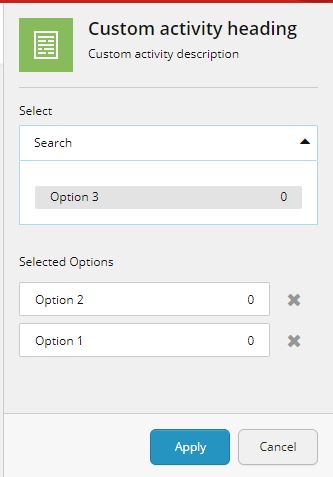
In this editor you can select more than one option. In the example, both Option 1 and Option 2 have been selected, and the editor's serialize method returns a JSON object like this:
To implement an action to handle the type:
-
In a custom C# type, create an activity implementation class like this:
-
Create a complex type implementation like this:
-
Generate your plugin and deploy it to Sitecore.
-
In the content tree, navigate to your custom activity item. Add a new parameter item by right-clicking
Parameters, and in the Insert menu, click Activity Parameter. -
On the Content tab, in the Editor section, fill in the following values:
Field Value Editor ID B5DD8B01-C09A-4FDA-8900-758C84171743Editor Parameters key (first field) ObjectTypeEditor Parameters value (second field) Enter the type you defined in your activity class. For example, System.Collections.Generic.List1[[CustomActivity.TestClass, CustomActivity]]`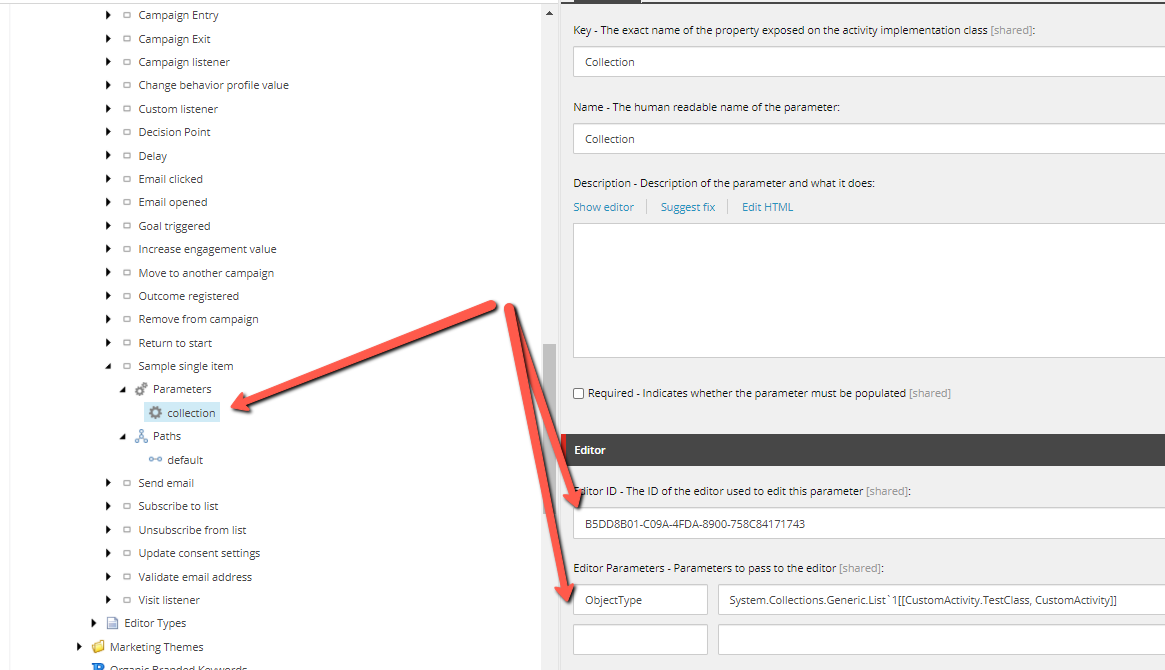
-
Save the changes.