Monitoring Managed Cloud Containers
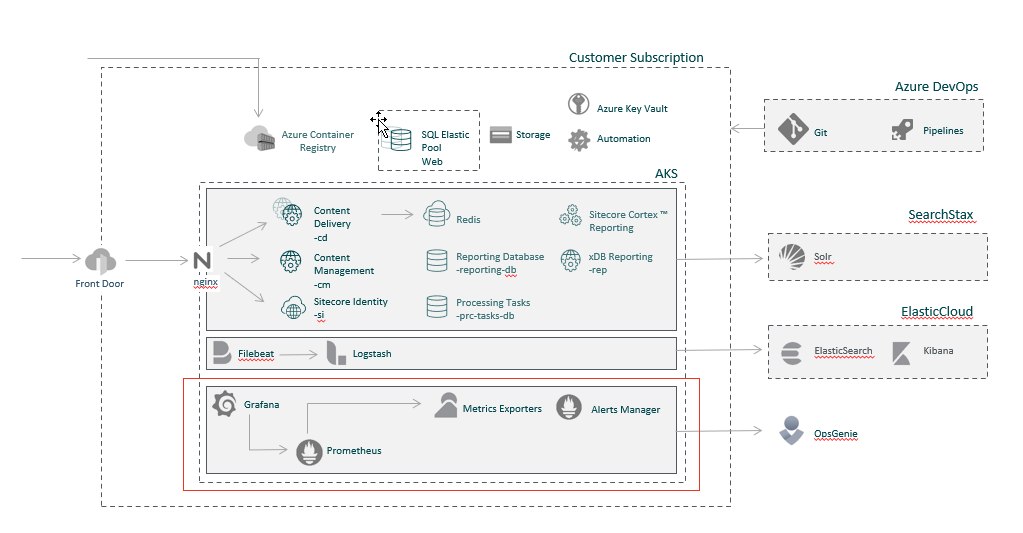
You can monitor the performance and availability of your Managed Cloud Containers solution by using the built-in monitoring services:
- Metrics exporters - libraries that help to export metrics from services and infrastructure to an existing Prometheus server.
- Prometheus - scrapes metrics from services, aggregates and stores data, and allows other services such as Grafana to collect such metrics.
- Grafana - collects metrics from Prometheus and visualizes them.
Authentication in Grafana
Grafana is integrated with the Azure Active directory and Basic Authentication is disabled. Therefore, you must choose the Sign in with Microsoft authentication option and use your Microsoft work account.

Dashboards
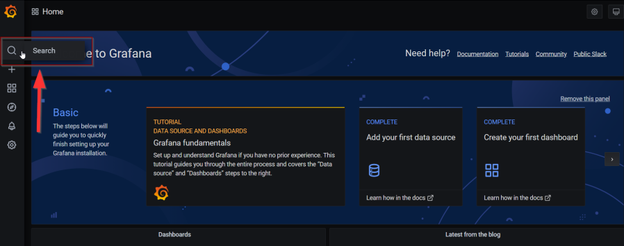
You can search for dashboards by the dashboard name, filtered by one (or many) tags or filtered by starred status. You can access dashboard search through the dashboard picker, available in the dashboard top navigation area. You can also open dashboard search by using the shortcut F.
The following default dashboards are available:
| Dashboard | Description |
|---|---|
| Container overview | Lists all containers with their namespace and pod. Provides the status of each container and the total number of healthy/unhealthy and/or stopped containers. |
| Host Disk Overview (Linux only) | Exposes node filesystem and disk I/O metrics such as read-write time spent, the filesystem available space, and so on. |
| Host Disk Overview (Windows only) | States the filesystem available space. |
| Ingress Overview | Provides the Ingress metrics for each Sitecore role and Grafana. |
| Kubernetes Cluster | Provides a high-level overview of the Kubernetes cluster. |
| Kubernetes Pod Overview | Exposes memory and CPU request, limits, and utilization per pod for all namespaces including system. It provides live logs. |
| Linux Node Overview | Provides detailed information about Memory/CPU/Disk utilization for each Linux Node. |
| MsSql Elastic Pool | Provides detailed information about MsSql Elastic Pool utilization. |
| Redis Server Overview | Exposes general Redis metrics. Similar to native Redis "INFO" command. |
| Windows Node Overview | Provides detailed information about Memory/CPU/Disk utilization for each Windows node. |
Alerts
Alerts proactively notify the MCP team when issues are found with your Managed Cloud solution. They allow you to identify and address issues before the users of your system notice them.
The following table lists the available alerts:
| Description | Condition | Resource | Period | |
|---|---|---|---|---|
| Node statistic | Memory percentage is >85% | The node memory utilization percentage is more than 85%. | Kubernetes node | 10 minutes |
| CPU percentage of Linux node is >85% | The CPU load percentage of Linux node is more than 85%. | Kubernetes node | 10 minutes | |
| CPU percentage of Windows node is >85% | The CPU load percentage of Windows node is more than 85%. | 10 minutes | ||
| Infrastructure | Pod is not ready for 30m | Pod status != ready | Kubernetes pod | 30 minutes |
| Kubelet is down | The kubelet job is down for the last 15 minutes. | Kubernetes job | 15 minutes | |
| Pod is restarting frequently | The Pod is restarted at least once per 5 minutes. | Kubernetes pod | 1 hour | |
| Deployment generation mismatch | The deployment has failed but has not been rolled back. | Kubernetes deployment | 15 minutes | |
| Deployment replicas mismatch | Deployment has not matched the expected number of replicas for longer than an hour. | Kubernetes deployment | 1 hour | |
| DaemonSet pods not ready | Not all of the desired pods are scheduled and ready. | Kubernetes daemonset | 15 minutes | |
| DaemonSet pods not scheduled | Not all of the desired pods are scheduled. | Kubernetes daemonset | 10 minutes | |
| DaemonSet pods misscheduled | Pods of DaemonSet are running where they are not supposed to run. | Kubernetes daemonset | 1 hour | |
| Warning events occurred | One or more events of type Warning occurred in namespace. | Kubernetes namespace | 1 hour | |
| Node is not ready | The node is not ready. | Kubernetes node | 1 hour | |
| Kubernetes version mismatch | There are different semantic versions of Kubernetes components running. | Kubernetes | 1 hour | |
| Kubernetes API server client is experiencing errors | More than one error in the Kubernetes API server. | Kubernetes | 5 minutes | |
| Node is running out of pods capacity | The node pods capacity is more than 95%. | Kubernetes node | 15 minutes | |
| Disk space is used for >90% | The node disk space is used for more than 90%. | Kubernetes node | 1 hour | |
| Linux node pool reboot required | Linux node reboot required | Kubernetes node | ||
| Prometheus | Prometheus PersistentVolume available space | Prometheus PersistentVolume space is used for > 90% | Prometheus | 1 hour |
| Sitecore roles | Http request is 5xx >10 | 5xx http response is more than 10. | nginx_ingress_controller | 10 minutes |
| Average page response time >5 – set by default instead of 1 second | The average response time is more than 1 second. | nginx_ingress_controller | 30 minutes | |
| Average page response time >30 seconds | The average response time is more than 30 seconds. | nginx_ingress_controller | 5 minutes | |
Availability tests are on /sitecore/service/keepalive.aspx | The availability tests on /sitecore/service/keepalive.aspx failed. | Sitecore pod | 3 minutes | |
| Redis cache | Average number of connected clients in % are >80% | The number of connected clients is more than 80% compared to redis_config_maxclients. | Redis Cache | 30 minutes |
| The server load is >95% | The processor load percentage for Redis is more than 95% over the last 30 minutes. | Redis Cache | 30 minutes | |
| MSSQL elastic pool | Database throughput unit (vCores) is >95% | More than 95% during last 5 mins. | MSSQL Elastic Pool | 5 minutes |
| Storage percentage is >75% | More than 75% for the last 5 min. | MSSQL Elastic Pool | 5 minutes | |
| CPU is >90% | CPU usage is more than 90% for the last 15 mins | MSSQL Elastic Pool | 15 minutes | |
| SQL Databases Deadlock | The database is deadlocked. | MSSQL Elastic Pool | ||
| Data IO percentage is >90% | More than 90% of Data IO load during the last 15 min | MSSQL Elastic Pool | 15 minutes | |
| Log IO percentage is >90% | More than 90% of Log IO load during the last 15 mins | MSSQL Elastic Pool | 15 minutes | |
| Workers percentage is >90% | More than 90% Worker load during the last 15 mins | MSSQL Elastic Pool | 15 minutes | |
| Concurrent sessions supported by the DB tier is >90% | Number of allowed concurrent sessions has reached 90% of its limit during the last 15 mins | MSSQL Elastic Pool | 15 minutes | |
| Number of failed database connections >5 | More than 5 failure db connections over the last 5 mins | MSSQL Elastic Pool | 5 minutes | |
| Average In-Memory OLTP storage >95% | More than 95% of Average In-Memory OLTP storage usage over 30 mins. | MSSQL Elastic Pool | 30 minutes | |
| ElasticSearch | ElasticSearch cluster is in yellow state | ElasticSearch cluster is in yellow state | ElasticSearch | 15 minutes |
| ElasticSearch cluster is in red state | ElasticSearch cluster is in red state | ElasticSearch | 15 minutes | |
| ElasticSearch cluster JVM is overloaded | ElasticSearch cluster JVM is more than 75% capacity | ElasticSearch | 5 minutes | |
| Elasticsearch disk space low | The disk usage is over 80% | ElasticSearch | 0 minutes | |
| Elasticsearch disk out of space | The disk usage is over 90% | ElasticSearch | 0 minutes |