Sitecore SQL Upgrade process
The Sitecore SQL Upgrade process:
-
Upgrades the databases
The database upgrade scripts contain the changes that must be applied to the Sitecore databases to ensure compatibility. They also modify certain tables and collections to support new functionality and improve performance. The changes must be applied once per database.
The Sitecore Upgrade container has all the required upgrade scripts for all the databases that must be upgraded and executes them in a specific sequence.
-
Cleans up the resource items in the databases
NoteIf you are upgrading from Sitecore XP 10.1.0 or later, you do not have to clean up the resource items in the database.
As the Sitecore platform evolves, some items in databases are changed or deleted, and some new items are added. In Sitecore XP 10.1.0, we have changed to an Items as resources strategy and the resource items have been deleted from the
Sitecore.MasterandSitecore.Coredatabases. This enables us to keep the data in the databases consistent with the Sitecore XP version that you are upgrading to.The Sitecore upgrade container includes a clean-up tool that automatically removes the Sitecore resource items from the databases as part of the upgrade.
ImportantIf you have modified the Sitecore resource items, they are not removed from the database. You must review these items individually and decide if you want to keep your modified versions or you would prefer to remove them from the database and use the new versions that are provided as resource files. We recommend that you use the new versions.
For more information please refer to the ‘Clean up the content databases’ section in the Upgrade Guide for Sitecore XP .
The database upgrade process
Starting from Sitecore XP 10.2.X, the database upgrade process has become more flexible – you can now specify the Sitecore XP version that you are upgrading from and the version that you are upgrading to.
You specify this information in the following Docker env variables:
- DATABASE_UPGRADE_FROM_VERSION
- DATABASE_UPGRADE_TO_VERSION
If you do not specify these values for the database upgrade, the default values are used.
The default values are 10.4.0 and 10.5.X respectively.
Sitecore currently supports database upgrades from the Sitecore XP 9.3.0 - 10.4.X to Sitecore XP 10.5.X.
| From Sitecore version | XM1 | XP1 |
|---|---|---|
| 9.3.0-10.0.X | List common env variables* | |
| IS_ALWAYS_ENCRYPTED | ||
| PROCESSING_ENGINE_TASKS_DATABASE_USERNAME | ||
| 10.1.X-10.4.X | List common env variables* |
*Use the following list of common env variables for the XM1 and XP1 topologies:
- SQL_SERVER
- SQL_USERNAME
- SQL_PASSWORD
- DATABASE_UPGRADE_FROM_VERSION
- DATABASE_UPGRADE_TO_VERSION
- SITECORE_LICENSE
For more information about the Docker env variables, see Appendix C – The environment variables list.
The upgrade completed criteria
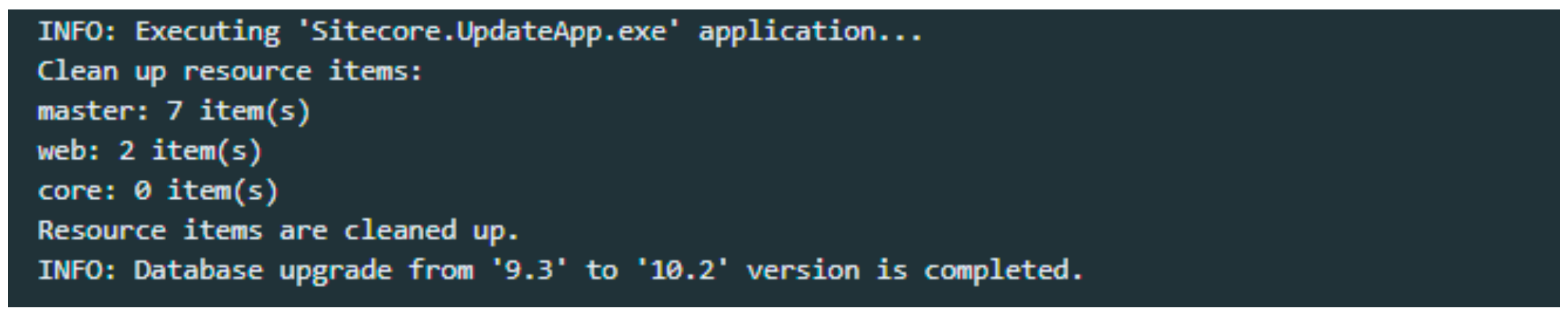
The database upgrade process is carefully logged and you can find all the details of the process in the Docker container or in the Kubernetes pod logs.
The log is saved to the C:\logs\DatabaseUpgradeScriptsLog.txt file in the container.
When the databases upgrade process is successfully completed, the following messages appears with ExitCode 0 in the log and in the terminal:
Changing the fields length in database schema
Starting from Sitecore 10.4.0, the length of UserName, Email, ArchivedBy and similar fields has been increased to 320.
As an optional step of the upgrade process, you can run a script to increase the field length to 320.
It is highly recommended to avoid increasing the length of fields unless necessary.
To increase the length of fields, run the next scripts as the last step of the database upgrade:
CMS_core_userName.sql(execute on core and security database)CMS_master_userName.sql(execute on master database)CMS_web_userName.sql(execute of web database)