Using the Solr spell checker
Solr has a spell checker feature. You use this feature to give users inline query suggestions based on other, similar terms. The source of the suggestions can be terms in a field in Solr, an external text file, or fields in other indexes.
You can configure the source in four ways:
IndexBasedSpellChecker: use the Solr index as the source for a parallel index used for spell checking. You must define a field as the basis for the index terms.DirectSolrSpellChecker: use terms from the Solr index without building a parallel index.FileBasedSpellChecker: use an external file as a spelling dictionary.WordBreakSolrSpellChecker: combine adjacent query terms and/or breaking terms into multiple word
We recommend these best practices:
- If you use
IndexBasedSpellCheck, copy terms from some fields (such as title, body, and so on) to another field that you create for spell checking purposes. - If you use
DirectSolrSpellCheck, when choosing a field to query for this spell checker, use one that has relatively little analysis performed on it, in particular stemming.
The Solr documentation provides more details.
Solr configuration
You can configure Solr in two ways:
- Use an existing select request handler if all requests should generate a suggestion
- Use a spell request handler if a dedicated request handler is required for serving the spellchecking suggestion
You configure Solr by editing the SolrConfig.xml file.
Use an existing request handler
This enables a spell check for the _name field of the master index:
- Open the
solrconfig.xmlfile, for exampleC:\solr-6.3.0\server\solr\configsets\sitecore_core_index\conf\solrconfig.xml. - Find the
<arr name="components">node and enable it. It is disabled by default. - Add
<str>spellcheck</str>to the<arr name="components">node. - Go to the
<searchComponent name="spellcheck" class="solr.SpellCheckComponent">node. - Under the
<lst name="spellchecker">node, change<str name="field">_text_</str>to<str name="field">_name</str>to enable spellchecking for the_namefield.
To check that it works:
- Open Solr Admin in a browser, select the core index, or go directly with this link: http://localhost:8983/solr/#/sitecore_core_index/query
- Select the spellcheck checkbox to enable spell check, and enter a spell check query in the spellcheck.q text field (
homt) - Click Execute Query.
Solr Admin looks similar to this if spell check works on the Solr server:
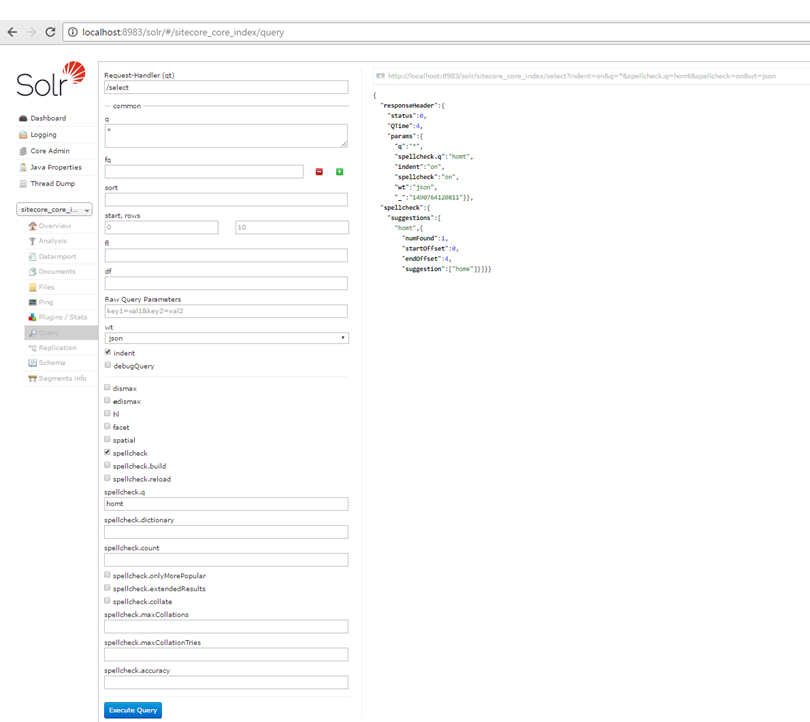
If you use multiple Solr cores, you must repeat this procedure for each of these cores.
Using a spell request handler
This enables spell checker for the _name field of the master index:
- Open the
solrconfig.xmlfile, for exampleC:\solr-6.3.0\server\solr\configsets\sitecore_core_index\conf\solrconfig.xml. - Locate the
<searchComponent name="spellcheck" class="solr.SpellCheckComponent">node. - Under the
<lst name="spellchecker">node, change<str name="field">_text</str>to<str name="field">_name</str>. - Save the
SolrConfig.xmlfile and restart Solr.
To check that it works:
- Go to
http://localhost:8983/solr/sitecore_master_index/spell?q=_name:homy&spellcheck=true&spellcheck.count=10&rows=100000000&version=2.2&spellcheck.build=true&wt=json&indent=truein the browser.
If it works, the response looks like this:
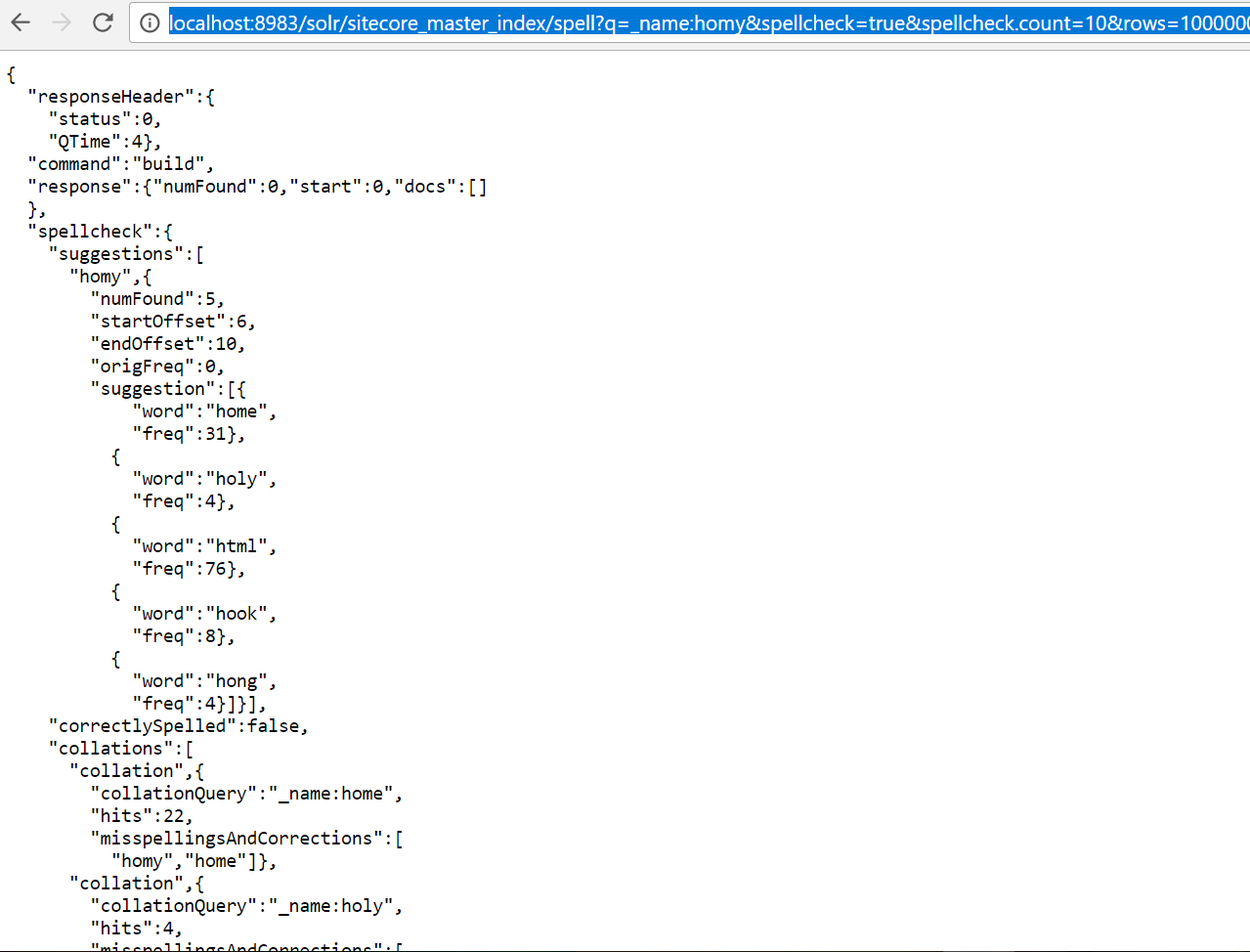
Optional configuration
You can configure many other aspects of the Solr spell checker feature. You configure these parameters in the request handler section in the solrconfig.xml file by adding nodes the <lst name="defaults"> node.
For example, this snippet adds spellcheck.count with a value of 20 as the default count:
https://cwiki.apache.org/confluence/display/solr/Spell+Checking has more detail.
Sample code
This sample code shows how you can create a list of suggestion when a search term does not result in any results.
For example, if a user searches for the term homy and there are no results, then you can return a list of suggestions that are close to homy, including home.
Sitecore exposes the two APIs that you can use:
-
Use this if your code uses an implementation of ISolrQuery:
-
Use this if your code does not use ISolrQuery. This is an easier implementation:
The following examples show two different ways of using Solr spell checker from Sitecore.