Modify Commerce Search Results rendering labels
You can modify the Commerce Search Results rendering labels for stock status, savings, and sale period. The following figure shows the Commerce Search Results rendering on a live storefront. You can further customize the behavior of the Commerce Search Results rendering by modifying the template.
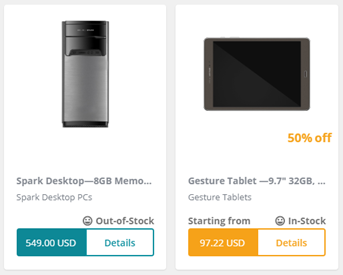
To calculate the product price, the rendering identifies the lowest price across its variants and displays the formatted SellPrice. If there are multiple price ranges, the rendering displays a Starting from label.
The following table describes the stock statuses that are possible:
| Stock status | Description |
|---|---|
| In Stock | A product is in stock when the IsAvailable flag is true and the Count parameter is greater than zero or the IsAlwaysAvailable flag is true. |
| Out of Stock | A product is out of stock if its status is not In Stock, Pre*-orderable* or Back-orderable. |
| Back orderable | A product is back orderable if its policy is Sitecore*.Commerce.Plugin.Backorderable.AvailabilityBackOrderedPolicy* and its QuantityOrdered has not exceeded its BackorderLimit. |
| Pre-orderable | A product is pre-orderable if its policy is Sitecore*.Commerce.Plugin.Preorderable.AvailabilityPreOrderedPolicy* and its QuantityOrdered has not exceed its PreOrderLimit. |
To modify labels:
-
To modify the labels for Details, Savings, and Starting From, in the Content Editor, go to
/sitecore/Content/<tenant>/<site>/<site> Dictionary/Commerce Search Results.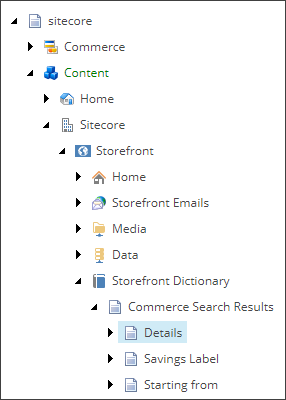
-
To modify the labels for stock status, in the Content Editor, go to
/sitecore/Commerce/Commerce Control Panel/<site> Settings/Commerce Terms/Inventory Statuses.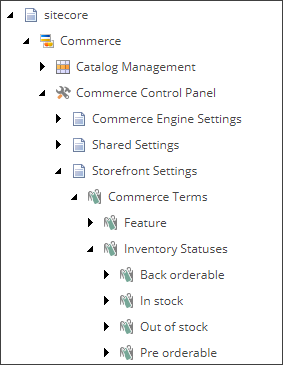
-
Modify any of the following labels:
| Labels | Default value | Item path | Description |
|---|---|---|---|
| Details | Details | /sitecore/Content/Sitecore/Storefront/<site> Dictionary/Commerce Search Results/Details | The label that displays at the bottom of the rendering that links to the product details page. |
| Back-orderable | Back-Orderable | /sitecore/Commerce/Commerce Control Panel/Storefront Settings/Commerce Terms/Inventory Statuses/Back orderable | The label for the product back-orderable indicator. |
| Pre-orderable | Pre-Orderable | /sitecore/Commerce/Commerce Control Panel/Storefront Settings/Commerce Terms/Inventory Statuses/ Pre orderable | The label for the product pre-orderable indicator. |
| Savings Label | Off | /sitecore/Content/<tenant>/<site>/<site> Dictionary/Commerce Search Results/Savings Label | The label that displays after the discount value. |
| Starting from | Starting from | /sitecore/Content/Sitecore/Storefront/<site> Dictionary/Commerce Search Results/Starting from | The label that appears above the price value. It is an indicator that the product has more than one price range. |
| In stock | In-Stock | /sitecore/Commerce/Commerce Control Panel/<site> Settings/Commerce Terms/Inventory Statuses/InStock | The label for the product in stock indicator. |
| Out of Stock | Out-of-stock | /sitecore/Commerce/Commerce Control Panel/<site> Settings/Commerce Terms/Inventory Statuses/OutOfStock | The label for the product out of stock indicator. |