Set standard values on an endpoint template
Version:
Before you can use the endpoint template, you must specify default values for the fields on the template.
To set values on an endpoint template:
-
In the Content Editor, navigate to Templates/Data Exchange/Providers/File System/Endpoints/Text Field Endpoint.
-
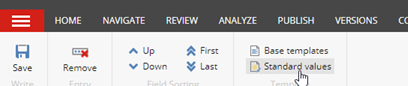
To create a new item, on the ribbon, on the Builder OPTIONS tab, click Standard values.
-
Set the following field values:
Field Value Column Separator , Column Headers in First Line selected Converter Type Examples.DataExchange.Providers.FileSystem.TextFileEndpointConverter, Examples.DataExchange.Providers.FileSystem NoteThe Converter Type field is in the Data Exchange Framework section. You might have to expand the section before you see the field.
-
Save the item.
If you have suggestions for improving this article, let us know!