Dynamics List Membership Facet
This topic describes how marketing list membership information from Dynamics is mapped to a contact in Sitecore.
Format in Dynamics
Dynamics supports static and dynamic marketing lists. The way a contact is associated with a marketing list depends on which of these types the marketing list is:
- Static marketing lists - a separate entity is used to associate the contact with the marketing list. Basically it is an entity with two properties: the marketing list ID and the contact ID.
- Dynamic marketing lists - membership is determined at runtime using a search query.
Format in Sitecore
In Sitecore, contact metadata from Dynamics is associated with a contact through a contact facet:
| Facet Name | DynamicsMembership |
|---|---|
| Facet Type | Sitecore.DataExchange.Tools.DynamicsConnect.Facets.DynamicsMembership |
Mapping values
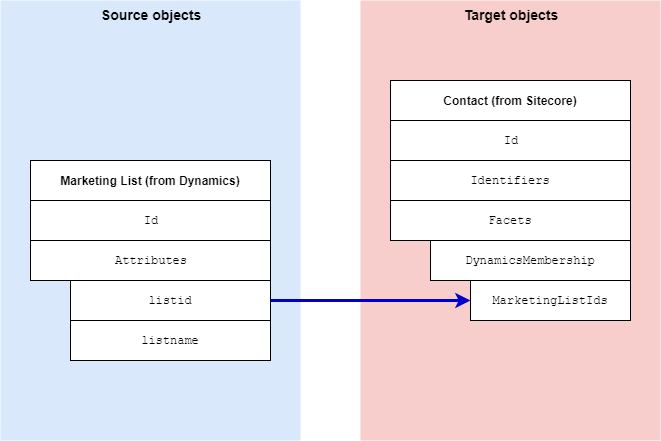
The data synchronization process determines the contacts in Dynamics that are associated with a marketing list. Then, information that identifies each marketing list is set on the contact in Sitecore.
The data mapping process is complex due to the way marketing list membership is read from Dynamics, and a need to read data from Dynamics as efficiently as possible. The description below is a very simplified representation of the mapping process. Fortunately, it is unlikely you will need to customize this mapping process.
| Source objects | Contact entity from Dynamics |
|---|---|
| Target object | Sitecore.DataExchange.Tools.DynamicsConnect.Facets.DynamicsMembership |
| Mapping definition | Staging Database to xConnect Contact Mappings maps to Add Dynamics Memberships to xConnect Contact Membership Facet |