Query examples
This topic describes some examples of how to query the Experience Edge GraphQL schema to meet common query needs.
Most of the example queries in this topic are derived from the Styleguide sample site. Item IDs and paths will vary by import/solution.
If your site supports a fallback language, enable publishing language fallback on the Experience Edge Connector before you start.
Get an item by ID or path
You can query items anywhere in your content tree by path or ID to read their fields and other properties. You can use inline fragments to cast items to their projected data template type and fields to their field type.
Query
Result
Get items filtered by multiple paths
You can filter items based on multiple paths. This query example assumes the following site structure:
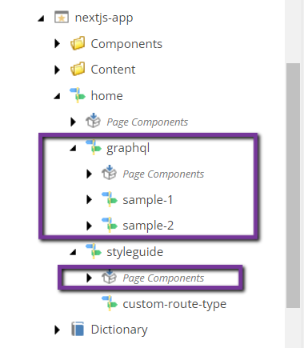
Assume that the /home/graphql and home/styleguide/Page Components items have the UUIDs 0C6F4AAF-DD7E-5FAF-B9B0-61070D496055 and AB99BA2B-B606-51E3-BAD9-FD8358DE1333, respectively. You want to get the /home items and descendants that are not /home/graphql and home/styleguide/Page Components or their children. The following query uses the NCONTAINS operator to exclude the path of these items and their children from the result.
Query
Result
The search query result does not contain items with the paths /home/graphql and home/styleguide/Page Components or any of their descendants but returns the /home item and the remaining child items.
Get item layout for a URL
Most often used with Headless SDKs, you can find items by their site name and HTTP URL and then obtain their Layout Service output for rendering by framework-specific Sitecore placeholder implementations.
Query
Result
Paginate items in an item bucket
When you work with Sitecore item buckets, a common requirement is to paginate all the items that descend from a particular template within that bucket. The following search query is helpful for these use cases.
Query
Result
Get the root item of a site
The Experience Edge schema does not currently allow querying of sites and their root items, but you can still find the root item of a site by using the layout query.
Query
Result
Get all site paths/pages
You can use the search query in the Experience Edge schema to find all items with layout data under a particular path. This is useful, for example, for obtaining paths for a static site generator or building site maps. The search query results are paginated and, by default, return only 10 results. You must use the endCursor property with the first and after query argument to paginate the results.
Query
Result
Build site navigation
This sample query combines finding the site root with the ability to traverse item children. You can use the hasLayout argument to find only items with layout (navigable pages) and the includeTemplateIds argument to filter on a (base) data template.
Query
Result
Build a page breadcrumb
You can use the ancestors field on the item graph type to create breadcrumb navigation. Use the hasLayout argument to find only items with layout (navigable pages), and use includeTemplateIds to filter on a (base) data template.
Query
Result
Use item fields with Sitecore Headless SDKs
The various Sitecore Headless SDKs all contain helpers for rendering field values. These helpers assist with rendering complex fields (such as images or links) and editable values in the context of inline editing. Item fields in the Experience Edge schema include jsonValue that outputs the field in a format compatible with these field helpers.
For example, the following link field could be rendered in React or Next.js using the Link field helper: