Synchronize to the SFMC centralized data extension and a journey
Before you can configure the synchronization process from Sitecore Marketing Automation to Salesforce Marketing Cloud (SFMC) Journey, you must create a journey in SFMC using Journey Builder. Set the entry source for the journey as an API event.
Sitecore synchronizes contacts with the Xconnect contact template fields format. When you create a journey in SFMC with the entry source as an API event, you must have a data extension where you can design the data extension yourself. You must include contactKey in your data extension. If contactKey is not included, SFMC raises an error.
When you create the journey in SFMC, you must use a different data extension from the xDB contact, or create a new one.
To synchronize contact data to the SFMC centralized data extension and API event data extension via a journey:
-
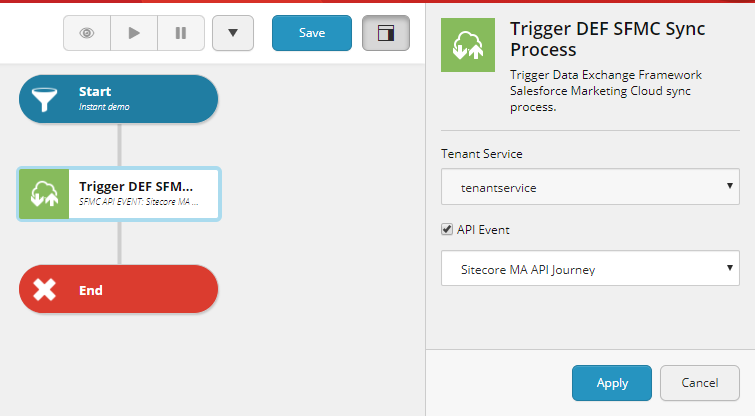
In the Sitecore Marketing Automation action, add a Trigger DEF SFMC Sync Process action into a plan, select the API Event check box and, in the drop-down list, select the API event of the journey that you want to trigger.
 Note
NoteThe list of API events is retrieved from SFMC Journey Builder, Activity Name.
-
Click Apply.
-
Save the campaign and click Activate the current campaign (
 ) to activate it.
To test the synchronization:
-
Click Drop-down (
 ) and select Enroll contacts from list.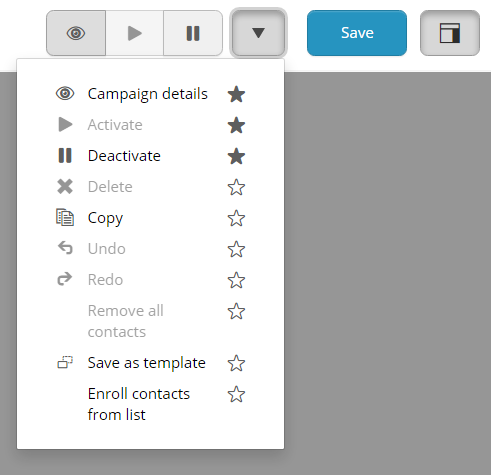
-
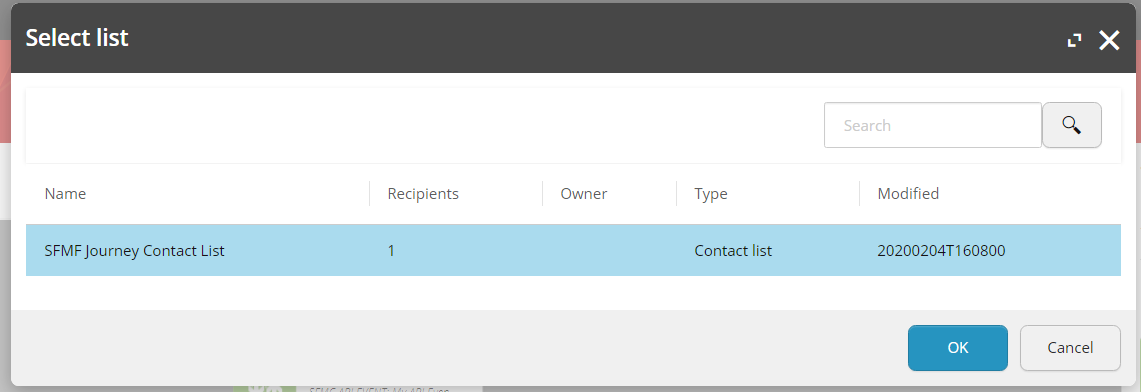
In the Select list dialog box, select the contact list that you want to synchronize to SFMC, and click OK.
 Note
NoteThe contacts are synchronized to both the SFMC centralized data extension and the selected SFMC journey data extension.
-
Log in to your SFMC website portal.
-
Navigate to the centralized data extension,
\Audience Builder\Contact Builder\Data Extensions\Sitecore\xDB Contact.NoteThere can be duplicate Activity Names in SFMC. So if you have duplicate names, they are also included in the list.