Generate a custom static error page
SXA lets you set site-specific 404 and 500 pages. When an error occurs, visitors will be redirected to one of these static error pages.
404 custom error pages are multi-lingual and are, by default, displayed in the context language of the website visitor. If a website visitor requests a page in, for example, Italian, but the page does not exist in Italian, they are redirected to a 404 page in Italian:
- If a 404 page does not exist in the language requested by a website visitor, they are redirected to a 404 page in the default language of the website.
- If a 404 page does not exist in the default language of the website, the website visitor is redirected to the standard Sitecore 404 page.
To generate a static error page:
-
Create your error page(s).
-
Publish the error page(s).
-
Navigate to sitecore/Content/
/ and in the Error Handling section insert the links to your custom error pages./Settings 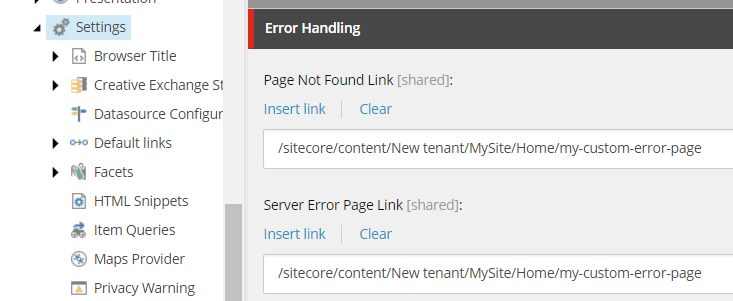 Note
NoteIf you cannot find the Error Handling section, you may have forgotten to select the Error Handling option when creating your site collection.
-
Navigate to /sitecore/Content/
/ and in the ribbon, on the Error Handling tab, click Generate static error page and click Ok. Now for every error that cannot be handled, visitors will see the static page that is loaded from the ErrorPages folder located in the root of your website./Settings/Site Grouping/
SXA only generates an ErrorPages folder on the instance that you are on when you click Generate static error page. If you are using a scaled environment, you must manually copy the ErrorPages folder and paste it onto your Content Delivery servers.