Include credentials on cross-origin requests
A web application executes a cross-origin HTTP request when it requests a resource that has a different origin (domain, protocol, and port). Cross-origin Resource Sharing (CORS) is a mechanism that uses additional HTTP headers to tell a browser to let a web application running at one origin (domain) have permission to access selected resources from a server at a different origin.
By default, CORS does not include cookies on cross-origin requests. To include credentials on cross-origin requests, you must change the CORS settings.
To include credentials on cross-origin requests:
-
Navigate to your site definition item: /sitecore/content/
/ and click default./Settings/Site Grouping/ /CORS -
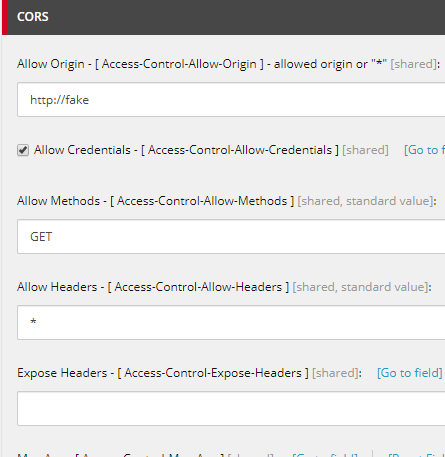
In the CORS section, in the Allow Origin field, enter the URL of the site.
NoteIf the Allow Origin field value is empty or equal to "*", SXA ignores the Allow Credentials check box.
-
Select the Allow Credentials check box.
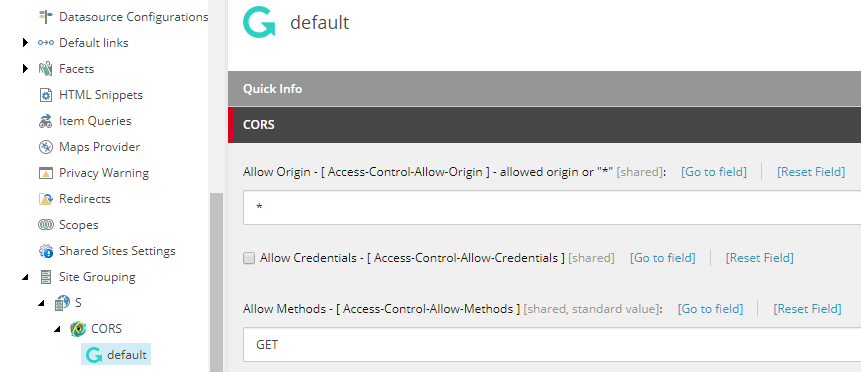
For example:
When you access http://sxa from http://fake, without setting the Allow Credentials and Allow Origin fields, with the following script:
The response is:
Access to XMLHttpRequest at 'http://sxa/?sc_device=json' from origin 'http://fake' has been blocked by CORS policy: No 'Access-Control-Allow-Origin' header is present on the requested resource.
When you do set the Allow Credentials and Allow Origin fields:
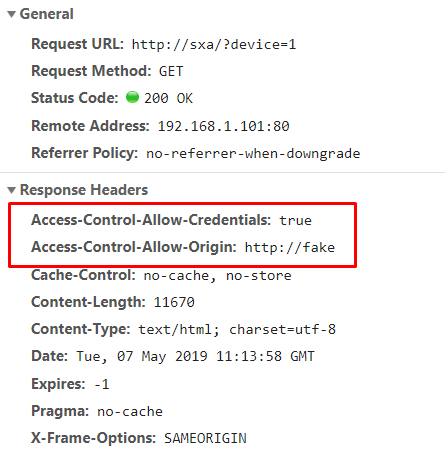
The response is valid, with proper response headers without any errors: