Overview of functionality in the SXA Storefront
This topic provides you with an overview of functionality that is built into the SXA Storefront. The topic highlights functionality in the following areas:
Shopping cart
Shopping cart
Customers can add items they want to buy to a shopping cart on the storefront. If they leave the storefront before making a purchase, the items remain in the cart. An existing shopping cart is automatically resumed when a contact returns to the storefront.
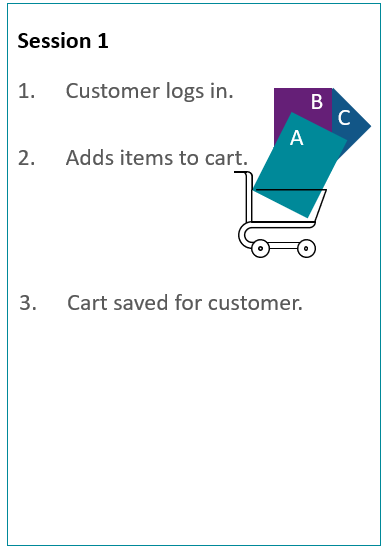
Session 1: Customer logs in and adds items to cart, then logs out. Cart is saved for a later session.
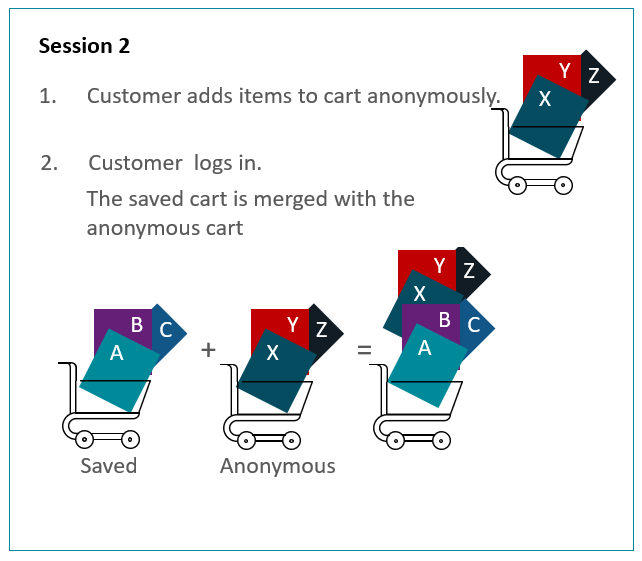
Session 2: Customer browses the site and adds items to the cart anonymously. When the customer logs in, the items saved from Session 1 appear in the contact's shopping cart together with the items added anonymously in session 2.
Catalog
Catalog
Customers can browse the storefront by category and subcategory, and they can filter the results using facets.
Categories and products can have multiple different presentations within the same storefront, as well as across different storefronts that share the same catalog.
Product prices
Product prices
The storefront shows list prices for all products, and adjusted prices and savings in percentage for products on sale.
The storefront supports both indexed prices and dynamic price lookup in the commerce engine. List prices and adjusted prices exposed on product items via the data provider are automatically indexed. For search results, category pages, and product detail pages, the default is dynamic lookup.
Product inventory
Product inventory
Search result and category pages show inventory statuses such as in-stock, out-of-stock, preorderable, and back-orderable.
Product detail pages show:
-
Inventory status such as in-stock, out-of-stock, preorderable, and back-orderable.
-
Number of items in stock.
-
Date for when preorderable products will become available/in-stock.
-
Date for when back-orderable products will become available/in-stock.
The storefront supports both cached inventory status information and dynamic inventory status lookup in the commerce engine. The default is dynamic lookup for both search results, category pages, and product detail pages.
Payment
Payment
The following billing options are supported:
-
Credit card
-
Promotion codes
-
Gift cards (can be redeemed as payment during checkout)
You configure payment options in the Commerce Control Panel for the individual storefronts.
Shipping
Shipping
The following shipping options are supported:
-
Ship to address
-
Send by email for digital products, including gift cards
Shipping options can be selected per shopping cart line.
You configure shipping methods in the Commerce Control Panel for the individual storefronts.
Multistore support
Multistore support
Using SXA Storefront, you can host multiple storefronts within the same Sitecore instance. Individual stores use different catalogs; however, with catalog cloning, they can share product information.
Globalization
Globalization
Other than the product catalog, all textual content in Sitecore that is used on a given storefront is stored in connection with the individual storefront. When you use SXA, textual data that is stored on associated data items is stored in the Data folder unless it is meant to be shared across sites within a tenant.
This approach:
-
Allows maximum flexibility in multistorefront scenarios where content might differ between shops.
-
Keeps all content together in one area for easy content management.
System error messages are localizable and stored in the shared Commerce Control Panel for all storefronts.
Security
Security
By default, the storefront enforces use of the secure SSL based HTTPS protocol on pages and on asynchronous API calls that access sensitive data and content.
The storefront also enforces restrictions on browser caching and storage of data.
Unauthorized visitors cannot access APIs that handle sensitive data.
Experience Editor support
Experience Editor support
In the Experience Editor, you can:
-
Edit catalog data directly on the page, for example, category titles, and product information except prices, inventory status and stock count.
-
Edit the association of images to products in the related product item.
-
Edit most textual content on the page. Exceptions are hint text (placeholder or watermark text) and tooltips, which can be edited on the associated data item accessed from the floating toolbar.
-
Execute a search and see the search result.
The Experience Editor looks similar to the final website, but some functionality is only available on the live storefront. For example, in the Experience Editor:
-
Most forms cannot be submitted, for example, Login and Registration. When you work in the Experience Editor, you are logged in as a Sitecore user and it does not make sense to authenticate or register. This also applies to editing address and profile information.
-
It is not possible to add products to the shopping cart.
-
It is not possible to place an order or navigate the checkout using the regular buttons. The items that represent the pages in the checkout process must be manually selected from the Experience Editor breadcrumb.
-
Renderings are always visible so you can select and edit them. An example is the Message Summary, which is not visible on the live storefront when it is empty.
-
Catalog renderings show actual catalog data when the context is valid and they show placeholder data when the context is not valid.
Mobile support
Mobile support
The SXA Storefront is built with responsive design for ease of use with mobile phones or tablets.
Search engine support
Search engine support
Each category and each product has a single canonical URL for SEO purposes.
Even though the same categories and products can be presented in multiple different areas of the storefront, the metadata always points to the same canonical URL.