The email campaign templates
In a default installation, the Email Experience Manager (EXM) contains predefined templates and import options. As part of the email campaign creation process, you select the template you want to use.
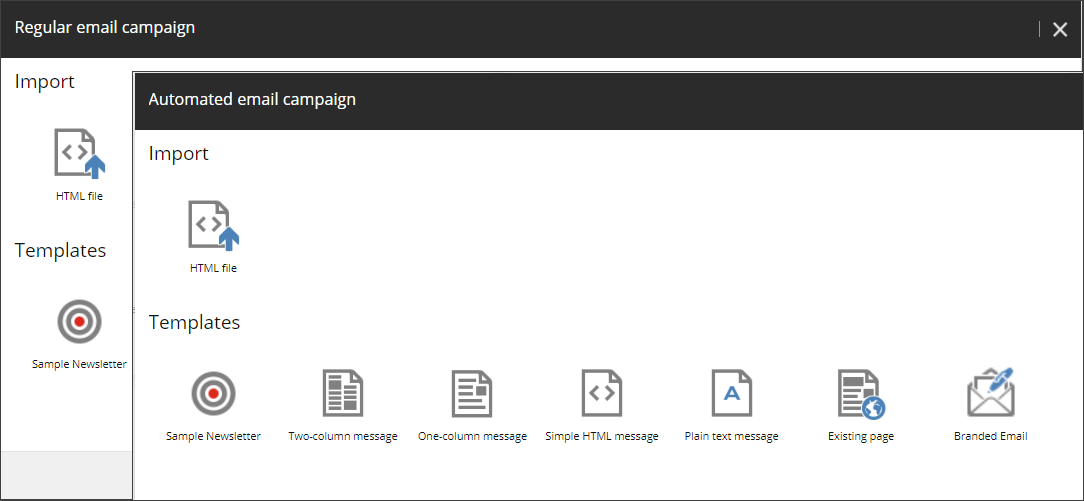
The following table describes the available default templates. You can also create a custom template (such as the Branded Email template) to meet your individual requirements.
| Template | Description |
|---|---|
| HTML file | An email campaign based on imported HTML code for the message body. You can import any HTML file. Note
In a scaled setup, any HTML files that you want to use as templates for your email campaigns, you must manually copy to the |
| Sample Newsletter | A newsletter template with a header containing a link to the online version of the email campaign and a footer with links to opt-out pages. |
| Two-column | A template with a two-column layout and a footer with links to opt-out pages. |
| One-column | A template with a one-column layout and a footer with links to opt-out pages. |
| Simple HTML | An HTML template without a predefined layout. |
| Plain text message | A plain text template without a predefined layout. Note This template does not contain the tracking pixel needed to track Open events for email messages. If you want to track how many recipients open your email messages, do not use this template. |
| Existing page | A template based on a Sitecore webpage. Select a page on your Sitecore website and use it as the message body. Pages in Sitecore XP can be complex and security restrictions might apply to certain elements on the page. For example, a page might contain a section that only registered users can see if they open this page on the website. EXM enables you to define how email campaigns are created from webpages. There are two options:
|