
URLをCommerce Business Toolsに変更してください
このページの翻訳はAIによって自動的に行われました。可能な限り正確な翻訳を心掛けていますが、原文と異なる表現や解釈が含まれる場合があります。正確で公式な情報については、必ず英語の原文をご参照ください。
CommerceのBusiness ToolsのデフォルトURLは、Coreデータベースのコンテンツエディターで確認できます。Sitecoreのユーザーインターフェース設定はすべて含まれています。例えば、SitecoreをカスタマイズしてCommerce Business Toolsの公開URLを提供する場合、このデータベースを使います。
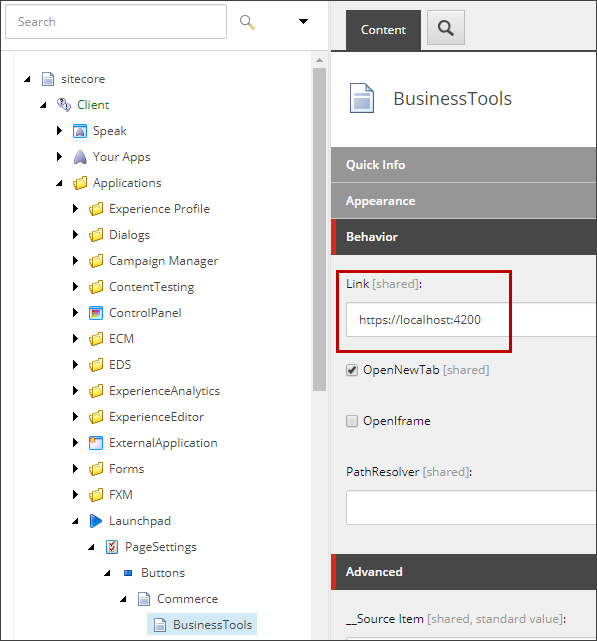
Commerce Business ToolsのURLを変更するには:
-
Sitecore LaunchpadでDesktopをクリックし、デスクトップではデータベースアイコン
 をクリックし、その後Coreデータベースをクリックしてください。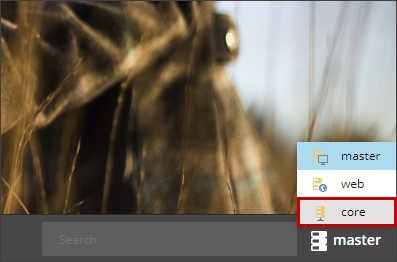
-
Sitecoreボタンをクリックし、その後コンテンツ エディターをクリックしてください。

-
コンテンツエディターでsitecore\Client\Your Apps\Applications\Launchpad\Page Settings\Buttons\Commerceへ行ってください。
-
Behaviorセクションのリンク欄でリンクを更新し、変更を保存してください。
-
以下の設定ファイルそれぞれで、AllowedOrigins設定を変更してください:
- C:\inetpub\wwwroot\CommerceAuthoring_Sc9\wwwroot\config.json
- C:\inetpub\wwwroot\CommerceMinions_Sc9\wwwroot\config.json
- C:\inetpub\wwwroot\CommerceOps_Sc9\wwwroot\config.json
- C:\inetpub\wwwroot\CommerceShops_Sc9\wwwroot\config.json
"AppSettings": { "SiteTitle": "CommerceAuthoring_Sc9", "BootStrapFile": "Global", "DeploymentId": "Deployment01", "EnvironmentName": "HabitatAuthoring", "EncryptionProtectionType": "Redis", "EncryptionCertificateHash": "Enter a valid certificate thumbprint for a PXF file. X-509 not supported yet", "EncryptionSID": "Enter a valid SID for a domain registered user", "EncryptionKeyStorageLocation": "c:\\Encryption-Keys\\", "SitecoreIdentityServerUrl": "https://cqa-dem-01-dk1-identityserver", "AllowedOrigins": "https://
", "https://bizfx.sc9.qa", "https://" , -
以下の設定ファイルで 、BizFxUriの設定を変更してください:
- C:\inetpub\wwwroot\SitecoreBizFx\assets\config.json
{ "EnvironmentName": "HabitatAuthoring", "EngineUri": "https://
", "IdentityServerUri": "https://-identityserver", "BizFxUri": "https:// ", "Language": "en", "Currency": "USD", "ShopName": "CommerceEngineDefaultStorefront", "LanguageCookieName": "selectedLanguage", "EnvironmentCookieName": "selectedEnvironment", "AutoCompleteTimeout_ms": 300 } -
以下のSitecore Identity Server設定ファイルで、AllowedCORSOriginsの設定を変更し、グループに新しいURLを含めるように変更してください:
- C:\inetpub\wwwroot\SitecoreIdentityServer\Config\Production\Sitecore.Commerce.IdentityServer.Host.xml
https:// :4200|https://cqa-dem-01-dk1:5000 https://bizfx.sc9.qa|https://commerceauthoring.sc9.qa -
IISを使ってすべてのEngineインスタンスを再起動してください。
-
IISを使ってBusiness Toolsサイトを再起動してください。
-
IISを使ってSitecore Identity Serverを再起動してください。