Commerce検索結果レンダリングのカスタマイズ

Version:
日本語翻訳に関する免責事項

このページの翻訳はAIによって自動的に行われました。可能な限り正確な翻訳を心掛けていますが、原文と異なる表現や解釈が含まれる場合があります。正確で公式な情報については、必ず英語の原文をご参照ください。

Commerce検索結果レンダリング バリアントには、Scribanテンプレートの形式のレンダラーが含まれています。

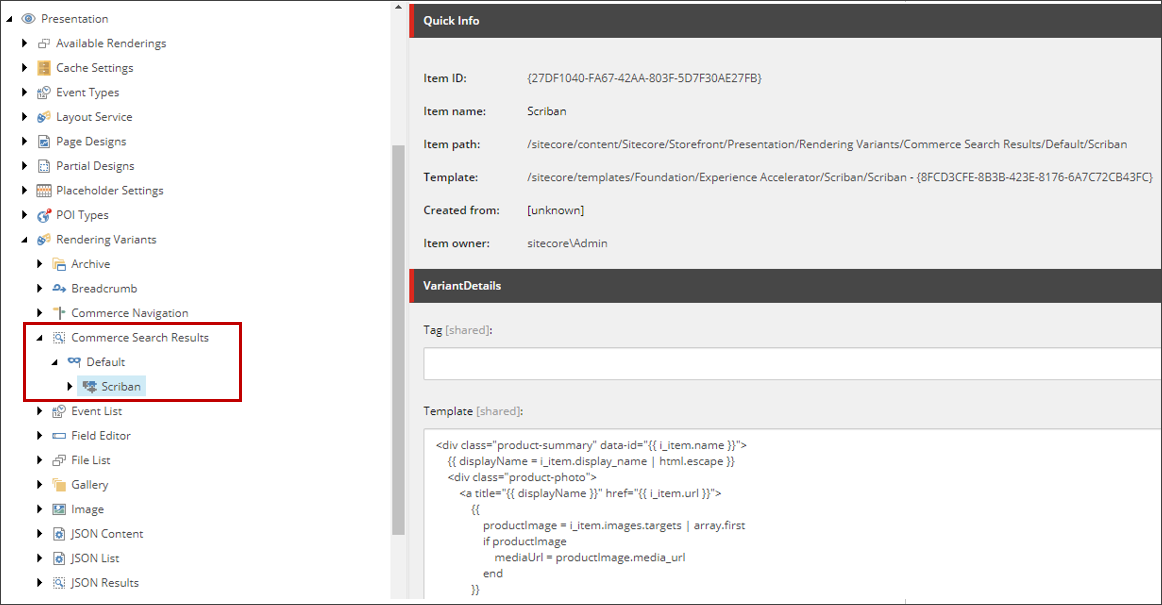
Scribanテンプレートは、個々の製品カードのマークアップをレンダリングする役割を担います。これは、製品アイテムを反復処理するループ内で実行されます。商品カード用に生成されたマークアップを変更するには、Scribanテンプレートを変更します。この場合、ソフトウェアのアップグレード中にカスタマイズが上書きされないように、新しいカスタム レンダリング バリアントを作成するのが最善です。レンダリングの ラベルを変更する こともできます。

Location of the Scriban template in the content tree

次の表では、Commerce検索結果レンダリングScribanテンプレートの主要なプロパティについて詳しく説明します。

プロパティまたは変数

形容

i_item

i_itemプロパティは、レンダリング バリアントのコンテキストにおける現在のアイテムです。多くの場合、i_datasourceアイテムと同等ですが、この場合は、個々のアイテムのカタログ データが公開されます。

デフォルトの実装では、アイテムはすべてproductsタイプであると想定されていますが、アイテムはバンドル、カテゴリ、またはバリアントにすることもできます。 i_itemアイテムは、このテンプレートにさまざまな種類のデータを格納するために使用されます。たとえば、i_item.nameプロパティはProduct IDを格納し、idという名前のデータ属性に割り当てられ、i_item.urlプロパティは製品詳細ページへのリンクを格納し、href属性に割り当てられます。

o_model

o_modelプロパティは、MVCコントローラー レンダリングに渡されます。これは、カタログの名前と製品バンドルIDがMVCコントローラーに渡されることを意味します。o_modelプロパティは、価格やプロモーション情報を伝えるためにも使用されます。

displayName

displayName変数は、さまざまなコンテキストで使用されます。たとえば、i_item.display_nameに初期化され、製品の表示名が格納されます。変数は組み込み関数html.escapeに渡されるため、返される文字列はテキスト ブロックになります。

また、アンカー タグのtitle属性にも割り当てられます。商品ページへのリンクを格納するi_item.urlプロパティは、href属性に割り当てられます。 displayName変数は、anchorタグのテキストとしても割り当てられます。

sc_imagelink

イメージ リンクは、CatalogProductImageオブジェクトに対してsc_imagelink関数を使用して取得されます。カタログ画像のソースを設定すると、定義した設定に応じて、メディアライブラリまたはデジタルアセット管理システムから結果が得られます。この関数は、製品イメージを表すCatalogProductImage型のパラメーター オブジェクトと、メイン/ヒーロー製品イメージのCatalogProductImageオブジェクトを含むo_model.master_product_imageプロパティを想定しています。

sc_translate

この機能は、サイトの辞書ドメイン(sitecore/Content/<tenant>/<site>/Storefront Dictionary)で定義されたアイテムを表示するために使用されます。

i_item.brand

このプロパティは、製品のブランド名を格納し、<div> 要素に表示されます。

次のコードは、既定のレンダリング バリアント内で定義されたCommerce検索結果レンダリングScribanテンプレートを示しています。

{{ # The <div> element renders a product item with values from the search item (i_item) and the ProductSummaryViewModel (o_model) }}
<div class="product-summary" data-id="{{ i_item.name }}">
    {{
        # If the o_model is not available, set it to an empty object to be accessed by the rest of the template without null reference error
        if !o_model
            o_model = {}
        end
    # Escape any HTML characters in the display name
    displayName = i_item.display_name | html.escape
}}
{{ # The &#x3C;div> element contains the product photo }}
&#x3C;div class="product-photo">
    {{ # The &#x3C;a> element wraps the product photo with a link to navigate to the product page }}
    &#x3C;a title="{{ displayName }}" href="{{ i_item.url }}">
        &#x3C;img src="{{ o_model.master_product_image | sc_imagelink 220 220 }}" alt="{{ o_model.master_product_image.alternate_text }}" />
        {{ ## The &#x3C;div> element contains the savings percentage and savings label.
              The CSS class "promotion" is added on server side (if "o_model.is_on_sale" is true) or on client side after the data binding (if "promotion" has a true value). ## }}
        &#x3C;div data-bind="css: { 'promotion': promotion }"
            class="hidden {{ if o_model.is_on_sale  }} promotion {{ end }}">
            {{ # The promotion text is rendered on server side and will be overwritten on the client side if data binding occurs }}
            &#x3C;span data-bind="text: promotion" class="savings-percentage">{{ o_model.savings_percentage }}%&#x3C;/span>
            &#x3C;span class="savings-label">{{ sc_translate 'SAVINGS_LABEL' }}&#x3C;/span>
        &#x3C;/div>
    &#x3C;/a>
&#x3C;/div>
{{ # The &#x3C;div> element contains all the product information such as the display name and price }}
&#x3C;div class="product-info">
    {{ # The &#x3C;a> element wraps the product display name with a link to navigate to the product page }}
    &#x3C;a class="product-title" title="{{ displayName }}" href="{{ i_item.url }}">
        {{ displayName }}
    &#x3C;/a>
    &#x3C;div class="product-brand">
        {{ i_item.brand }}
    &#x3C;/div>
    {{ # The &#x3C;div> element contains the stock status of the product and a "Starting From" label }}
    &#x3C;div class="product-indicator">
        {{ ## The &#x3C;label> element contains the "Starting From" label.
              The CSS class "price-difference" is added on server side (if "o_model.display_starting_from" is true) or on client side after the data binding (if "hasDifferentPrice" is true). ## }}
        &#x3C;label class="hidden  {{ if o_model.display_starting_from  }} price-difference {{ end }}"
            data-bind="css: { 'price-difference': hasDifferentPrice }">
            {{ sc_translate 'STARTING_FROM' }}
        &#x3C;/label>
        &#x3C;label class="stock-status" data-bind="text: stockLabel">{{ o_model.stock_status_name }}&#x3C;/label>
    &#x3C;/div>
    {{ ## The &#x3C;div> element contains the product price and product details link.
          The CSS class "on-sale" is added on server side (if "o_model.is_on_sale" is true) or on client side after the data binding (if "promotion" has a truthy value). ## }}
    &#x3C;div class="product-detail {{ if o_model.is_on_sale  }} on-sale {{ end }}"
        data-bind="css: { 'on-sale': promotion }">
        {{ # The product price text is rendered on server side and will be overwritten on the client side if data binding occurs }}
        &#x3C;span data-bind="text: price" class="product-price">{{ o_model.adjusted_price_with_currency }}&#x3C;/span>
        &#x3C;a class="product-link" title="{{ displayName }}" href="{{ i_item.url }}">
            {{ sc_translate 'DETAILS' }}
        &#x3C;/a>
    &#x3C;/div>
&#x3C;/div>

</div>

Commerce検索結果レンダリングは、Commerceに固有のSXA検索結果レンダリングのクローンです。独自のデフォルト レンダリング バリアント ルートとデフォルト レンダリング バリアント (/sitecore/Content/<tenant>/<site>/Presentation/Rendering Variants/Commerce Search Results) があり、マークアップの生成にはScribanテンプレート、株式と価格情報の取得にはJavaScript (AJAXリクエストとして)、ラベル変換にはSXAディクショナリを使用します。

メモ

Commerce検索結果レンダリングで使用される ラベルを変更できます

製品概要ビューモデル

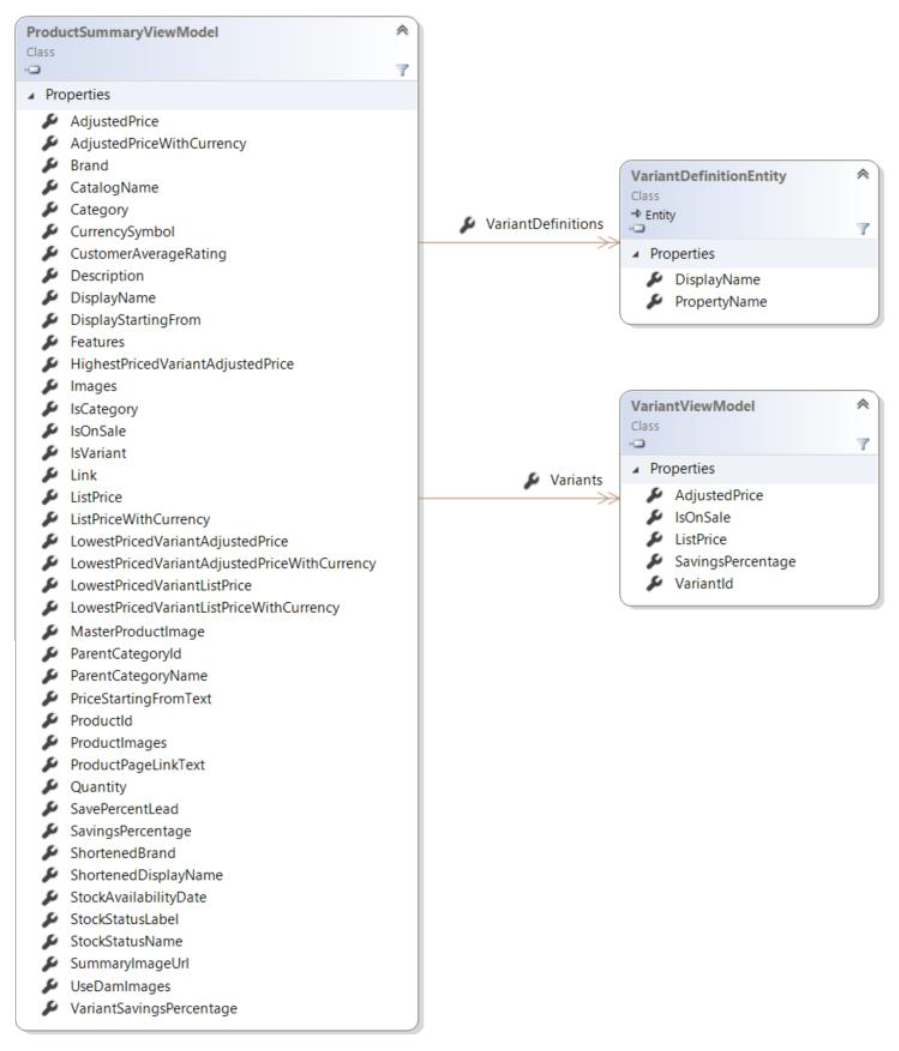
検索結果が処理されると、価格と在庫の情報がCommerce Engineから取得され、Scribanテンプレート (o_model変数を介してアクセス) 内でレンダリングされるProductSummaryViewModelモデルに変換されます。

Class diagram for the ProductSummaryView Model

この記事を改善するための提案がある場合は、 お知らせください!