無料ギフト選択レンダリングのカスタマイズ

Version:
日本語翻訳に関する免責事項

このページの翻訳はAIによって自動的に行われました。可能な限り正確な翻訳を心掛けていますが、原文と異なる表現や解釈が含まれる場合があります。正確で公式な情報については、必ず英語の原文をご参照ください。

無料ギフト選択レンダリングには、Scribanテンプレートの形式のレンダリングバリアントが含まれています。Free Gift Selectionレンダリングには、独自のデフォルトレンダリングバリアントルートとデフォルトレンダリングバリアント(/sitecore/Content/<tenant>/<site>/Presentation/Rendering Variants/Free Gift Selection)があり、マークアップを生成するためのScribanテンプレートと、Claim giftsボタンがクリックされたときにCDへのAJAX呼び出しを使用してAdd-to-cartイベントをトリガーします。無料ギフトはAPIを使用してカートの品目に追加され、IsFreeGiftプロパティはtrueに設定されます。

Scribanテンプレートを変更することもできますが、この場合は、ソフトウェアのアップグレード中にカスタマイズが上書きされないように、新しいカスタム レンダリング バリアントを作成するのが最善です。レンダリングの ラベルを変更する こともできます。

次のコードは、デフォルトのレンダリング バリアント内で定義されたFree Gift SelectionレンダリングのScribanテンプレートを示しています。買い物客が無料ギフトを選択できる販売可能な商品のリストは、埋め込み商品o_modelを使用してScribanテンプレートに渡されます。

{{ # The hidden <div> element contains serialized data in JSON format. }}
<div class="freegiftselection-data" style="display: none;">
    {{ sc_xc_serialize o_model.free_gift_selections | html.escape }}
</div>

{{ ## The hidden <div> element contains texts related to the component. These values are populated from data model and datasource. ## }} <div class="freegiftselection-messages" style="display: none;"> <span data-type="heading-text">{{ sc_raw i_datasource 'Heading Text' | html.escape }}</span> <span data-type="no-selection-message">{{ sc_raw i_datasource 'No Selection Message' | html.escape }}</span> <span data-type="exceed-max-count-message">{{ sc_raw i_datasource 'Exceed Maximum Count Message' | html.escape }}</span> <span data-type="error-claim-message">{{ sc_raw i_datasource 'Error Claim Message' | html.escape }}</span> <span data-type="invalid-variant-message">{{ sc_raw i_datasource 'Invalid Variant Message' | html.escape }}</span> </div>

{{ # The <div> element shows a list of multiple free gift selections based on various qualifications. }} <div data-bind="visible: isVisible, foreach: freeGiftSelectionGroups" style="display: none;"> <div class="freegiftselection-group" data-bind="css: { 'no-selection-item': !hasSelectionItem() }">

    {{ ## The &#x3C;div> element displays the selected free gift that has been chosen and the maximum number
          of free gifts that a shopper can choose from the free gift selection. ## }}
    &#x3C;div class="freegiftselection-header">
        &#x3C;span class="freegiftselection-header-title" data-bind="text: headingText">&#x3C;/span>
        &#x3C;div class="freegiftselection-header-claimed-text" data-bind="visible: hasClaimedItem()">
            &#x3C;span class="freegiftselection-header-selectedtext">
                &#x3C;span>{{ sc_field i_datasource 'Free Gift Chosen Text' }}&#x3C;/span>
                &#x3C;span data-bind="text: claimedItemName">&#x3C;/span>
            &#x3C;/span>
            &#x3C;span class="freegiftselection-header-changeselectiontext">{{ sc_field i_datasource 'Free Gift Selection Text' }}&#x3C;/span>
        &#x3C;/div>
    &#x3C;/div>

    {{ # The &#x3C;div> element contains a checkbox, product image, display name, description, stock status, variant combinations for each free gift. }}
    &#x3C;div class="freegiftselection-body" data-bind="foreach: selectionItems">

        {{ # The &#x3C;div> element displays each item as free gift selection in the list populated from data model. }}
        &#x3C;div class="freegiftselection-item">

            {{ # The &#x3C;div> element shows whether a free gift is already included in the free gift selection. }}
            &#x3C;div class=" freegiftselection-checkbox">
                &#x3C;input type="checkbox" data-bind="checked: isSelected, disable: isClaimed || isNotClaimable" />
            &#x3C;/div>
            {{ # The &#x3C;div> element display product image. }}
            &#x3C;div class="freegiftselection-image">
                &#x3C;a data-bind="attr: { href: productLink }">
                    &#x3C;img data-bind="attr: { src: displayImage }" />
                &#x3C;/a>
            &#x3C;/div>
            {{ # The &#x3C;div> element displays product display name, description, valid variant combinations. }}
            &#x3C;div class="freegiftselection-info">
                &#x3C;a data-bind="attr: { href: productLink }">
                    &#x3C;h5 class="freegiftselection-info-displayname" data-bind="text: displayName">&#x3C;/h5>
                &#x3C;/a>
                &#x3C;span class="freegiftselection-info-description" data-bind="text: productDescription">&#x3C;/span>
                &#x3C;div data-bind="visible: hasOnlyOneVariantCombination(), foreach: variantSelections">

                    {{ # The &#x3C;div> element displays the variant combination when there is only one valid variant combination. }}
                    &#x3C;div class="variant-information">
                        {{ # The &#x3C;span> element displays the variant name. }}
                        &#x3C;span class="variant-property-name" data-bind="text: propertyName">&#x3C;/span>&#x3C;span>:&#x3C;/span>
                        {{ # The &#x3C;span> element displays the variant value. }}
                        &#x3C;span class="variant-value" data-bind="text: firstOptionDisplayValue()">&#x3C;/span>
                    &#x3C;/div>

                &#x3C;/div>
            &#x3C;/div>
            {{ # The &#x3C;div> element contains the selections for variant properties. }}
            &#x3C;div class="freegiftselection-variant">

                &#x3C;div data-bind="visible: hasMultipleVariantCombinations(), foreach: variantSelections">

                    &#x3C;div class="variant-selection-group">
                        {{ # The &#x3C;label> element contains the display name of the variant. }}
                        &#x3C;label class="variant-property-name" data-bind="text: propertyName">&#x3C;/label>
                        &#x3C;select class="variant-selection-selector" data-bind="value: currentSelection, options: options, optionsText: 'propertyDisplayValue', optionsValue: 'propertyValue', event: { change: onSelectionChange }">&#x3C;/select>
                    &#x3C;/div>

                &#x3C;/div>
            &#x3C;/div>
            {{ # The &#x3C;div> element displays stock status of the free gift. }}
            &#x3C;div class="freegiftselection-stockstatus" data-bind="text: stockStatusName">&#x3C;/div>
            {{ # The &#x3C;div> element displays the sale and list prices of the free gift. }}
            &#x3C;div class="freegiftselection-total">
                &#x3C;span class="freegiftselection-sellprice" data-bind="text: sellPriceWithCurrency">&#x3C;/span>
                &#x3C;span class="freegiftselection-listprice" data-bind="text: listPriceWithCurrency">&#x3C;/span>
            &#x3C;/div>
        &#x3C;/div>

    &#x3C;/div>
    {{ # The &#x3C;div> element contains the button to claim the free gift. The text of the button is populated from the datasource. }}
    &#x3C;div class="freegiftselection-buttons">
        &#x3C;span class="error-message" data-bind="text: errorMessage">&#x3C;/span>
        &#x3C;button type="submit" class="claim-gift-btn" data-bind="click: claimSelectedFreeGiftItems, enable: isValidToClaim ">
            {{ sc_field i_datasource 'Button Text' }}
        &#x3C;/button>
    &#x3C;/div>
&#x3C;/div>

</div>

Free Gift Selectionレンダリング モデル

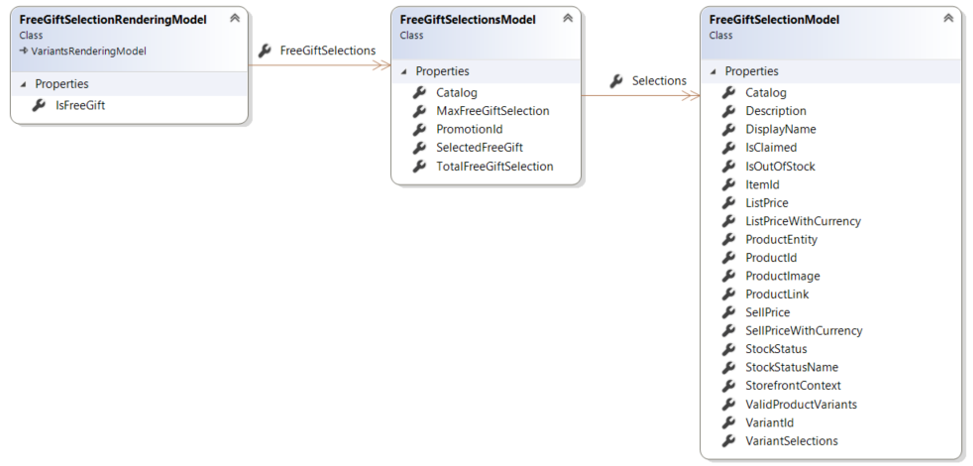
Free Gift SelectionのScribanテンプレートでは、次の図に示すように、埋め込みアイテムo_modelを使用してFreeGiftSelectionRenderingModelモデルに含まれるプロパティとオブジェクトにアクセスします。

Diagram of the Free Gift Selection rendering model

無料ギフトセレクションの通話シーケンス

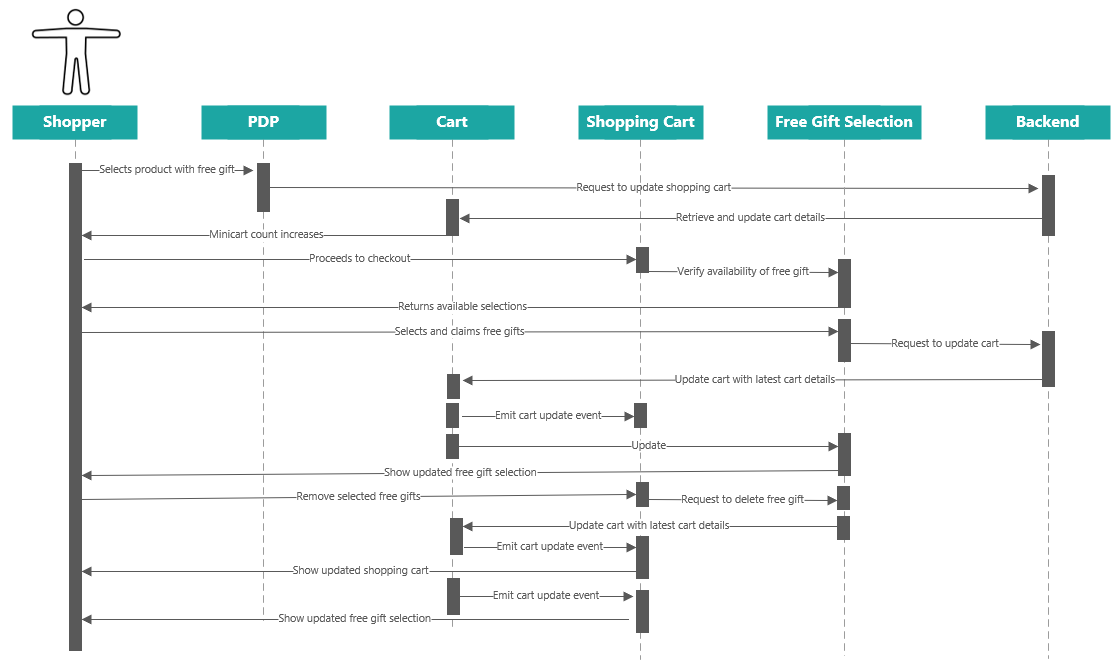
次のシーケンス図は、買い物客が無料ギフトを選択して請求したときに行われる通話の概要を示しています。最新のカートの詳細を取得するために使用されるのは1回の呼び出しのみで、買い物客が変更を加えるたびにFree Gift選択レンダリングが自動的に更新されます。

Free Gift Selection sequence diagram

この記事を改善するための提案がある場合は、 お知らせください!