Add image metadata using AI
AI capabilities in Content Hub need to be enabled and, if necessary, configured by a superuser or a user with the necessary permissions granted to them through user group policies. Most AI capabilities require Sitecore Stream.
AI-assisted metadata enrichment helps you add image tags to your images that are relevant, contextual, and align with the needs of your organization. You can also improve image accessibility by using AI to add image alt text.
The number of suggestions made for a taxonomy is not configurable. Currently, one value is suggested for a single-value taxonomy and up to five values for a multiple value taxonomy. For tags, up to ten values are suggested.
You can also add metadata to multiple images at the same time or enable automatic metadata enrichment whenever an image is uploaded.
To add image metadata and alt text using AI:
-
On the menu bar, click Assets.
-
On the Assets page, select the image asset you want.
-
On the asset details page, in the upper-right corner, click More actions
 and, from the menu, click
  Enrich with AI.
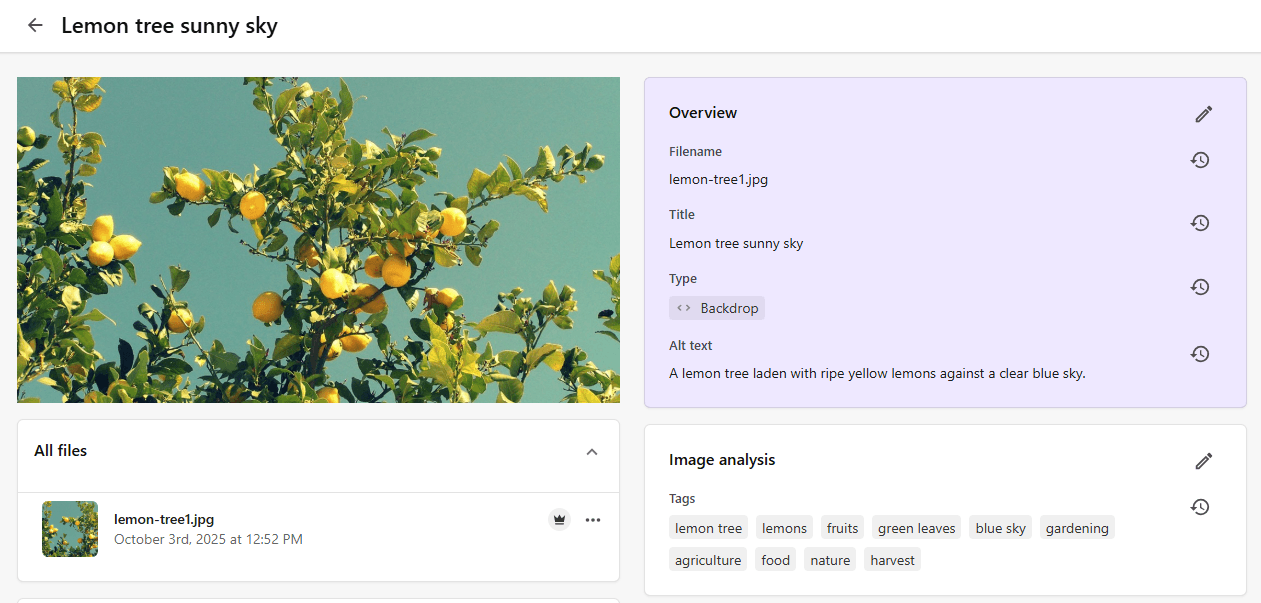
The AI-generated alt text is added to the Overview section of the asset details page while AI-generated tags are added to the Image analysis section.
-
To modify the AI suggestions, in the relevant section, click Edit
 .
. -
When you are happy with the alt text, the image and taxonomy tags, click Save.
Only images and vectors are supported.