Use AI to generate field-level text
AI capabilities in Content Hub need to be enabled and, if necessary, configured by a superuser or a user with the necessary permissions granted to them through user group policies.
To use AI-assisted capabilities, you must have a Stream subscription and, for some features, be a Stream Premium user. Contact your Account Manager for more information.
You can use AI to generate text for Sitecore Content Hub fields, such as the image alt text field. To align the text with your brand and voice, select a brand kit that you have mapped to a Content Hub entity.
AI-assisted field-text generation is only available if you have content generation enabled and only for the SC.Asset.AltText field defined in the data model for the M.Asset definition.
To use AI to generate field-level text:
-
To use the Generate with AI feature, on the Assets page, click an image asset to open its details page.
-
In the Overview section, click Edit
 .
. -
In the Alt text field, click Generate with AI
 .
. -
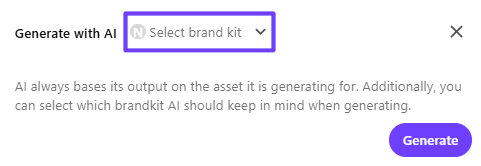
In the Generate with AI dialog, from the Select brand kit drop-down list, click the brand kit you want to use when generating text and then click Generate. If no brand kit is selected, the AI-assisted field level text uses a generic tone and voice.
-
Do any of the following:
-
To generate new alt text, click Retry
 .
. -
To copy the text, click Copy
 .
. -
To discard the proposed alt text, click Discard.
-
To accept the proposed alt text and insert it into the Alt text field, click Accept.
-
-
In the Overview section, click Save.
Only assets with the media type image or vector are supported. To use AI-assisted alt text generation, assets must have a preview rendition.