The Customer Engagement Console (CEC)
Sitecore Discover provides configuration and developer tools in the Customer Engagement Console (CEC) that you can use during implementation. Your catalog can be regularly updated using feed APIs using the definitions for the product and category entities.
When the Discover service receives a request, all entities matching the request are returned. The returned items are structured according to their configured entity, product or category.
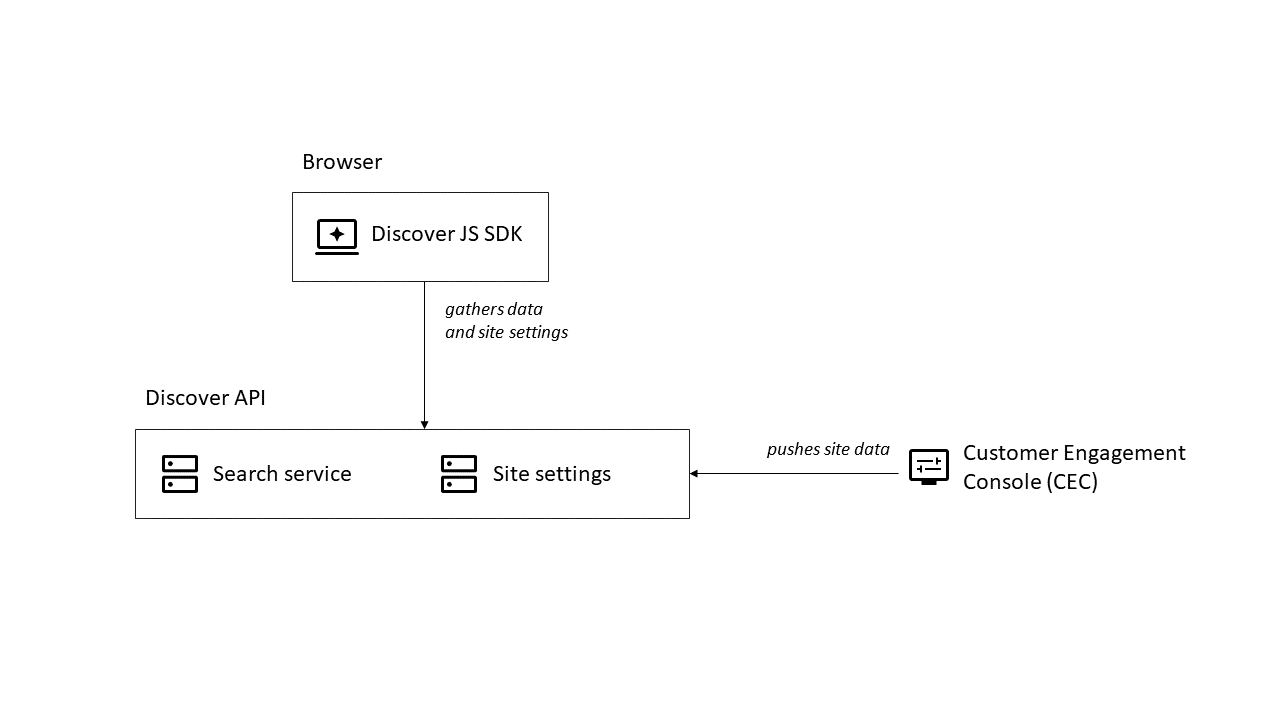
Discover experiences are built with pages and widgets. At runtime requests, the service responds to requests for data from the user interface. From a typical Model View Controller (MVC) perspective, the following describes the role of the CEC at run time:
- The Model is the Discover API response based the configuration in the CEC and context provided in the request.
- The View is made of UI components representing widgets and their host page.
- The Controller is implemented by the query hooks to coordinate communication and manage the state of UI components.
Developer resources
The Developer Resources section of the CEC provides the following tabs for API information or to test queries:
- API access - page that provides important information about accessing the APIs, including API keys, first-party URLs, SFTP credentials, and so on.
- API explorer - tool for learning how to make runtime experience requests and how the responses to those requests are formatted. Also for learning how to interact with the search and recommendation API.
- Event builder - tool for creating and validating events.
- Event monitor - tool for verifying that you have implemented an experience correctly and that it is publishing events to Discover from user interactions on your live website.
- AI monitor - tool for understanding how visitor actions on the site are being interpreted by the AI in Discover.
Pages and widgets
To create or access the configuration of widgets and pages, use the following link.
- Create merchandising experiences with pages and widgets. Pages are containers for widgets and are associated with URLs or URL patterns.
Domain settings
In the Domain settings section of the CEC, using the following tabs, you can modify the data and features of your implementation:
- Attributes - on this tab, you can view, define, and configure attributes for the product or category entities in your implementation.
- Feature configuration - on this tab, you can assign and configure attributes to the various features in your implementation.