- Concepts
Route handling and data fetching in Content SDK apps
In SitecoreAI, each page is represented by a content item in the content tree. The structure of the tree defines the URL structure of the website. Content authors control URLs by organizing items hierarchically. For example:
The above hierarchical structure results in the following URL mappings:
Content SDK apps are expected to fully support SitecoreAI URL mapping.
Site hostnames and URL mapping rules (for example, casing, whitespace handling) are defined in XML configs. Discuss with your Sitecore developers whether customization is needed. Custom routing in SitecoreAI requires coordination between front-end and back-end teams.
It might require you to implement the same custom routing on the Sitecore back end to allow editing of the custom-routed site.
When possible, use hierarchical routes for clarity and consistency—for example, /products/shoes/running instead of a flat structure like /runningshoes.
Changing routes in a Content SDK app involves making a call to a SitecoreAI endpoint with GraphQL to fetch data for the new route. Next.js apps use a file-system-based router and optional catch-all routes.
Route resolution
In a Content SDK Next.js app, routes are handled using the underlying framework’s routing system. For example, Next.js apps use catch-all routes and optionally file-system-based routing. To support Sitecore-driven routes, these apps typically implement a custom route resolver that maps incoming paths to Sitecore content items.
Data Fetching Flow
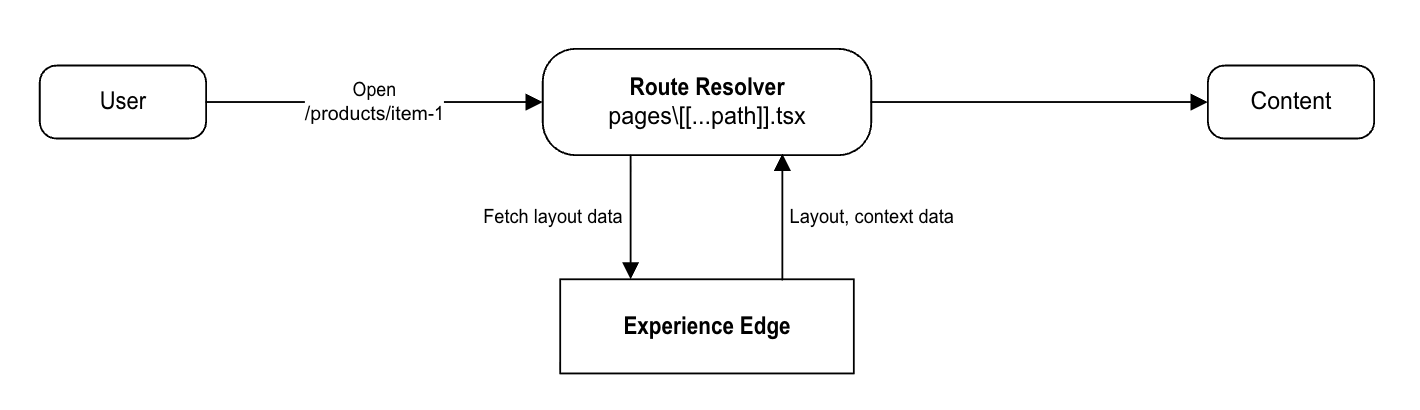
When a route is resolved, data is fetched from the Edge or Preview API using GraphQL via the LayoutService. This includes route-specific data. The following scenario depicts the typical flow when a user navigates to https://site-1-hostname/products/item-1.
- The user navigates to
/products/item-1. - Route resolver converts the path into a Sitecore route (for example,
/products/item-1) - GraphQL query is issued to the GraphQL endpoint
https://edge-platform.sitecorecloud.io/v1/content/api/graphql/v1?sitecoreContextId=${sitecoreEdgeContextId}. - The query retrieves:
- Route layout definition
- Component fields
- Context data (language, site, and so on.)
- The data is passed to the rendering layer (for example, Placeholders and Components in Next.js)
Configure display name based routing
Content SDK versions 1.1 and higher support display name based routing. Display name based routing derives URLs from the display name field of Sitecore items instead of their item name field, providing more flexibility in creating user-friendly and localized URLs.
Generate sitemaps for display name based routes
For generating sitemaps for display name routes you need to use a patch file to customize your Sitecore configuration.
To generate sitemaps for display name based routes:
-
Add a customized localized class to the
linkManagerconfiguration. -
Make sure to set the
useDisplayNameattribute to true in the configuration. -
Use the following sample patch file as a reference:
-
Re-deploy your environment.
-
Open the Content Editor and go to your site in the Content tree.
-
Go to Settings > Sitemap, and under the URL options section, update the Link provider name with the same class name in your custom patch config.
After deploying the patch, sitemaps will only be generated for display name–based routes. Standard item name–based routes will no longer appear in the sitemap.