Interactions dashboard
The Interactions dashboard helps Organization Admins or Organization Owners track user interactions with AI features in Sitecore. It provides insights into usage trends, peak activity periods, and overall interaction across supported products and AI capabilities.
Each organization has a fair use threshold of 50,000 interactions per year. This is not a hard limit—interactions are are still counted after the threshold is reached, but usage is monitored to ensure fairness.
Access the dashboard
To view the Interactions dashboard, you must have one of the following roles:
- Admin app role in Sitecore Stream
- Organization Admin or Organization Owner role in Sitecore Cloud Portal.
To access the dashboard:
- In Sitecore Stream, go to the top-right corner of the navigation bar.
- Click your profile icon
 .
. - Select Interactions dashboard.
Monitor interactions over time
The Interactions over time graph shows a line graph of user interactions over a selected time period.
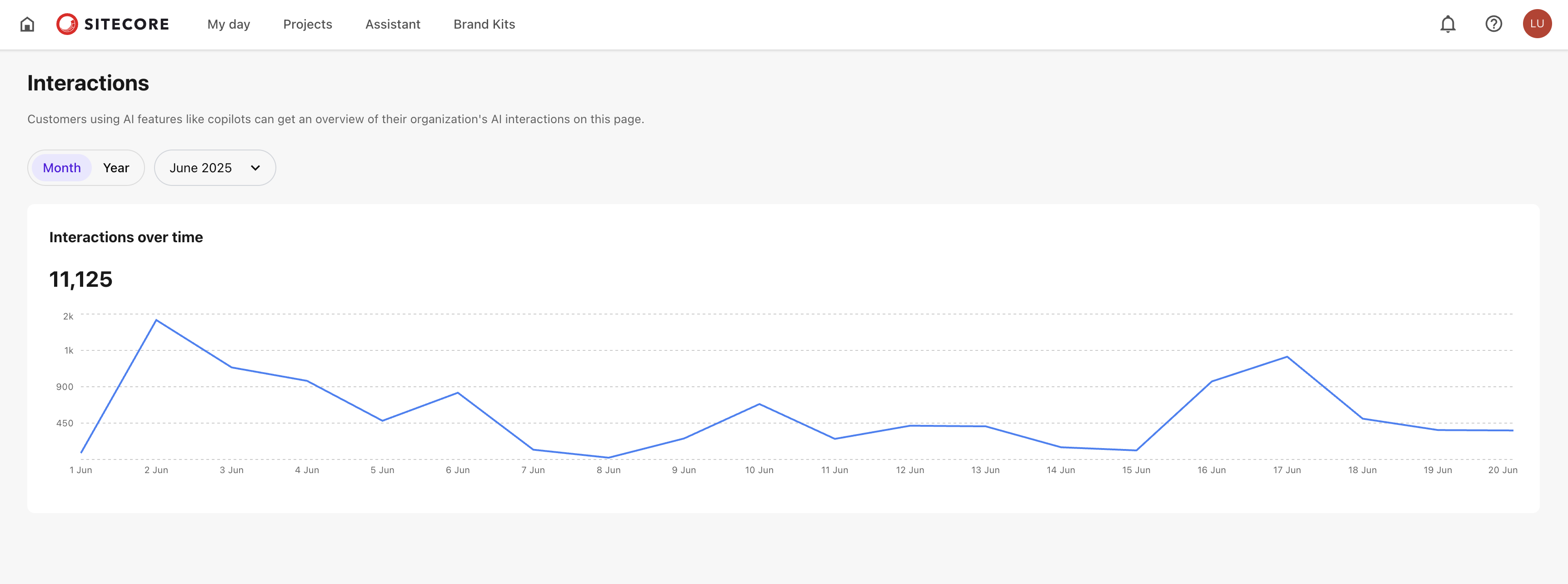
It includes:
- Cumulative usage - for example, if the graph shows 11,125 , it means you've used 11,125 out of your 50,000 available interactions.
- Time-based filters - use filters to select a time frame to view interactions for a specific month or year. The default view is the current month.
- Hover details - hover over any point on the graph to see the total number of interactions for that day.
If you have suggestions for improving this article, let us know!