The pricing domain model
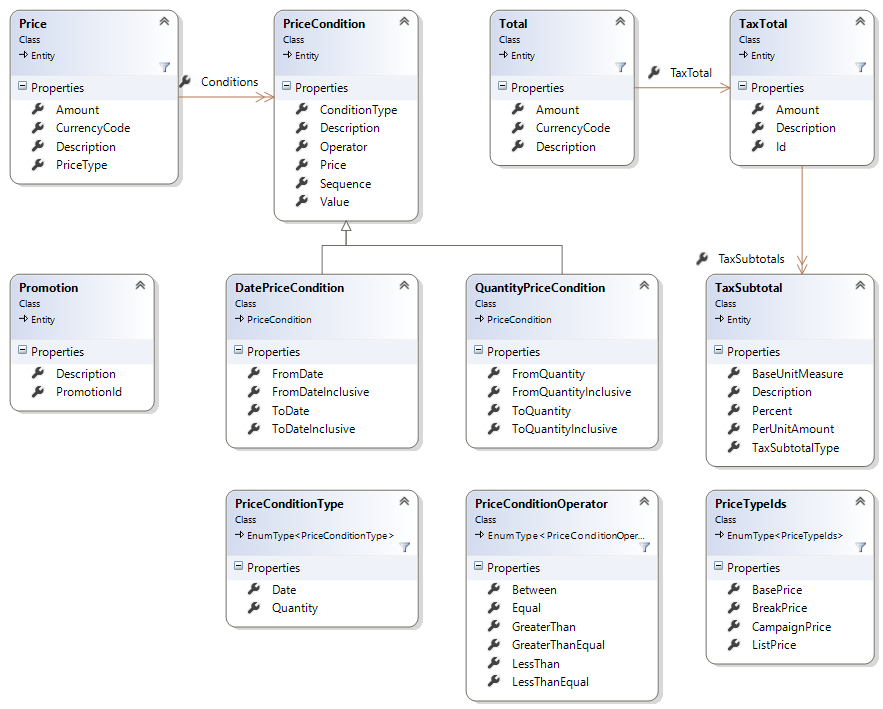
The information passed in the service layer from the Connect framework must be enough to meet the requirements of the external commerce system in order to do its business logic. The Connect framework does not perform business logic and therefore the information passed back from the external commerce system is for informational purposes.
Class: PriceConditionType
The PriceCondition class includes a value of type PriceConditionType and it is either a date or a quantity.
When the PriceConditionType is a date, it is either:
- a single date with an operator (greater than (>) or less than(<))
- a date range such as A - B with the operator in between
When the PriceConditionType is a quantity, it is either:
- a single integer with the operator greater than (>).
- a range such as 5-10 with the operator between.
| Name | Type |
|---|---|
| Date | String |
| Quantity | String |
Class: Price
Price represents the amount that a product costs. The price is used to determine what a customer has to pay for a single product, but the total cost is represented by the Total object, which takes additional information into consideration such as tax, shipping, and so on.
Price is returned by the Pricing service provider as a part of the output from the GetProductPrices method. A product can have multiple prices and multiple prices might be returned from a single call. Therefore, a collection of Price objects is the output from the Pricing service provider when a single product is priced.
| Name | Type | Description |
|---|---|---|
| PriceType | String | Examples are List Price (mandatory) and Customer Price (mandatory). Customer price means the price that the customer will have to pay taking all parameters into account. Other custom PriceTypes might be sale price and break price. There might be several prices for a single product with a given PriceType (for example, break price), which is where the conditions are used to distinguish when the price is applicable. |
| Description | String | Descriptive text about the price. |
| Amount | Float | The price amount. |
| CurrencyCode | String | Currency in which the price amount is given. |
| Conditions | List | Used for break pricing and campaigns, where a specific price is only good when certain conditions are met (for example, the customer has bought at least 5 products or the date is in the year 2013). |
Class: PriceCondition
The PriceCondition class represents a condition that must be met in order for a price to apply. This interface must be extended for each commerce system with the actual ConditionTypes, operators and possible return values depends.
The condition information is used for presentation and triggering engagement and not for calculation, so the value can be an arbitrary string.
| Name | Type | Description |
|---|---|---|
| ConditionType | String | Examples are quantity, date, and total |
| Description | String | Descriptive text about price condition. |
| Operator | String | Examples are greater than, equal to and between |
| Sequence | Int | Represents the order in which the condition is evaluated. For example, one condition might only apply to "shop A" and another condition might only apply to more than 5 items. If the customer is in "shop A" and has more than 5 items, which pricing should be used? This value determines this. Conditions apply in ascending order. |
| Value | String | Break prices (also known as Volume pricing) Break prices depend on the quantity, which is why the ConditionType is Quantity. When the ConditionType is Quantity, the value is typically either:
Or
Campaign prices When the ConditionType is Date the value is typically either:
Or
|
Class: DatePriceCondition
The DatePriceCondition class represents a date-based condition that must be met in order for a price to apply.
| Name | Type | Description |
|---|---|---|
| FromDate | DateTime? | The date at which the price condition begins to apply. If null, the price condition is valid any time before the ToDate. |
| FromDateInclusive | Bool? | Specifies whether the FromDate property is inclusive or exclusive when performing the date comparison. |
| ToDate | DateTime? | The date at which the price condition ends applying. If null, the price condition is valid any time after the FromDate. |
| ToDateInclusive | Bool? | Specifies whether the ToDate property is inclusive or exclusive when performing the date comparison. |
Class: QuantityPriceCondition
The QuantityPriceCondition class represents a quantity-based condition that must be met in order for a price to apply.
| Name | Type | Description |
|---|---|---|
| FromQuantity | Decimal? | The quantity at which the price condition begins to apply. If null, the price condition is valid for any quantity less than ToQuantity. |
| FromQuantityInclusive | Bool? | Specifies whether the FromQuantity is inclusive or exclusive when performing the comparison. |
| ToQuantity | Decimal? | The quantity at which the price condition ends applying. If null, the price condition is valid any quantity greater than FromQuantity. |
| ToQuantityInclusive | Bool? | Specifies whether the ToQuantity is inclusive or exclusive when performing the comparison. |
Class: Total
The Total class represents the total price a customer will have to pay for a product, cart-line or entire cart at a specific point in time including charges, discounts, coupon codes, tax and shipping, and so on.
The Total class is the output from the Pricing service provider when a collection of products is priced as a unit (aka bundling). It provides a total price for the entire collection.
| Name | Type | Description |
|---|---|---|
| Description | String | Descriptive text about the total price a customers pays. |
| Amount | Float | Representing the total amount. |
| CurrencyCode | String | A code referring to the currency. |
| TaxTotal | TaxTotal | A reference to TaxTotal describing the tax and how it is combined from tax subtotals. |
Class: TaxTotal
The TaxTotal class represents the tax that applies to something with a Total. Any object with a Total also has a TaxTotal.
| Name | Type | Description |
|---|---|---|
| Id | String | This value is only available if an external system is used to perform the tax lookup and the external system provides an id (for audit purposes, for example). |
| Amount | Float | Representing the total tax amount. Currency is assumed to be the same as for the Total. |
| TaxSubtotals | List | A list of entries that affect the total tax. |
Class: TaxSubtotal
The TaxSubtotal class represents a specific tax that applies to an object, and the amount of the tax. This level of granularity is required in some countries.
| Name | Type | Description |
|---|---|---|
| TaxSubtotalType | String | Examples are CA state tax, NYC city tax, and special levy 003a. |
| Percent | Float | Percentage per unit, zero if fixed value is used. |
| PerUnitAmount | Float | Fixed value per unit, zero if percentage is used. |
| BaseUnitMeasure | Float | The number of items in a unit for which the fixed value (PerUnitAmount) applies to. Not applicable if percentage is used. |
Class: Promotion
The Promotion class represents a limited time discount or benefit that can be applied to a product.
The promotion information is used for presentation and triggering engagement and not for calculation, so the value can be an arbitrary string.
| Name | Type | Description |
|---|---|---|
| Description | String | A friendly description of the promotion that can be displayed to the end customer. |
| PromotionId | String | The unique ID of the promotion. |