Enable telemetry reporting in production
The Sitecore telemetry reporting feature gathers information that helps Sitecore understand how customers use our products. The environment type (production or non-production) helps us to associate the features used with the appropriate use-cases.
The telemetry system assumes Sitecore Experience Platform is running in a non-production environment by default. When you set up a production environment, you must therefore define a system variable to report the environment type.
To define a system variable:
-
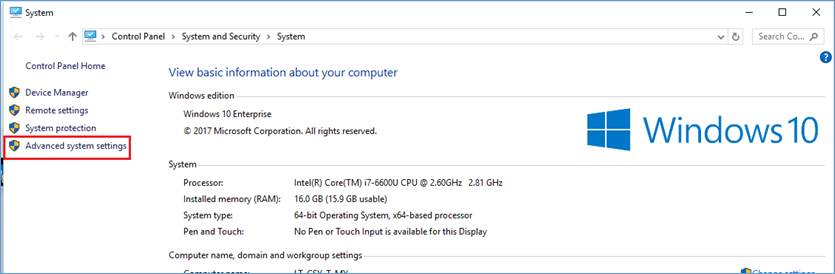
In the Control Panel, click System, Advanced system settings.
-
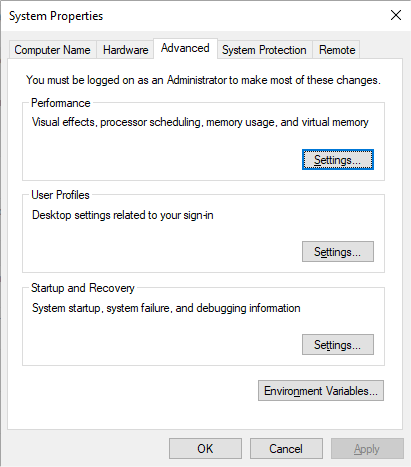
In the System Properties dialog, click Environment Variables.
-
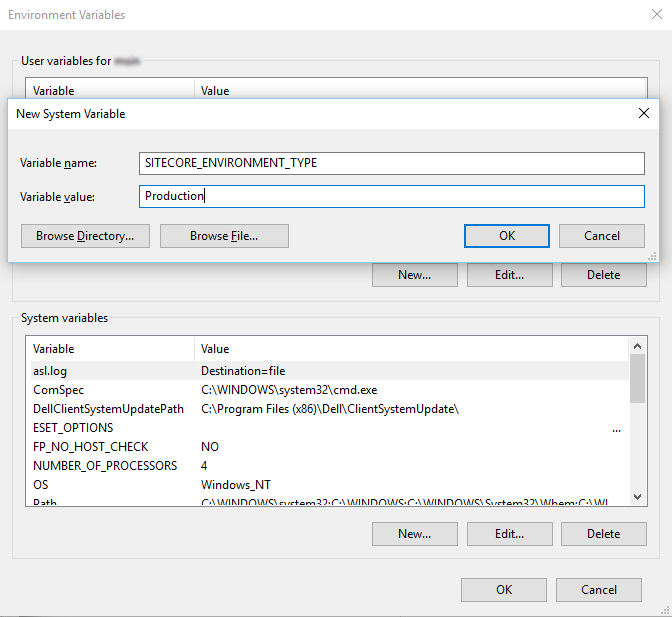
In the Environment Variables dialog, in the System variables section, click New.
-
In the New System Variable dialog, in the Variable name field, enter SITECORE_ENVIRONMENT_TYPE and in the Variable value field, enter Production.
-
Restart the computer.