Add a pipeline step to apply mappings
Version:
The result of the first step in this pipeline is to ensure a target object is available, either by finding an existing item or creating a new one. In the second step, you must use the value mapping set you configured in Add Value Mappings to map values from the source object to the target object.
To add a pipeline step to apply mappings:
-
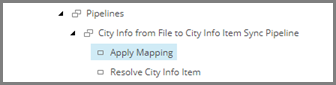
Navigate to the pipeline item City Info from File to City Info Item Sync Pipeline.

-
In the right-hand pane, click Apply Mapping Pipeline Step. Name the new item Apply Mapping. Select the new item.
-
Select the new item.
-
In the right-hand pane, set the following field value:
Field Value Mapping Set Value Mapping Sets/Row from City Information File to City Information Item -
Save the item.
-
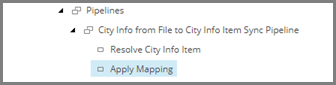
Drag and drop the item to the second position in pipeline.
If you have suggestions for improving this article, let us know!