Sitecore Documentation
  • Learn
  • Downloads
  • Changelog
  • Roadmap
XP
Data Exchange Framework
    • Configure a tenant with the Tenant Service
    • Enable a tenant
    • Filter which entries to synchronize
    • Walkthrough: Implementing a Tenant Service Endpoint
    • Troubleshooting the Tenant Service
    • Walkthrough: Implementing a troubleshooter component
    • Walkthrough: Using code to define data mapping
    • Walkthrough: Creating a custom form save action
    • Troubleshooting Save Action for Experience Forms
    • Walkthrough: Setting up a Marketing Automation action in Data Exchange Framework
    • Troubleshooting Activity for Marketing Automation
  1. Using Data Exchange Framework
  1. Data Exchange Framework
  2. Using Data Exchange Framework
  3. Enable a tenant

Enable a tenant

Version:

In order for a tenant to be active, you must enable it.

To enable a tenant:

  1. In the Content Editor, navigate to your tenant.

  2. On the Content tab, in the Administration section, select the Enabled check box.
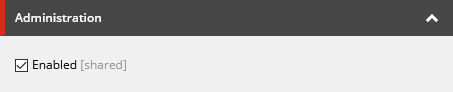
    Administration section with check box enabled checked
  3. Save the item.

If you have suggestions for improving this article, let us know!

© Copyright 2026, Sitecore A/S or a Sitecore affiliated company.
All rights reserved.

Privacy policySitecore Trust CenterTerms of use