Content Management (CM)
The Content Management (CM) role enables authors to create, manage, and publish content.
Supported infrastructure
You can host the CM role on:
Refer to the Sitecore compatibility table for compatible versions.
Reference structure
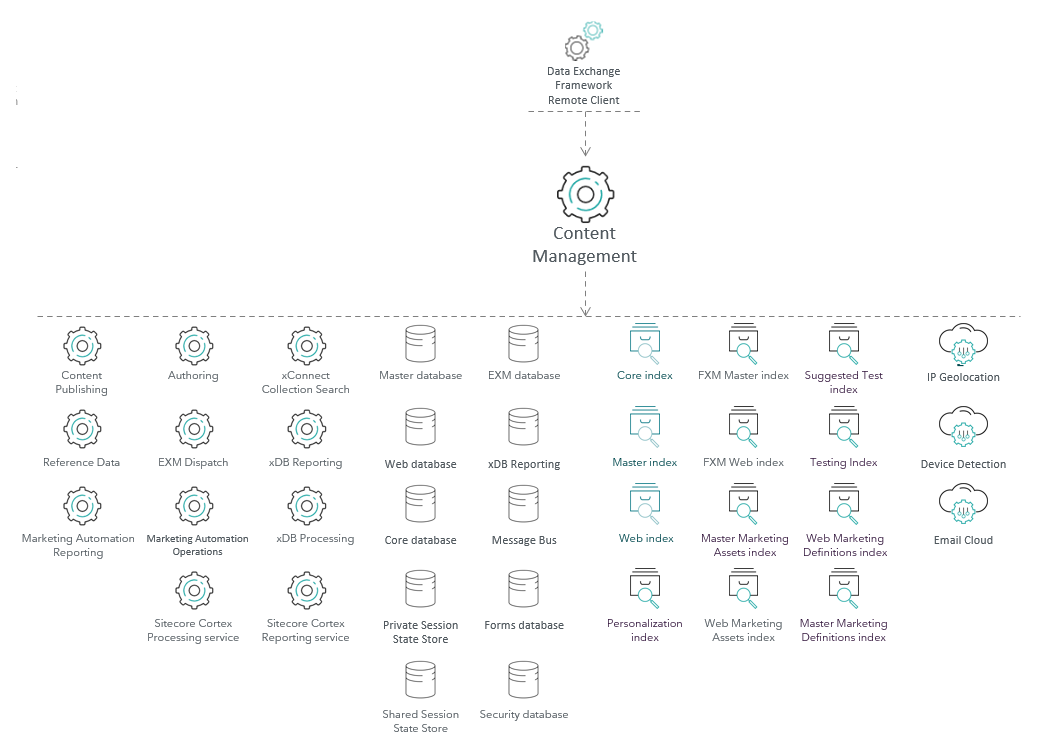
The CM role has its place in the Sitecore reference structure. It can be referenced by other roles, and it can also reference other roles.
Referenced by
The CM role is referenced by the following roles:
References
The CM role references the following roles:
Storage roles
| Role name | Connection string name | Port | Type | Notes |
|---|---|---|---|---|
| Master database | master | 1433 | SQL | |
| Core database | core | 1433 | SQL | |
| Security database | security | 1433 | SQL | |
| Web database | web | 1433 | SQL | |
| xDB Reporting database | reporting | 1433 | SQL | |
| Message Bus | messaging | 1433 | SQL | If you install using SIF, SQL is the default provider. Not applicable to Experience Manager. |
| 443 | Azure Service Bus | If you install Sitecore on Azure, Azure Service Bus is the default provider. | ||
| Forms database | experienceforms | 1433 | SQL | The connection strings for the Forms database and for file storage are the same by default. You can create your own file storage provider with a custom connection string. See Manage file storage for forms and The security roles in Sitecore Form for details. |
| EXM database | exm.master | 1433 | SQL | Not applicable to Experience Manager |
| Private Session State Store | session | 1433 | SQL | Optional, for SQL session state provider |
| 6379 | HTTP | Optional, for Redis session state provider | ||
| Shared Session State Store | sharedsession | 1433 | SQL | Optional, for SQL session state provider |
| 6379 | HTTP | Optional, for Redis session state provider |
On-premise application roles
| Role name | Connection string name | Port | Type |
|---|---|---|---|
| xConnect Collection service | xconnect.collection | 443 | HTTPS |
| xConnect Collection Search service | xconnect.search | 443 | HTTPS |
The following client certificates and keys are required in a secure production environment:
| Role | Connection string name | Type |
|---|---|---|
| xConnect Collection service | xconnect.collection.certificate | Certificate |
| xConnect Collection Search service | xconnect.search.certificate | Certificate |
Azure application roles
On XP1 topologies deployed on Azure, the xConnect Collection Search service has a dedicated connection string. This is to separate the collection requests from the search and indexing requests. The xConnect Collection Search service is hosted under a basic hosting plan which might not have enough resources for collection, search, and indexing requests.
| Role name | Connection string name | Port | Type | Notes |
|---|---|---|---|---|
| xConnect Collection service | xconnect.collection | 443 | HTTPS | Hosted on a resource intensive plan. |
| xConnect Collection Search service | xconnect.search | 443 | HTTPS | Hosted on a basic plan. |
The following client certificates and keys are required in a secure production environment:
| Role | Connection string name | Type | Notes |
|---|---|---|---|
| xConnect Collection service | xconnect.collection.certificate | Certificate | |
| xConnect Collection Search service | xconnect.search.certificate | Certificate |
Application roles for both on-premise and Azure
| Role name | Connection string name | Port | Type | Notes |
|---|---|---|---|---|
| Reference Data service | xdb.referencedata.client | 443 | HTTPS | |
| Marketing Automation Operations service | xdb.marketingautomation.operations.client | 443 | HTTPS | |
| Marketing Automation Reporting service | xdb.marketingautomation.reporting.client | 443 | HTTPS | |
| xDB Processing | N/A - see notes | 443 | HTTPS | The xDB Processing service URL is configured in<content management root>\App_Config\Sitecore\Marketing.xDB\Sitecore.Xdb.Remote.Client.config |
| EXM Dispatch | N/A - see notes | 443 | HTTPS | |
| Content Publishing | N/A - see notes | 80/443 | HTTP/HTTPS | Service url is configured in the<content management root>\App_Config\Modules\PublishingService\Sitecore.Publishing.Service.Config |
| Sitecore Cortex™ Reporting service | sitecore.reporting.client | 443 | HTTPS | |
| Sitecore Cortex Processing Service | cortex.processing.engine | 443 | HTTPS |
If you have a dedicated xDB Processing role, you must include the following API key in the CM connection strings configuration file:
| Role | Connection string name | Type | Notes |
|---|---|---|---|
| xDB Processing | reporting.apikey | Unique string | Required if you use a dedicated xDB Processing role. |
The following client certificates and keys are required in a secure production environment:
| Role | Connection string name | Type | Notes |
|---|---|---|---|
| Reference Data service | xdb.referencedata.client.certificate | Certificate | |
| Marketing Automation Operations service | xdb.marketingautomation.operations.client.certificate | Certificate | |
| Marketing Automation Reporting service | xdb.marketingautomation.reporting.client.certificate | Certificate | |
| Sitecore Cortex™ Reporting service | sitecore.reporting.client.certificate | Certificate | |
| EXM Dispatch | EXM.CryptographicKey | Key | |
| EXM Dispatch | EXM.AuthenticationKey | Key | |
| Sitecore Identity | sitecoreidentity.secret | Key | |
| Sitecore Cortex Processing service | cortex.processing.engine.client.certificate | Certificate |
Search indexes
The Content Search provider determines how the CD role connects to the indexes. Sitecore supports Solr.
| Index | Port, Solr | Type | Notes |
|---|---|---|---|
| Master index | 8983 | HTTPS | |
| Core index | 8983 | HTTPS | |
| Web index | 8983 | HTTPS | |
| FXM Web index | 8983 | HTTPS | Only for XP installations |
| Web Marketing Definitions index | 8983 | HTTPS | Only for XP installations |
| Web Marketing Assets index | 8983 | HTTPS | Only for XP installations |
| FXM Master index | 8983 | HTTPS | Only for XP installations |
| Master Marketing Definitions index | 8983 | HTTPS | Only for XP installations |
| Master Marketing Assets index | 8983 | HTTPS | Only for XP installations |
| Testing index | 8983 | HTTPS | Only for XP installations |
| Suggested Test index | 8983 | HTTPS | Only for XP installations |
| Personalization index | 8983 | HTTPS | Only for XP installations |
For more information, see Configure Solr provider.
Cloud Services
| Role Name | Port | Type | Endpoint URL |
|---|---|---|---|
| IP Geolocation | 443 | HTTPS | geoip-ces.cloud.sitecore.net |
| Device Detection | 443 | HTTPS | devicedetection-ces.cloud.sitecore.net |
| E-mail Cloud | 443 | HTTPS | Multiple endpoints |
For more information, see:
Other
The CM role includes a reference to the Package Management Service via the PackageManagementServiceUrl connection string.
Privacy and security
The CM role handles personal data in the following ways:
- Handles authentication and authorization of content editors and other business users.
- Allows the management of website user accounts and authorization.
- Hosts the business tools for accessing and managing Experience Database contacts and interactions.
- Hosts the Experience Profile which shows Commerce customer and order information.
Refer to the Security Guide for steps to secure the CM role.