The Commerce Control Panel settings for SXA Storefront
The Commerce Control Panel is installed automatically when you install Commerce Connect. It contains Commerce Engine and Storefront settings that you must configure. When you install the SXA Storefront, a number of folders with additional configuration items are added to the Commerce Control Panel.
The Commerce terms installed with SXA Storefront
The Commerce terms installed with SXA Storefront
When you install the SXA Storefront, a Commerce Terms folder is installed in the Storefront Settings folder (/sitecore/Commerce/Commerce Control Panel/Storefront Settings/Commerce Terms). These terms are similar to the terms in the Commerce Terms folder that is installed for the commerce engine (/sitecore/Commerce/Commerce Control Panel/Commerce Engine Settings/Commerce Terms), but the terms in the Storefront Settings folder are specific to your storefronts.
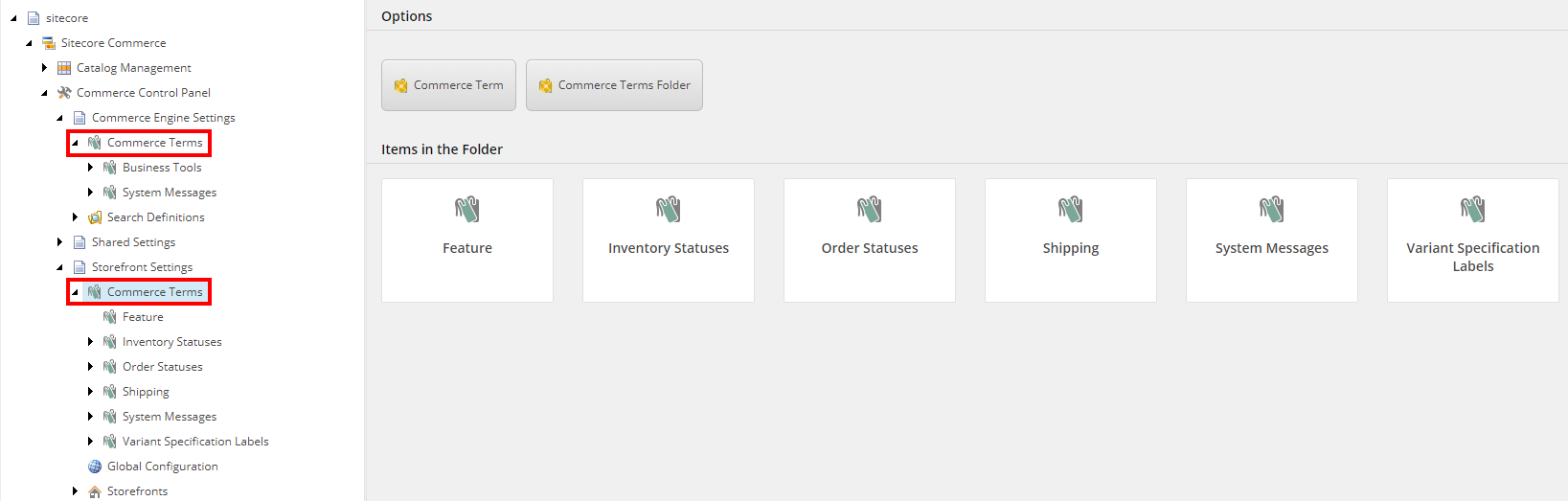
The Commerce Terms folder enables you to assign user-friendly terms to various status options that are used by the commerce system, such as inventory and shipping statuses.
In the Commerce Terms/System Messages folder, you can edit system messages used on the storefront.
The Global Configuration item
The Global Configuration item
When you install SXA storefront, the Global Configuration item is installed in the Storefront Settings folder (/sitecore/Commerce/Commerce Control Panel/Storefront Settings/Global Configuration).
You use the Global Configuration item to provide configuration information that applies to all storefronts.
You use the Catalog Item Encoding fields to manage encoding values for your storefronts. In some cases, data strings imported from the commerce system can introduce errors in Sitecore. For example, a "/" in a category or subcategory name in a URL would cause the Sitecore routing table to read the string as a product rather than a category, because the string appears to contain an extra path segment.
This issue is avoided by replacing the "/" character with other characters when the URL is generated, and then reverting to "/" when searching for the category. The replacement is made based on an encoding rule in the Catalog Item Encoding field. You can add characters to encode to the list. Each time you add a character to the list, a new empty line appears at the bottom of the list.
The URL Token Delimiter field defines the character used as a separator between the catalog item ID and catalog item name. For example, if the system is configured to use Shop URLs, the separator is placed between the category ID and category display name as well as the product id and product display name.
The Encoded Delimiter field contains the encoding rule for the URL token delimiter.
Storefront-specific settings installed with SXA Storefront
Storefront-specific settings installed with SXA Storefront
When you install SXA storefront, four custom configuration items are added to the /sitecore/Commerce/Commerce Control Panel/Storefront Settings/Storefronts/Storefront folder:
|
Setting |
Description |
|---|---|
|
Account Management Configuration |
Determine the maximum number of addresses that can be registered per customer. |
|
Catalog Configuration |
Note From SXA Storefront 1.0.2, the Catalog field and the Start Navigation Category field are deprecated. Use the corresponding fields on the Select the Use Index File for Product Status in Lists field to improve performance when retrieving the product status for lists of products, for example, for the Product List rendering. By default, product statuses are retrieved live from the commerce engine by separate calls. The value in the Default Items Per Page field is used as the default for all categories. To change the setting for a single category, in the The value affects the Product List rendering, and the Product List Header rendering, which allows the customer to select the number of products to show on a category or search result page. In the Gift Card Product ID field, enter the product ID that the commerce system uses for gift cards. The Gift Card Page Link field contains the URL for the gift card product page. In the Shop Pages Root Paths section, the Shop Page Root Path, Category Page Root Path and Product Page Root Path fields must be set to the relative path for the items used when generating links for category and product navigation. Renderings in the Commerce Catalog group that generate links will use the value of the Shop Page Root Path field to generate the URLs. The Metadata meta rendering uses the values configured in the Category Page Root Path and Product Page Root Path fields to generate a canonical URL in the head section of each page that contains the rendering. Canonical URLs are used by search engines to improve indexing of categories and products. |
|
Storefront Configuration |
Enforce SSL is enabled by default to ensure a private and secure connection between the client browser and the storefront. It is not recommended to disable this feature except during development and testing of the solution. |
|
Email Configuration |
In the From Email Address field, enter the email address to use as the sender address for email messages sent by the storefront. The Email Address Validation Regex contains the regular expression used to validate email addresses, for example, for the Login, Registration, and Checkout Billing renderings. |