
オーバーライドカタログテンプレートの設定
このページの翻訳はAIによって自動的に行われました。可能な限り正確な翻訳を心掛けていますが、原文と異なる表現や解釈が含まれる場合があります。正確で公式な情報については、必ず英語の原文をご参照ください。
デフォルトでは、カタログアイテムはグローバルコマーステンプレートに基づいています。つまり、マルチサイト構成では、すべてのストアフロントサイトが同じプレゼンテーションおよびカスタムフィールドを持つことを意味します。各サイトに独自のプレゼンテーションおよび カスタムフィールドを持たせたい場合は、各カタログでオーバーライドテンプレートを定義し、ページタイプテンプレートが他の基本テンプレートから継承するコンテナとなり、テンプレートからページへのデザインマッピングが決定されます。これはページをレンダリングするために必要なデータ構造とデータ継承を定義するテンプレートです。これは以下の図で示されています。
!注このトピックはストアフロントサイトテンプレートを参照していますが、SXA StorefrontやストアフロントサイトテンプレートなしでSitecore Commerceを使用する場合も内容が適用されます。
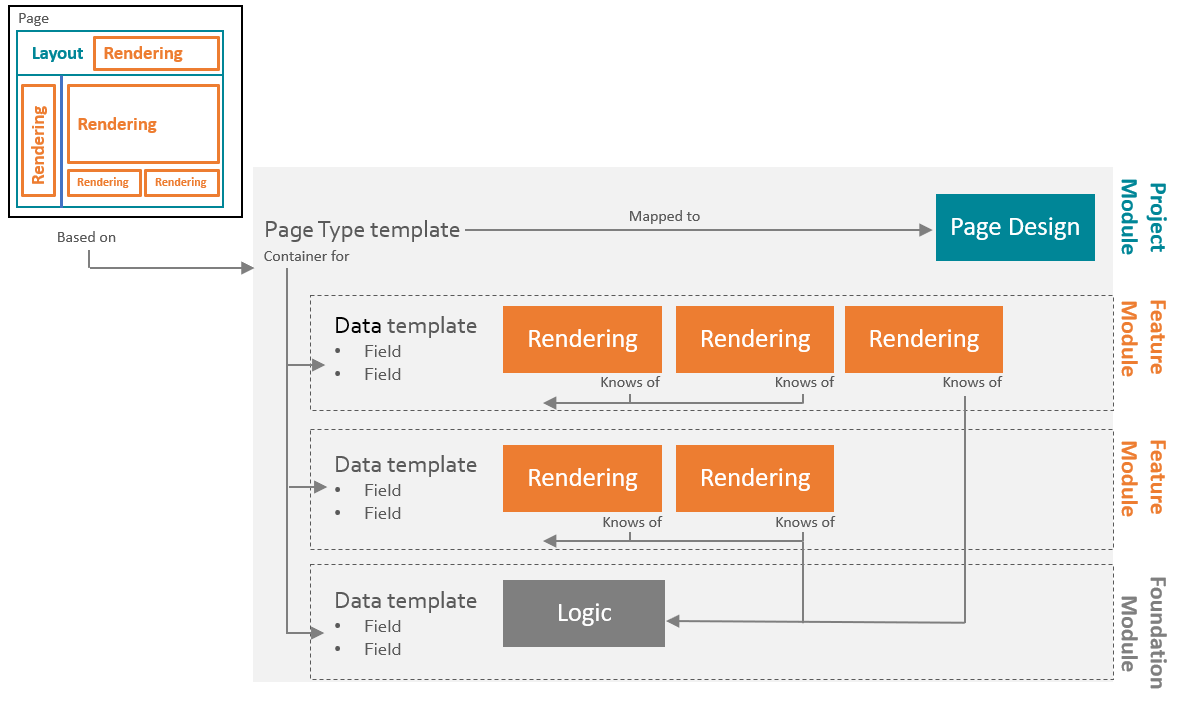
以下のオーバーライドテンプレートは、ストアフロントサイトテンプレートにデフォルトで提供されています。
!注_SearchableWithoutRelatedItemsテンプレートはカスタムインデックスを使用している場合や、Sitecoreコンテンツクローラーがカタログコンテンツをクロールするように設定されている場合のみ必要です。この場合、カタログコンテンツのインデックス作成にかかる時間を短縮するために、テンプレートを含めることが重要です。
オーバーライドテンプレート
ベーステンプレート
カテゴリテンプレート
- /sitecore/Templates/Project//Catalog Navigation Page
- /sitecore/テンプレート/Foundation/Commerce Experience Accelerator/Commerce Pages/カタログカテゴリページ
- /sitecore/Templates/Commerce/Catalog/Commerce Category
- /sitecore/テンプレート/Foundation/Experience Accelerator/Search/Computed Fields/_SearchableWithoutRelatedItems
製品テンプレート
- /sitecore/Templates/Project//Catalog Navigation Page
- /sitecore/テンプレート/Foundation/Commerce Experience Accelerator/Commerce ページ/カタログ製品ページ
- /sitecore/Templates/Commerce/Catalog/Commerce Product
- /sitecore/テンプレート/Foundation/Experience Accelerator/Search/Computed Fields/_SearchableWithoutRelatedItems
製品バリアントテンプレート
- /sitecore/Templates/Project//Catalog Navigation Page
- /sitecore/テンプレート/Foundation/Commerce Experience Accelerator/Commerce ページ/カタログ製品ページ
- /sitecore/Templates/Commerce/Catalog/Commerce Product Variant
- /sitecore/テンプレート/Foundation/Experience Accelerator/Search/Computed Fields/_SearchableWithoutRelatedItems
静的バンドルテンプレート
- /sitecore/Templates/Project/Sitecore/Catalog Navigation Page
- /sitecore/テンプレート/Foundation/Commerce Experience Accelerator/Commerce ページ/カタログ製品ページ
- /sitecore/Templates/Commerce/Catalog/Commerce Bundle
- /sitecore/テンプレート/Foundation/Experience Accelerator/Search/Computed Fields/_SearchableWithoutRelatedItems
動的バンドルテンプレート
- /sitecore/Templates/Project/Sitecore/Catalog Navigation Page
- /sitecore/テンプレート/Foundation/Commerce Experience Accelerator/Commerce ページ/カタログ製品ページ
- /sitecore/Templates/Commerce/Catalog/Commerce Dynamic Bundle
- /sitecore/テンプレート/Foundation/Experience Accelerator/Search/Computed Fields/_SearchableWithoutRelatedItems
データ提供者が使用するテンプレートを上書きするには:
- コンテンツエディターで /sitecore/Content///Home/Catalogsへ行ってください。
- カタログを選択してください。
- コンテンツタブのテンプレートオーバーライドセクションで、各テンプレートタイプごとにフィールドをクリックし、*Templates/Project/*フォルダ内のプロジェクトテンプレートにオーバーライドテンプレートをマッピングします。
- 変更を有効にするには、リボンの 「Commerce 」タブで「 Commerce Cache」をクリックしてください。
オーバーライドテンプレートを定義した後は、カタログ表示の設定を行わなければなりません。ダイレクトナビゲーションを設定する場合は、ストアフロントサイトで 有効化 する必要があります。