- Developer guides
Implement wildcard routing
Wildcard routing is intended for scenarios where you need to support large numbers of dynamic URLs without creating a Sitecore item for each one, while keeping routing, layout resolution, and editor workflows fully managed by Sitecore.
This topic explains how wildcard routing works in Content SDK apps and is applicable to both Pages Router and App Router apps built using the Content SDK. It focuses specifically on how wildcard routing works and how Sitecore resolves wildcard items to support deeply nested, dynamic URLs.
Wildcard items
Wildcard items allow a single Sitecore item, named *, to handle multiple URL paths under the same branch of the content tree. When a request matches a wildcard path, Sitecore resolves the request to the match the wildcard item while preserving the original URL path.
For example, a wildcard item under /blogs can handle requests such as /blogs/my-first-post or /blogs/tech/ai/sitecore-wildcards. Although all requests resolve to the same Sitecore item, the requested path continues to represent the full URL entered by the visitor. This mechanism reduces content tree complexity while still allowing flexible, deeply nested URL structures.
Architecture
Wildcard routing in SitecoreAI is implemented by combining Sitecore wildcard items with a single catch-all route in the Content SDK. The Content SDK is responsible for resolving the incoming URL to the appropriate Sitecore item and layout, including wildcard items.
All Sitecore-driven routes are handled by a single [[...path]] route per template. When a request is received, the Content SDK uses the full resolved path to determine which Sitecore item should be rendered. If the path matches a wildcard item, Sitecore returns that item and its associated layout. This approach ensures that routing behavior remains consistent across server-side rendering, Experience Editor, preview, analytics, and personalization.
Wildcard routing flow
The following diagram shows how a request to a wildcard URL is resolved using SitecoreAI and the the Content SDK:
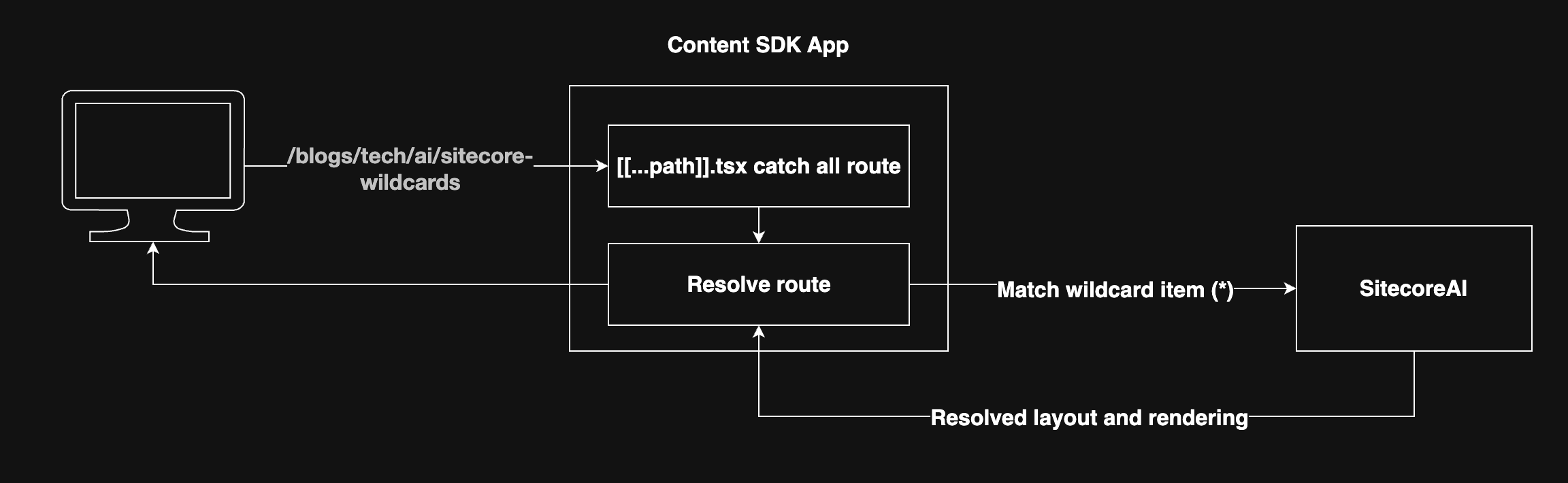
In this flow, the Content SDK app receives the full URL path from the user and uses the catch all route to resolve it. Then, the resolved path is matched with the wildcard item in SitecoreAI. Finally, the resolved layout and renderings are returned to the Content SDK app from Sitecore.
Catch-all route
The Content SDK uses a single dynamic route to handle all Sitecore-managed pages.
For Pages Router apps, it is at:
src/pages/[[...path]].tsx
For App Router apps, it is at:
src/app/[site]/[locale]/[[...path]]/page.tsx
This route acts as the entry point for standard Sitecore pages as well as wildcard pages and arbitrarily deep URL paths. The route parameters (site, locale, and path) are passed to the Content SDK, which resolves the correct Sitecore item and layout.
By using a single catch-all route, no additional route files are required as new wildcard URLs are introduced. This keeps routing logic centralized and predictable.
Configure wildcard items in Sitecore
To enable wildcard routing in Sitecore:
- Create an item named
*under the appropriate parent in the content tree, such as/blogs. - Assign a template that supports the required renderings.
- Configure presentation details in the same way as a standard page item.
When requests match paths beneath the wildcard item, Sitecore resolves them to that item automatically. No additional Sitecore items are required as new URLs are added.
Wildcard routing should be used selectively and is best suited to large collections of pages where creating individual Sitecore items would be impractical. Centralizing routing through a single catch-all route simplifies maintenance and ensures consistent behavior across all Sitecore rendering modes.
Using wildcard items with the Content SDK provides a scalable and editor-friendly way to handle dynamic URLs in SitecoreAI. By combining Sitecore’s wildcard resolution with a single catch-all route, you can support deeply nested paths while keeping routing and layout management fully within Sitecore.