- Developer guides
Getting started with Next.js App Router using Content SDK
Content SDK 1.2.0 introduces beta support for Next.JS App Router. As opposed to Pages Router employed by JSS and Content SDK Next.JS applications by default until now, App Router adds support for latest React features such as React Server Components (or RSC) and Server Functions. It marks a paradigm shift, adding more options and flexibility in how developers can build their Content SDK apps.
Beta support for App Router was introduced as part of Content SDK 1.2.0.
It became generally available (GA) in Content SDK 1.3.1.
Benefits of adopting App Router
Next.JS App Router introduces a clear separation of concerns between server and client components. In practice, this introduces the following benefits:
- Developers can fine tune and better optimize the performance of their applications.
- Better control over the behavior and SEO of the site.
- More flexibilty to control client bundle size.
- Improved security of the app.
The move to App Router also opens doors for more advanced Next.JS features, to be added later, such as Partial Prerenderings (PPR) and Cache Components, enabling faster SitecoreAI personalization. See the NextJS documentation for considerations on using server and client components.
Content SDK App Router app
You can create a new template App Router app with the following CLI command:
Compared to Pages Router, the App Router sample introduces the following key changes:
-
A new file structure.
-
Some built-in components (for example,
Form) are explicitly marked with'use client';. -
Separate client and server implementations for the Placeholder component.
Now called
AppPlaceholder, it is instrumental in allowing flexible page composition with both server and client components.AppPlaceholderdynamically chooses the correct server/client logic to apply based on current context for extra convenience. Read Use AppPlaceholder in Next.js App Router for more information. -
Updated logic for FEAAS and BYOC components, with dedicated server/client separation in their implementations.
-
Support for separate server and client component maps, which allows developers to fine tune the app and bundle sizes.
-
Updated internationalization logic using the
[next-intl](https://next-intl.dev/docs/getting-started)package.
The new app structure
The earlier Pages Router Content SDK app structure had several main points of interest like the pages/[[..path]].tsx, pages/api folder, and 404, 500 error pages.
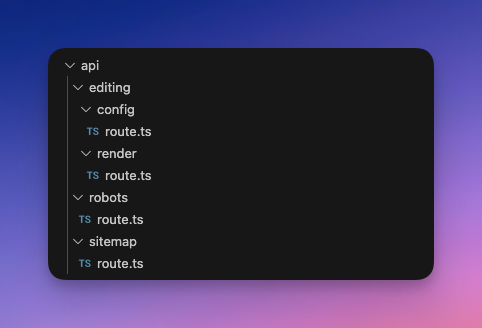
The new App Router template app follows the updated Next.js project structure and introduces a new catch all route along with a new error handling structure and an adjusted api folder.
Old structure | New structure |
|---|---|
 |  |
Each route file now exports separate handlers for GET, POST and OPTIONS API requests and uses updated request types. See the Next.js documentation for detailed information about the logic behind App Router API routes.
Next steps
You can migrate your existing Content SDK 1.2 Pages Router app to use App Router by following the migration guide. Sample implementations of App Router are also available in the XM Cloud starter JS repository.
Some code examples, images, and UI labels may still use XM Cloud while engineering assets are being updated.