- Developer guides
Understanding code extraction in the Design studio
Code extraction is the first prerequisite to enable the Design studio's code generation feature. With code extraction, component definitions and metadata are retrieved from your Content SDK app’s codebase and sent to SitecoreAI. It ensures that the Design studio has the necessary details to provide accurate and context-aware code suggestions when using the AI-powered code generation in SitecoreAI.
Code extraction is only available in Content SDK versions 1.1.0 or later. If you're using the JavaScript Services (JSS) SDK, see how you can migrate to Content SDK.
If you're on Content SDK 1.0, see the upgrade guide to upgrade to this version.
Code extraction flow
When enabled, code extraction takes place during the deployment of your Content SDK application. Ensure you have the right SDK version to use this feature. The following list describes the flow of extraction:
-
When deployment starts, the system checks if consent has been granted for extracting code.
-
If consent is available, an access token request is made to Sitecore's authentication endpoint. If you've opted out of code generation, no code extraction takes place.
ImportantCode extraction is enabled by default. If you want to opt out of it, in
sitecore.config.ts, add the following parameter inside thedefineConfig({...})block: -
The components to be sent for extraction are identified and read from the Content SDK app's
.sitecore/component-map.tsfile. -
The access token is used to authenticate with Sitecore's Mesh endpoint.
-
The extracted code is sent along with the application's
package.jsonfile.
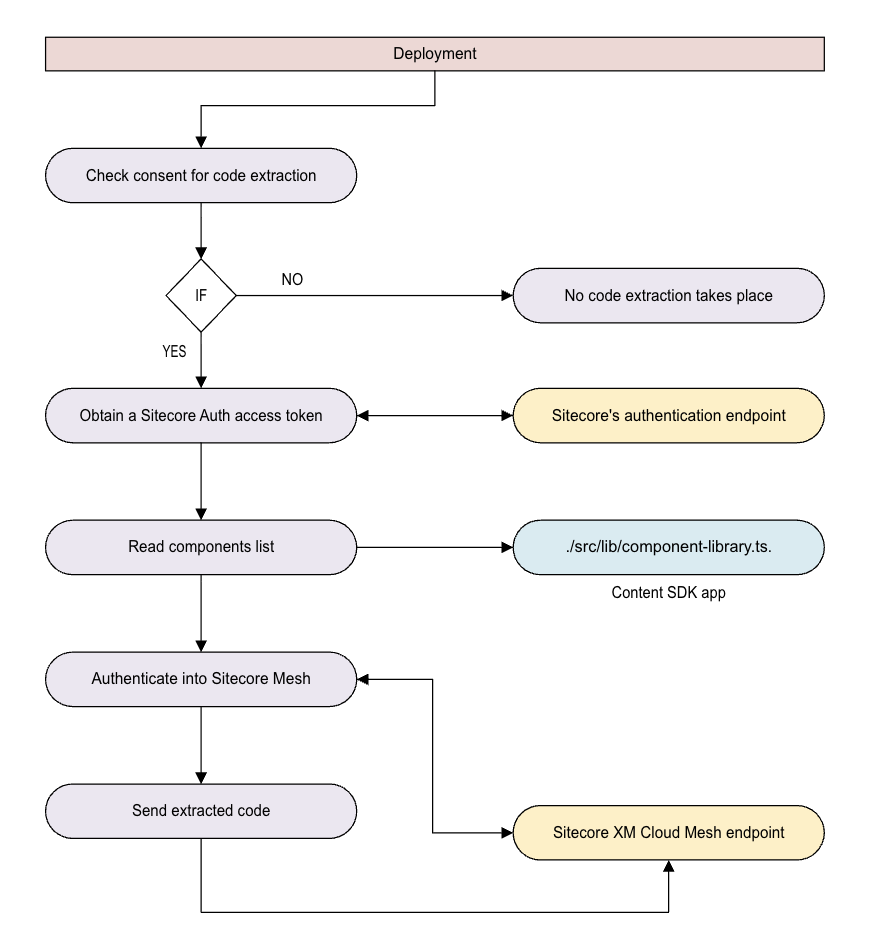
Some code examples, images, and UI labels may still use XM Cloud while engineering assets are being updated.
With code extraction, you enable the Design studio's AI-powered code generation, ensuring your components are always contextually accurate and ready for seamless integration.
Required environment variables for code extraction
For SitecoreAI editing hosts, the required environment variables for code extraction are automatically populated. No manual action is required unless you wish to override the defaults. To enable code extraction for external hosts, you must configure two environment variables that allow your application to authenticate with SitecoreAI:
SITECORE_AUTH_CLIENT_ID- Client ID for your SitecoreAI environment.SITECORE_AUTH_CLIENT_SECRET- Client secret for your SitecoreAI environment.
You must manually add these environment variables during your deployment setup for external hosts. You can obtain these values by creating an external editing host client in the SitecoreAI Deploy app. If these variables are not set, code extraction fails with an authentication error.