Decision table rules
In component personalization, each row in a component’s decision table is a rule that uses your selected inputs to determine whether a visitor matches.
For each input in a rule, you define:
-
Comparator - the operator used to evaluate an input, such as Is equal to or Is in. Available comparators depend on the selected input.
-
Value - the specific value the input is compared against, such as a country, device type, or condition result.
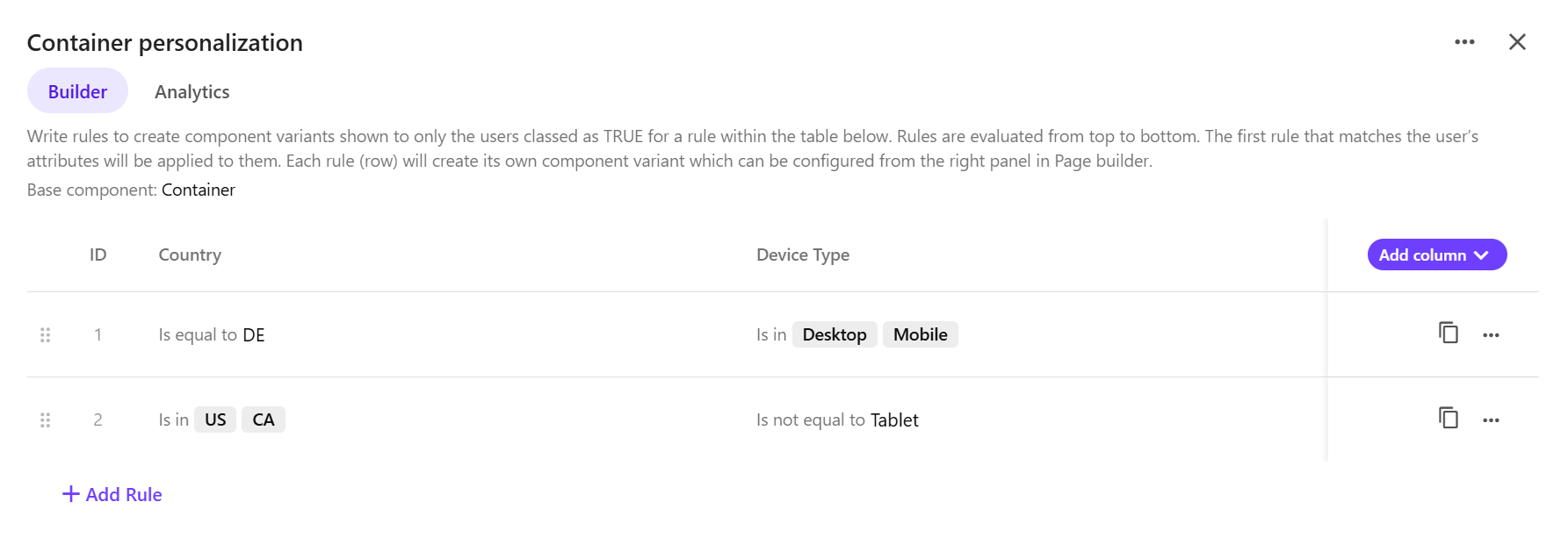
For example, if you use Country and Device type as inputs, your rules might look like this:
-
Rule 1
-
Country is equal to
DE -
Device type is in
Desktop,Mobile
-
-
Rule 2
-
Country is in
US,CA -
Device type is not equal to
Tablet.
-
Each rule appears as a separate row in the decision table and creates a corresponding component variant that you can customize in Page builder.
When personalization is live and a visitor loads the page:
-
Rules are evaluated from top to bottom.
-
The first matching rule is applied.
-
The corresponding component variant is displayed.
-
If no rules match, the original component is displayed.
Because only the first matching rule is applied, place more specific rules above more general ones.
Available decision table comparators
The following comparators are available for use when configuring personalization rules in decision tables:
|
Comparator |
Description |
Example use case |
|---|---|---|
|
Contains |
Value includes the specified text. |
Email contains |
|
Does not contain |
Value excludes the specified text. |
Referrer does not contain |
|
Does not end with |
Value does not end with the specified text. |
Email does not end with |
|
Does not start with |
Value does not start with the specified text. |
Referrer does not start with |
|
Ends with |
Value ends with the specified text. |
Email ends with |
|
Greater than |
Value is greater than the specified number. |
Number of page views is greater than |
|
Is after |
Date value occurs after the specified date. |
Date of birth is after |
|
Is before |
Date value occurs before the specified date. |
Date of birth is before |
|
Is between |
Date value falls within the specified range. |
Date of birth is between |
|
Is empty |
Value is empty. |
Email is empty |
|
Is false |
Boolean value is |
Guest birthday is |
|
Is equal to |
Value exactly matches a single value. |
City equals |
|
Is in |
Value matches any value in a list. |
Device type is in |
|
Is in the next |
Date value falls within the next number of days, weeks, months, or years. |
Date of birth is in the next |
|
Is in the past |
Date value falls within the previous number of days, weeks, months, or years. |
Date of birth is in the past |
|
Is in the year |
Date value falls within the specified year. |
Date of birth is in the year |
|
Is not equal to |
Value does not match the specified value. |
Country is not equal to |
|
Is not in |
Value does not match any value in a list. |
Country is not in |
|
Is not in between |
Date value falls outside the specified range. |
Date of birth is not in between |
|
Is not in the next |
Date value does not fall within the next number of days, weeks, months, or years. |
Date of birth is not in the next |
|
Is not in the past |
Date value does not fall within the next number of days, weeks, months, or years. |
Date of birth is not in the past |
|
Is not in the year |
Date value does not fall within the specified year. |
Date of birth is not in the year |
|
Is not null |
Value exists and is not null. |
Email is not |
|
Is not on the day |
Date value does not occur on the specified day. |
Date of birth is not on |
|
Is now minus |
Date value is before the current date by the specified number of days, weeks, months, or years. |
Date of birth is now minus |
|
Is now plus |
Date value is after the current date by the specified number of days, weeks, months, or years. |
Date of birth is now plus |
|
Is null |
Value is null. |
Email is |
|
Is on the day |
Date value occurs on the specified day. |
Date of birth is on |
|
Is true |
Boolean value is |
Guest birthday is true |
|
Starts with |
Value starts with the specified text. |
Referrer starts with |