Azure Bastion for PaaS 2.0
Azure Bastion is a fully managed service that is provisioned in the PaaS 2.0 Hub environment to securely connect virtual machines via a private IP address. It provides secure and seamless Remote Desktop Protocol (RDP) and Secure Shell Protocol (SSH) connectivity to virtual machines, without exposing public IP addresses, and does not require an agent or special client software.
Architecture
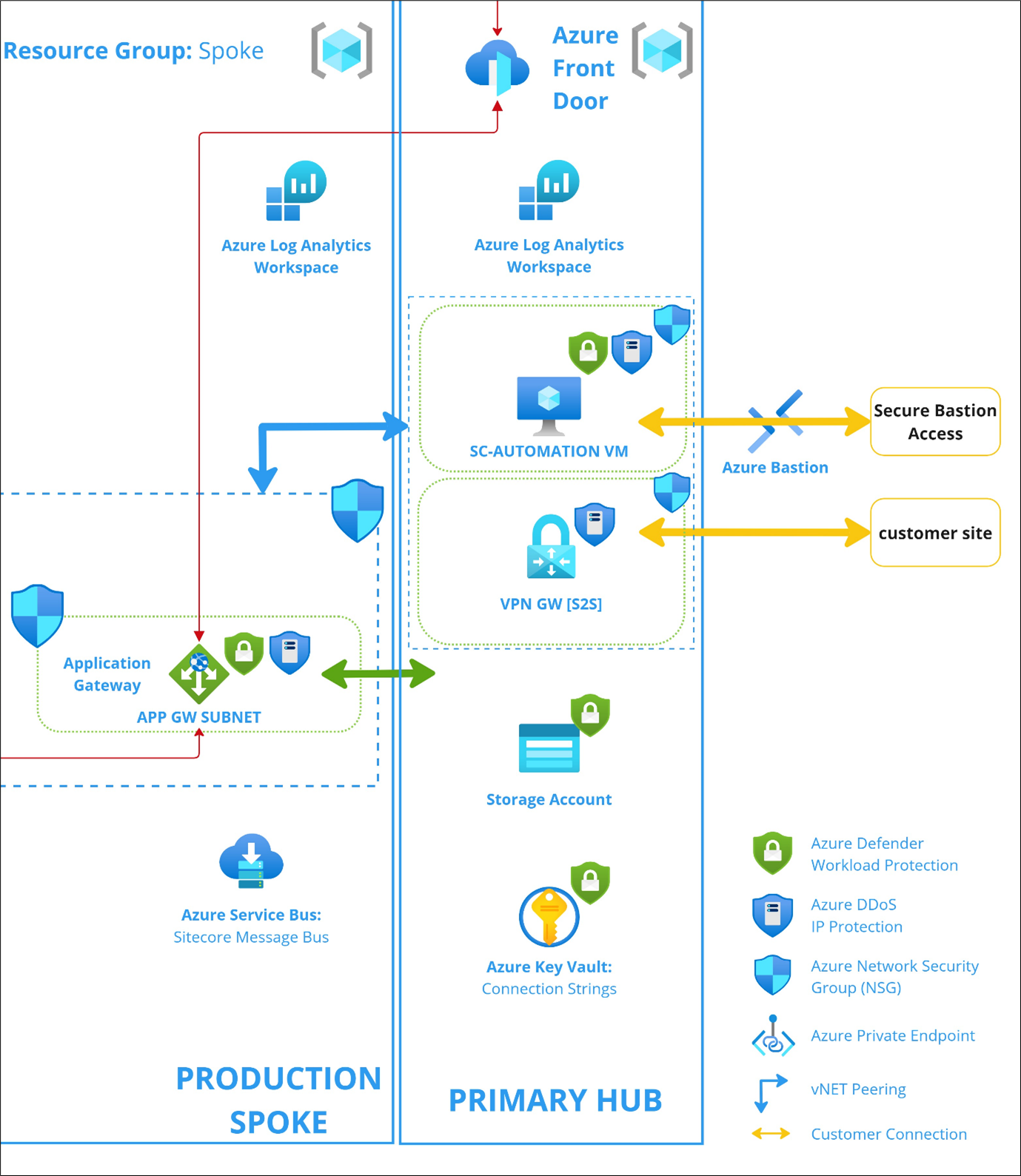
The following diagram illustrates how Azure Bastion is hosted in PaaS 2.0 to connect to the virtual machine in the Hub environment.
Security enhancements
These security enhancements apply to the Azure virtual machine resources used for the Azure Bastion entry point in PaaS 2.0. They are included in the initial provisioning of the Hub environment, except for Windows Defender Exploit Guard and File Integrity Monitoring, which can be enabled upon request.
-
Enable Azure guest configuration extension - the guest configuration extension allows the auditing of configuration settings in a virtual machine. This feature enhances Sitecore monitoring capabilities of the virtual machines that are used through the Bastion service to access the environment’s resources via the Hub virtual network.
-
Enable Azure Disk Encryption for Windows VMs - the configuration provides encryption for the OS and data disks of the virtual machine. This feature enhances the security of virtual machines for Bastion and reduces data exfiltration risks for the customer.
-
Enable the Azure Update Manager - this configuration enables a scheduled automated patching process on Bastion’s virtual machine, which occurs every Wednesday at 12:00 a.m. local time (based on the virtual machine's location), with the option NeverReboot enabled. Governance and maintenance are provided as a unified service for all the existing virtual machines via the Azure Update Manager dashboard. More details can be found here.
-
Enable the Installation of Endpoint Protection on virtual machines - this configuration is to strengthen the overall security posture of virtual machines by protecting critical access points from virus, spyware and other malicious software. This will help detect threats early, ensure compliance, and reduce the risk of security breaches. Microsoft Antimalware is added as an extension to the virtual machine to provide real-time protection. More details about Microsoft Antimalware can be found here.
-
Enable Windows Defender Exploit Guard on virtual machines - this configuration is to strengthen the security posture of virtual machines, by reducing the risk of attacks and vulnerabilities. Windows Defender Exploit Guard is a set of security features designed to protect against various type of threats, including malware, ransomware, exploit techniques, and network-based attacks. More details about this configuration can be found here.
ImportantWindows Defender Exploit Guard is not enabled by default during initial provisioning. If you want to enable it, contact the Sitecore support team.
-
Enable File Integrity Monitoring on virtual machines - this configuration is to monitor and track changes to critical system and application files, directories, and configurations for unauthorized or malicious changes that might indicate a potential security breach or compromise. More details about this configuration can be found here.
ImportantFile Integrity Monitoring is not enabled by default during initial provisioning. If you want to enable it, contact the Sitecore support team.