Enable FIPS
The XP service roles, including xConnect, do not support this feature.
If you enable the Use FIPS compliant algorithms for encryption, hashing, and signing security policy option in Windows, you must enable the correct cryptographic classes for Sitecore.
This topic describes how to:
Enable Sitecore FIPS support
Enable Sitecore FIPS support
To enable the Sitecore FIPS support:
-
Go to the
/Website/binfolder of your Sitecore instance. -
Right-click the
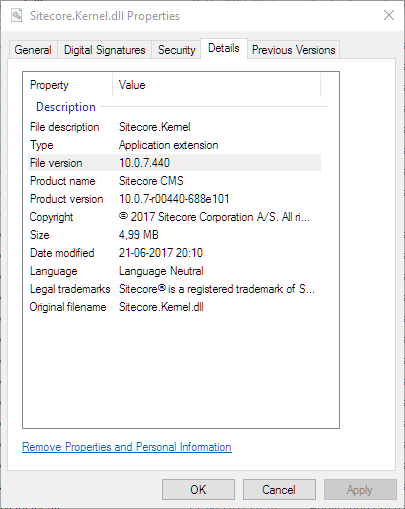
Sitecore.Kernel.dllfile and then click Properties. -
On the Details tab, note the value of the File version property:
-
Open the
machine.configfile. This file is in different folders on 32- and on 64-bit systems:-
On a 32-bit system, it is in the
%windir%\Microsoft.NET\Framework\<DotNetVersion>\Config\machine.configfolder. -
On a 64-bit system, it is in the
%windir%\Microsoft.NET\Framework64\<DotNetVersion>\Config\machine.configfolder.
-
-
Add the following node to the file:
Use the file version value you noted in step 3 as the value of
Sitecore.Kernel.Version(marked as XX.X.X.XXXX). -
Optionally, reset the Internet Information services.
Add encryption for FIPS in a WebApp
Add encryption for FIPS in a WebApp
You cannot reliably adjust a WebApp at the machine level within the WebApp itself. However, if you want to scale up, or have a CD server in another location, you can use the following example to enable the same standard keys, as they all require the same encryption.