Enable IP whitelisting
For Managed Cloud Containers, there are two Azure Web Application Firewall (WAF) policies that are associated with the CD/CM frontend host. This topic describes how to enable whitelisting for IP addresses and range.
To enable IP whitelisting:
-
Go to the Infrastructure repository and create a new branch.
-
Update
/frontdoor/main.tfwith the following:-
In the
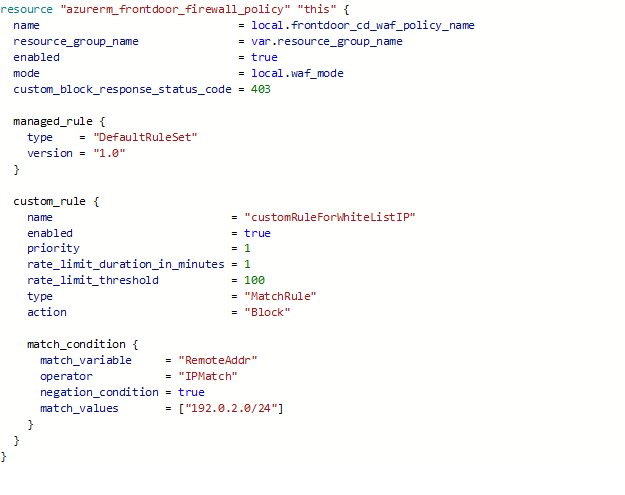
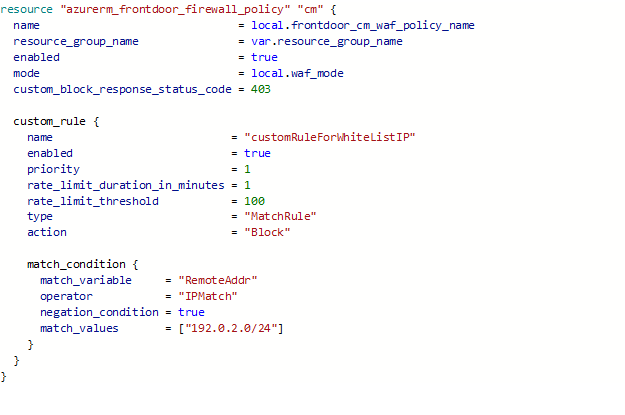
azurerm_frontdoor_firewall_policy, navigate to thecustom_ruleblock and replace thematch-values ["192.0.2.0/24"]with your values[your whitelisting IP address in CIDR format].For more information about how to manage an Azure Front Door Web Application Firewall Policy instance, go to AzureRM documentation on Terraform.
-
In the
azurerm_frontdoor_firewall_policy, navigate to thecustom_ruleblock and setenabledtotrue.
For example, to apply the 192.0.2.0/24 whitelisting IP address for CD:
For example, to apply whitelisting IP address 1.2.3.4. for CM:
-
-
Create a pull request to merge with the main branch and complete it.
-
Run the frontdoor pipeline and ensure that the pipeline executes successfully.