Commerce Engine Connect caching
Commerce Engine (CE) Connect caching stores catalog entities to allow for quicker access from the storefront. The size of Commerce catalogs and the complexity of their structure can affect memory cache behavior.
The Sitecore XC solution supports two Commerce Engine Connect cache providers:
-
Redis - the Redis cache provider is for distributed deployments, including integration, testing, and production environments. By default, Commerce Engine Connect uses Redis caching.
-
Memory - in-memory caching is for single-server deployments and development environments only.
NoteThe Memory cache provider is deprecated in Sitecore XC 10.2 and will be removed in a future release.
Commerce Engine Connect distributed caching
In a distributed Commerce deployment, Commerce Engine (CE) Connect uses Redis for caching catalog entities for improving the performance of the Content Delivery (CD) and Content Management (CM) environments. A single instance of Redis can contain cache stores for both CE Connect caching and Commerce Engine caching. The CE Connect cache store uses DB0. The Commerce Engine cache store uses DB1.
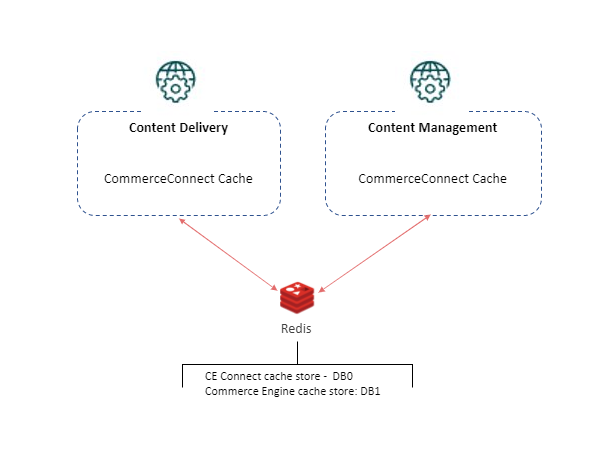
CE Connect Caching configuration
You can change the CE Connect caching service provider or fine-tune the caching configuration to meet the requirements of your Commerce storefront. The CE Connect Cache settings are located in the c:\inetpub\wwwroot\<site>\App_Config\Include\Y.Commerce.Engine folder, in the Sitecore.Commerce.Engine.Connect.config file.
Do not make configuration changes directly in the Sitecore.Commerce.Engine.Connect.config file. To customize CE Connect configuration, use the [Custom.Commerce.Engine.Connect.config patch file](patching-sitecore-commerce-engine-connect-configuration.html "Patching Sitecore Commerce Engine Connect configuration"), or create your own patch file.
The Redis cache provider is enabled by default in CE Connect caching configuration. If you enable both Redis and the in-memory cache providers, or if you disable both, CE Connect uses in-memory caching.
The following shows an example of the Redis cache configuration in the Sitecore.Commerce.Engine.Connect.config file:
Redis provider parameters
You can use the following parameters to configure the Redis cache provider:
| Parameter | Description |
|---|---|
enabled | Specifies whether the provider is enabled. Default value: true. |
cacheStoreName | Sets the name of the cache store. Default value: Commerce-Connector-Redis |
intervalBetweenConnectionAttemptsInSeconds | Sets the number of seconds before a failed connection attempts to connect again. Default value: 60 |
redisConnectionPoolSize | The number of connection to Redis in a pool. Default value: 1 |
redisCompressionEnabled | Controls whether the Redis provider compresses cached data. Default value: true |
configuration | Specifies the connection string options for the Redis cache provider. The following are defaults:
|
instanceName | Sets the Redis instance name. Default value: Redis |
In-memory cache provider parameters
You can use the following parameters to configure the in-memory cache provider:
| Parameter | Description |
|---|---|
enabled | Specifies whether the provider is enabled. Default value: false. |
cacheStoreName | Sets the name of the cache store. Default value: Commerce-Connector-Memory |
evictionPercentage | Sets the threshold at which the cache removes the least recently used entries to make room for new entries. Default value: 0.2 |
maxSizeInBytes | Sets the maximum size in bytes permitted in the cache store. Default value: 9223372036854775807 (long.MaxValue) |
PollingInterval | Sets the maximum time after which the cache store updates its memory statistics. Default value: "00:00" (2 minutes). |
sizeLimit | Sets the maximum number of items for a cache store. If no value is specified there is no limit and limitation is based on maximum size allowed in cache (as determined by the maxSizeInBytes) value). |
expirationScanFrequency | Sets the minimum length of time between scans for expired items. Default value: "00:00" (1 minute) |
compactionPercentage | Sets the percentage of cache data to compact when the maximum size is exceeded. Default value: 0.05 |
Cache Entry configuration
You can use the following parameters to configure cache entries (for any cache provider):
| Parameter | Description |
|---|---|
cacheName | Specifies the name of the cache. |
expiration | Sets the length of time after which a cache entry expires, in milliseconds. The default is 21600000. |
priority | Sets the priority for the cache entry. Possible values are:
|
absoluteExpirationRelativeToNow | Sets the length of time after which a cache entry expires relative to the current timestamp, in milliseconds. |
slidingExpiration | Sets the length of time after which a cache entry expires if it has not been accessed, in milliseconds. |
Threshold triggering full cache refresh after incremental indexing
The incremental indexing process runs at a regular interval and indexes any new or modified Commerce items. When the quantity of new or modified items exceeds the threshold specified by the <fullCacheRefreshThreshold> property value, then a full cache refresh is executed. The following shows the default configuration:
CE Connect Cache maintenance
You can refresh the content of the CE Connect cache in Sitecore Content Editor. (You cannot use the caching API sample requests in Postman to maintain the CE Connect cache.)
To refresh the CE Connect cache:
- On the Sitecore Launchpad, click Content Editor.
- On the Commerce tab, click Refresh Commerce Cache.
The Refresh Commerce Cache operation refreshes the following caches:
- Sitecore item cache
- Content path cache
- Sitecore data cache
- Standard value cache
- Template cache
- Template engine cache
- HTML cache
- Catalog entities
- Catalog mappings (always cached in memory)