1. Sitecore Authoring and Management GraphQL API

Query examples for events subscription

Version:

You can perform events subscription with subscription operations for the following GraphQL types:

  • Item

  • Job

  • Publishing

For a complete list of available types and operations, refer to the built-in documentation in the GraphQL IDE.

Enable WebSocket on IIS

Graphql subscription requires WebSocket for two ways communication.

To turn on the WebSocket feature in Windows Internet Information Services and authenticate with access token:

  1. In the Control Panel, open Windows Features and enable the WebSocket Protocol feature.
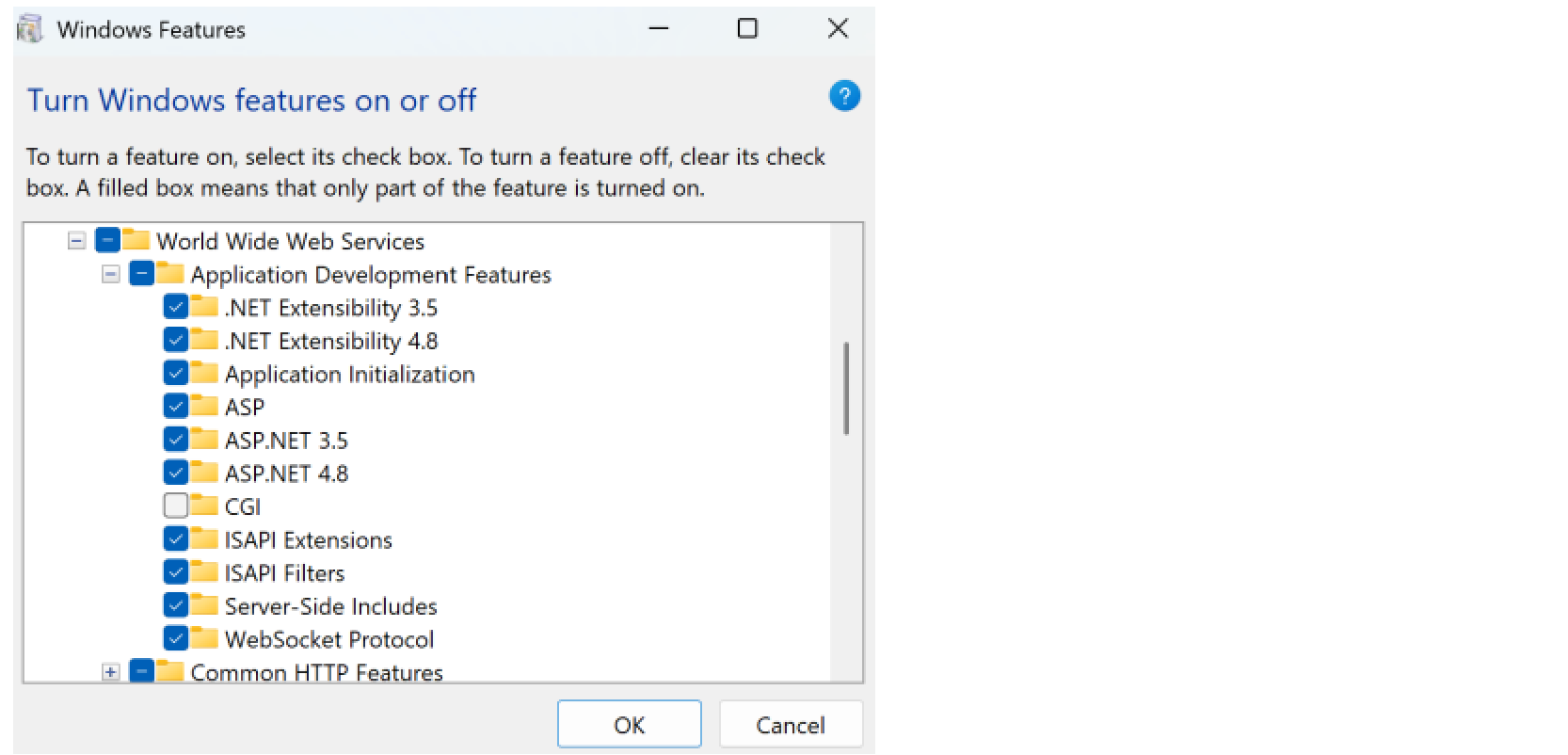
    The Windows Features dialog
  2. After the features have been enabled, go to IIS on Windows, then click on the root Site.

  3. Under Management, click on Configuration Editor.

  4. In the Section dropdown box, type "system.webServer/webSocket", then to the right, click Unlock Section.
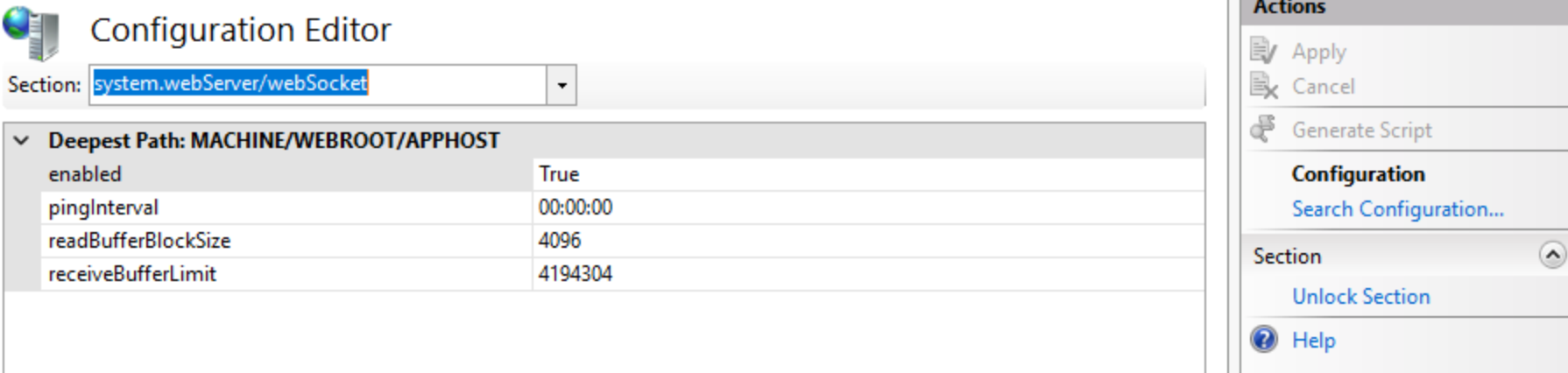
    The Configuration Editor
  5. Add the following in SitecoreCMInstance web.config:

    <system.webServer>
       <webSocket enabled="true" />
    </system.webServer>  
  6. Create an access token.

  7. Use your access token when creating a WebSocket GraphQL client in NodeJS with graphql-ws to connect to your Authoring endpoint, as in the following example:

    import { createClient } from "graphql-ws";
    
    export const wsClient = createClient({
      url: "wss://{cm_instance_url}/sitecore/api/authoring/graphql/v1", 
      connectionParams: () => ({
        access_token: `{access_token}`
      }),
      on: {
        connecting: () => console.log(" Connecting WS..."),   
        connected: () => console.log(" WebSocket connected"),   
        closed: (e) => console.log(" WebSocket closed:", e),   
        error: (e) => console.log(" Full keys:", e)   
      }  
    });  

Query examples for Item

The following sections contain example queries for events subscription.

On Item Added

You can receive the “on item added” event data with an onItemAdded subscription.

Query

subscription {
 onItemAdded(input: { database: "master"}) {
   name   
   displayName
   path
   }
 }  

Result

Data:    
  onItemAdded: 
  displayName: "test item"
  itemId: "5f18db1b7afa43e99b6c84f7a0cb3bd8"   
  name: "test item"   
  path: "/sitecore/content/Home/test item"  

On Job Started

You can receive the “on job started” event data with an onJobStarted subscription.

Query

subscription {
   onJobStarted(input: { jobName: "Sitecore.ListManagement.Operations.UpdateListOperationsAgent" }) {
   name   
   jobState  
   expiry   
   done   
   category   
   queueTime   
   handle   
   siteName   
   displayName   
   }   
   }  

Result

Data:
  onJobStarted:
    category: "schedule"
    displayName: "Sitecore.ListManagement.Operations.UpdateListOperationsAgent"
    done: true   expiry: "2025-12-15T11:35:29.216Z"
    handle: "cef968ae-ba25-46ae-b06e-4020c2b84ba1"
    jobState: "Finished"
    name: "Sitecore.ListManagement.Operations.UpdateListOperationsAgent"
    queueTime: "2025-12-15T11:34:29.215Z"
    siteName: "scheduler"  

Publishing Status Updated

You can receive the “publishingStatusUpdated” event data with a publishingStatusUpdated subscription.

Query

subscription {
   publishingStatusUpdated(input: { operationId: "1bac04b7-8b97-4756-b0c9-38dcacc89b5b " })   {
   isDone
   isFailed
   state
   processed
   }
   }  

Result

Data:
  publishingStatusUpdated:
    isDone: true
    isFailed: false
    processed: 104
    state: "Finished"
If you have suggestions for improving this article, let us know!