Configure API authentication keys in a scaled environment
| Applies to | xDB Processing, xDB Reporting and Content Management. |
|---|---|
| Sitecore Installation Framework | Security keys are not configured by default. |
| Azure Toolkit | Security keys are configured by default when they are entered into the ARM template. |
To ensure secure communication between servers in a scaled Sitecore environment, each request from a client must be authenticated on the xDB Reporting server and the xDB Processing server. For example, on a Content Management server that needs to communicate with a remote Reporting server. In scaled environments, only authenticated parties can gain access to data on remote servers.
For each server request, the Sitecore.Analytics.Commons.ApiKeyHttpTransportFactory class adds a custom HTTP header to the page requested. The header includes an API authentication key, which is stored in the ConnectionStrings.config file.
On each server you must enter an API authentication key that can be used during the authentication process. Keys must be identical to successfully authenticate requests. For example, the key on a Reporting server must match the key stored on a content management server to successfully retrieve data from the Reporting.
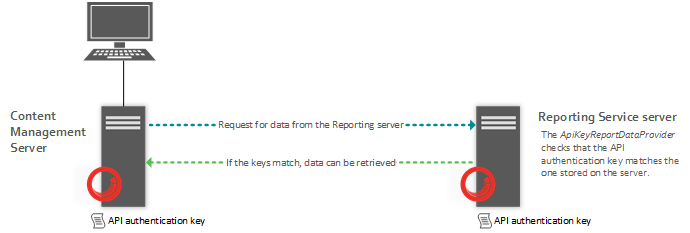
The server authentication process is as follows:
- A Content Management client requests data from the Reporting server using the
Sitecore.Analytics.Commons.ApiKeyHttpTransportFactoryclass. - When the Reporting server receives the request, the
ApiKeyReportDataProviderclass checks that the API authentication key from the HTTP header matches (case-sensitive) the one stored on the Reporting server. - If the two keys match, the processing of the request can continue, data is retrieved and can be sent back to the Content Management client.
- If the authentication keys do not match, the server responds with a 403 (Forbidden) status code.
Use HTTPS across your entire website. In the Sitecore.Xdb.Remote.Client.config file, RequireHttps is enabled by default and should remain enabled in all production environments. HTTP is not secure enough for production servers and should only be used on local testing or development instances.
Option #1: Configure a shared API authentication key
The following section describes how to configure an API authentication key between the Content Management and the Processing and Reporting servers. In this scenario, Processing and Reporting use the same authentication key.
On the Content Management server
To configure an API authentication key on the Content Management server:
-
On the Content Management server, navigate to the
Website\App_Configfolder and open theConnectionString.configfile. -
In the
ConnectionStrings.configfile, find thereporting.apikeyconnection string and enter an ASCII string to use as a key (default minimum length 32 characters). The key can be any combination of numerals or text.For example:
ImportantThe string you choose must conform to the minimum API key length as specified in the
Sitecore.Xdb.Remote.Client.configfile,MinimalApiKeyLengthattribute.
On the Processing and Reporting servers
To configure an API authentication key on the Processing and Reporting servers:
- On the Processing and Reporting servers, navigate to the
Website\App_Configfolder and open theConnectionStrings.configfile. - Add the
reporting.apikeyconnection string to theConnectionStrings.configfile. The key must match the Content Management server.
Option #2: Configure a separate API authentication key for Processing
The following section describes how to configure different API authentication keys between Content Management and Processing, and Content Management and Reporting.
On the Content Management server
On the Content Management server, or any other server that is making the request for data from the Processing server:
-
In the
Sitecore.Xdb.Remote.Client.configfile, locate the following section and set theconnectionStringNameparameter to a new value - for example,processing.apikey: -
Add two API authentication keys to the
ConnectionStrings.configfile:For example:
On the Processing server
To configure an API authentication key on the Processing server:
-
In the
Sitecore.Xdb.Remote.Client.configfile, locate the following section and update theconnectionStringNameparameter as shown: -
Add a new API authentication key to the
ConnectionStrings.configfile: -
Remove the
reporting.apikeyfrom theConnectionStrings.configfile if it is present.
On the Reporting server
To configure an API authentication key on the Reporting server:
-
Add a new API authentication key to the
ConnectionStrings.configfile:
Optional configuration
Optional Content Management server configuration
The following table shows the default parameter settings in the Sitecore.Xdb.Remote.Client.config file that you can adjust later, if necessary. You can configure different parameter settings for Processing and Reporting.
| Parameter | Description |
|---|---|
| ServiceUrl | The service host URL to use in all requests. Update this if the host name of your reporting server changes. |
| ConnectionStringName | The name of the connection string that contains the API authentication key. |
| HeaderName | The name of the header to include in the request. Use the same header name on both servers. For example, X-Reporting-Api-Key. |
| MinimalApiKeyLength | This specifies a minimum key length for the API authentication key. If it is too short, then the request will not be sent. Longer keys are more secure. |
| RequireHttps | Boolean switch set to “true” by default. Always use HTTPS in a production environment. If it is set to “true” and the schema in |
These configuration parameters appear in the following section of the Sitecore.Xdb.Remote.Client.config file:
Optional Reporting server configuration
On the Reporting server, the Sitecore.Analytics.Reporting.ApiKeyReportDataProvider is defined in the <dataProvider> configuration section of the Sitecore.Xdb.Remote.Server.config file. The Sitecore.Xdb.Remote.Server.config file contains the following default parameters:
| Parameter | Description |
|---|---|
| ConnectionStringName | The name of the connection string that contains the correct API authentication key (this should match the key of the server making the request). |
| HeaderName | The name of the header to check in the incoming server request. |
These configuration parameters appear in the following section of the Sitecore.Xdb.Remote.Client.config file:
Optional Processing server configuration
| Parameter | Description |
|---|---|
| ConnectionStringName | The name of the connection string that contains the correct API authentication key (this should match the key of the server making the request). |
| HeaderName | The name of the header to check in the incoming server request. |