Extracting contacts and interactions
Use the CreateContactEnumerator() and CreateInteractionEnumerator() methods to extract contacts and interactions. You must specify a batch size and use expand options to specify which facets should be returned with each result.
You cannot run data extraction synchronously.
For an example of a data extraction feature used to extract and migrate data to another Sitecore instance, see the xConnect Migration code sample.
Extracting contacts
The following example demonstrates how to extract all contacts. Results are returned in batches of 200. The CreateContactEnumerator() method accepts a ContactExpandOptions object, which determines which contact facets and related interactions are returned.
Exported JSON will include PII (Personally Identifiable Information) if you choose to extract facets marked [PIISensitive].
Data extraction returns all contacts, including contacts that were obsoleted during a merge.
Extracting interactions
The following example demonstrates how to extract all interactions that were saved before a specified cut-off date. Results are returned in batches of 200. The CreateInteractionEnumerator() method accepts a InteractionExpandOptions object, which determines which interaction facets and related contact facets are returned.
Specifying a date range
The CreateInteractionEnumerator() method accepts the following optional constructor parameters that work together with the cutOffDate parameter:
minStartDateTime- the minimum interactionStartDateTime(inclusive).maxStartDateTime- the maximum interactionStartDateTime(exclusive).
An interaction’s StartDateTime property represents when the interaction started, whereas the LastModified property represents when the interaction was saved to xConnect. If an interaction is imported from an external system at scheduled intervals, the LastModified date is likely to greater than the StartDateTime.
By specifying a start date range and a cut-off date, you can extract interactions that occurred between two dates, but exclude any interactions within that range that were saved to xConnect after a particular date.
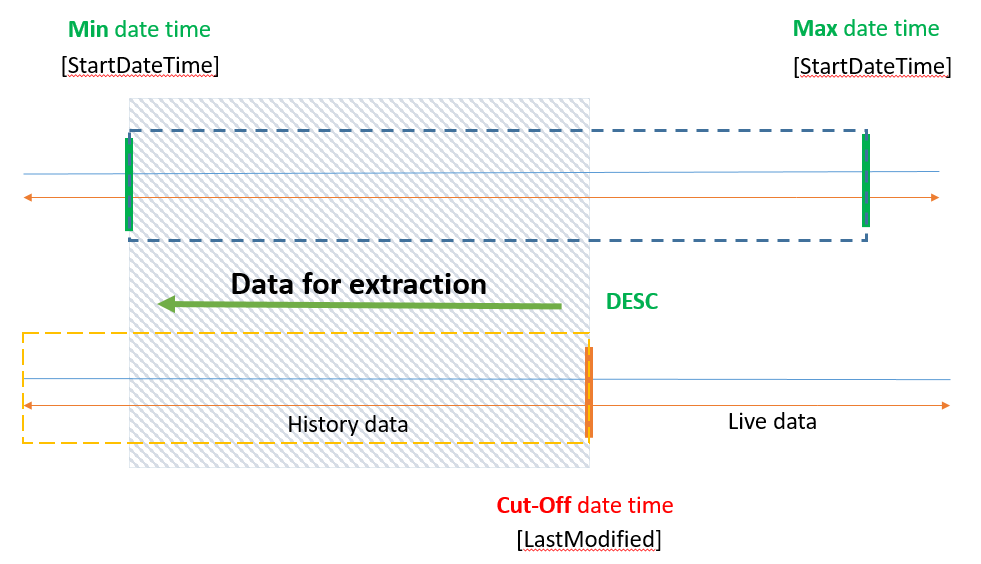
By default, the cutOffDate uses the creation time of the extraction cursor. Because the extraction can take time to process, it does not include any new contacts and interactions after that time.
The following example will return all interactions that started between 1st November and 10th November, but exclude any interactions that were saved after 8th November:
Using a cursor mark
You can use a cursor mark to resume data extraction if the process is interrupted. This applies to both contact and interaction data extraction. The following example demonstrates how to pass a cursor mark into the CreateContactEnumerator() if an exception is thrown:
Shard location information is not stored within the cursor. This means that cursor mark will expire if a shard is moved to a different server. If a cursor mark expires, you must start the data extraction process from the beginning.
Contact merge and data extraction
See Merge contacts for more information about how data extraction handles:
- Contacts that have previously been merged.
- Contact merges that occur whilst data extraction is ongoing.