Troubleshooting JSS Next.js apps
To help you debug your JSS application, we recommend you use the debug logging utilities provided by JSS.
You can prevent most errors by performing the following steps:
-
Verify that all environment variables used by the app have values. The sample app searches for environment variables in the following order:
scjssconfig.json..env..env.local(for local environments only).
-
If multiple files contain a definition of the same variable, the application uses the last value it finds.
Refer to the sample
.envfile for variable names and descriptions. -
Check that you have correctly set up the API key.
-
Check that your project's site definition and app definition are correct in your Sitecore configuration. Refer to the sample app configuration for the list of required properties.
-
Verify that you have set the JSS Editing Secret. The
JSS_EDITING_SECRETvalue used by your Next.js app must match the value used by your Sitecore instance. -
Verify that the GraphQL endpoint is correct in
package.jsonand the Sitecore app definition. Try opening the GraphiQL interface in a browser, using values from your config (<sitecore hostname + graphQL endpoint>/ui?sc_apikey=<api key>) to make sure the endpoint is working.
Server-side JavaScript errors
If you encounter unexpected JavaScript errors during the npm install or build steps, especially errors that other team members cannot reproduce, check the versions of Node and npm being used. From a terminal, run:
We test JSS using the Long Term Support (LTS) versions of Node. These are typically one major version behind the latest official Node version.
The Node/npm version used by your CI/Production environments may differ from the version your local environment uses. When a project configuration does not require a specific Node/npm version in package.json, deployment agents commonly build using the most recent version available or an environment-specific "default" version.
If you need to swap between multiple Node versions on your local environment for testing, you can use third-party packages like n or nvm.
Errors regarding SSL certificates
If you are working with a local Sitecore instance using a privately signed certificate, you might experience the following error:
Error: unable to verify the first certificate
Error: UNABLETOVERIFYLEAFSIGNATURE
UnauthorizedError: invalid signature
To resolve this error, configure Sitecore CA certificates for Node.js.
Errors deploying a JSS app locally
If the import role does not have the correct permissions, you might experience the following error:
Refer to Errors when importing JSS application on Azure for the solution.
Data-fetching issues
Building and rendering a JSS Next.js app depend on successfully fetching data using GraphQL. The most common cause of failed builds and apps that cannot render pages is an issue with the data-fetching process.
The GraphiQL interface at <sitecore hostname + graphQL endpoint>/ui?sc_apikey=<api key> is a visual browser for GraphQL data. It is a useful tool for diagnosing these types of issues.
To support static generation functionality, the sample app uses a GraphQL query to retrieve Sitecore paths. Try running this query directly in GraphiQL.
If you do not see the expected results, try the following steps:
- In the Sitecore Control Panel, use Populate Solr Managed Schema to populate the Solr Schema.
- In the Sitecore Control Panel, use Indexing Manager to rebuild indexes.
- Check that your content items have versions for the language you're trying to query.
GraphiQL is blank, and developer tools show "Error: Mode graphql failed to advance stream"
You might encounter this problem when the application cannot restore the data in localStorage. For example, if you tried to open a URL with an embedded query and the query was invalid.
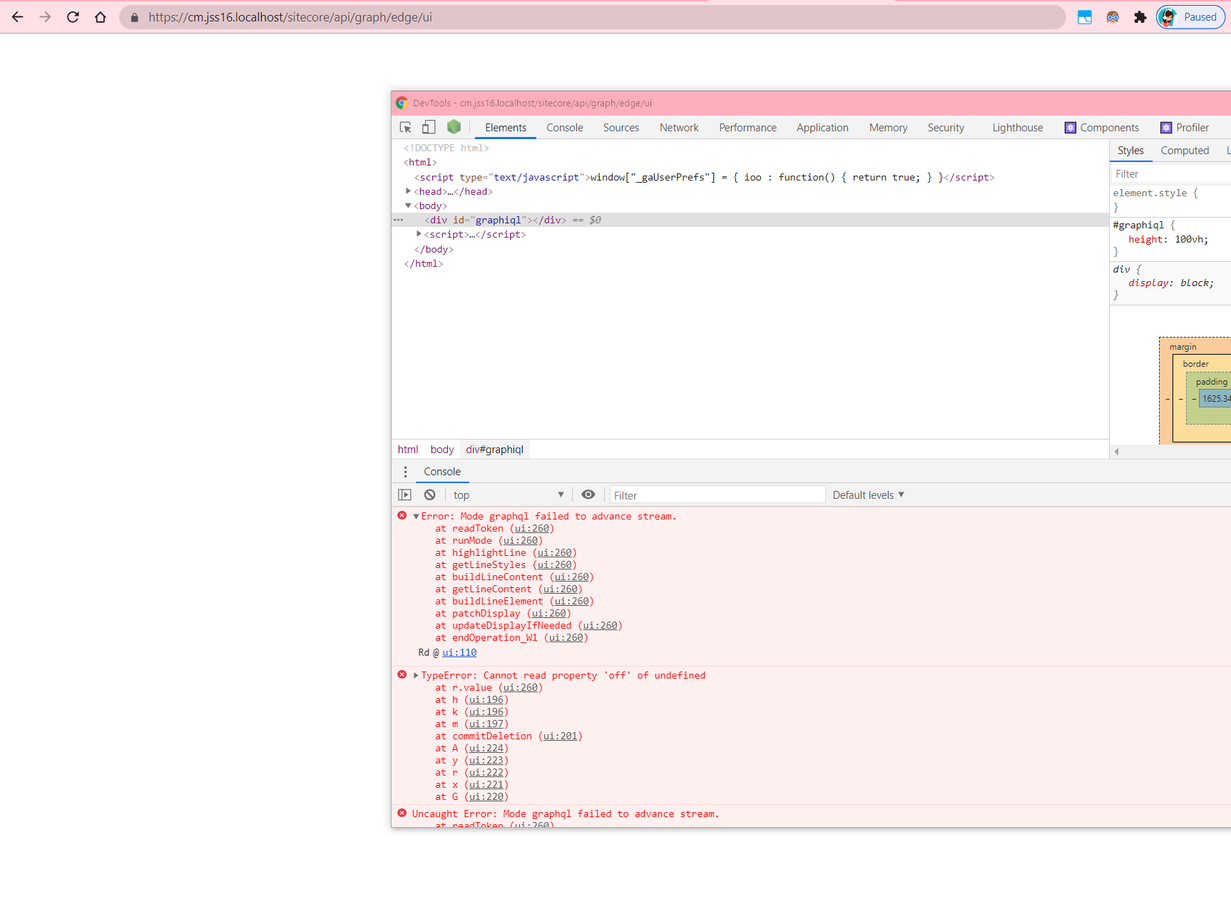
To solve the problem:
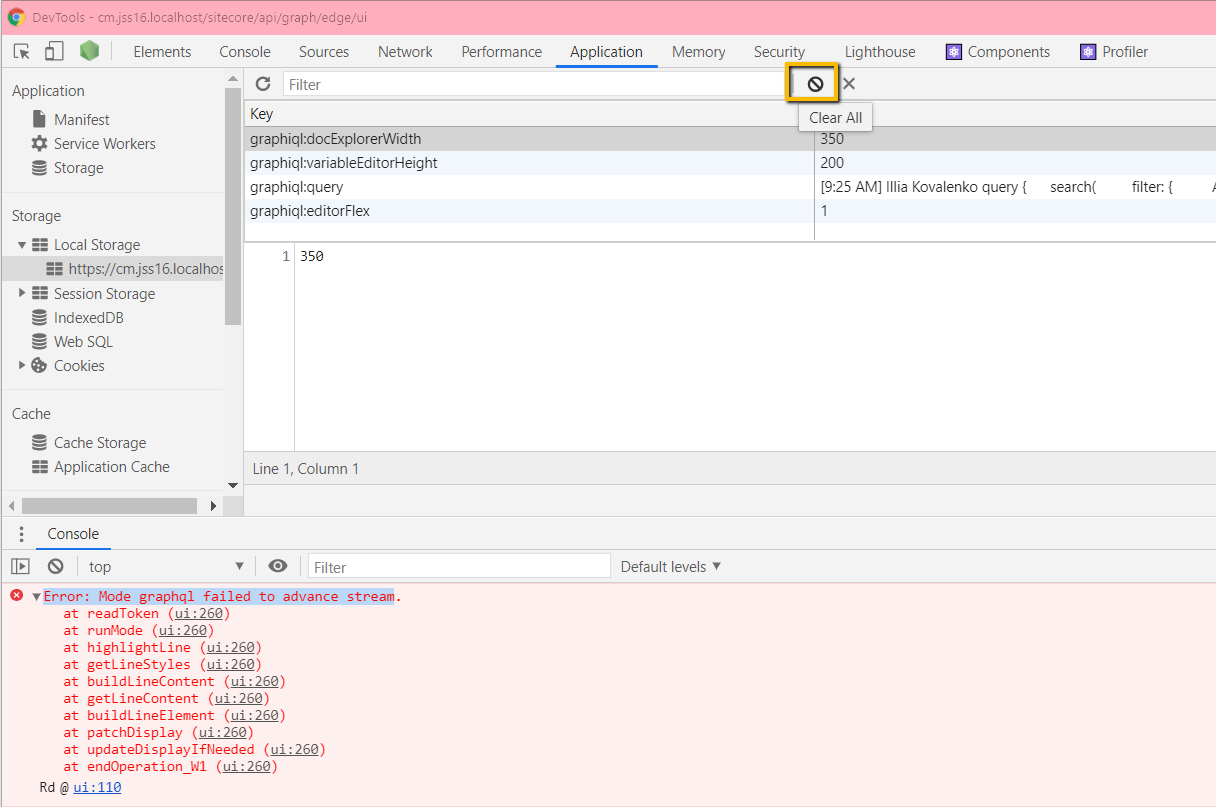
-
Clear all local storage from the relevant tab.
-
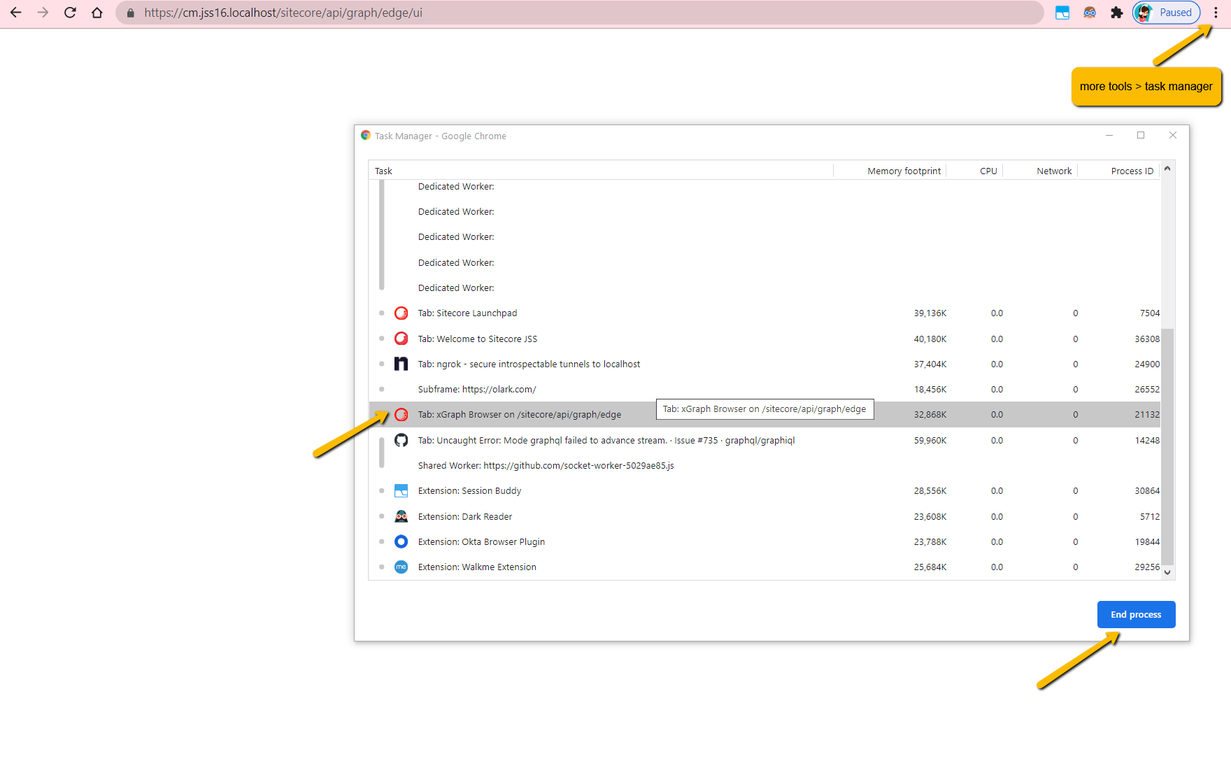
In Chrome's task manager, kill the process before it can write to local storage again.
Error "XmlException: Root element is missing" in GraphiQL
This error occurs when loading GraphiQL in the same browser where you logged in to Sitecore.
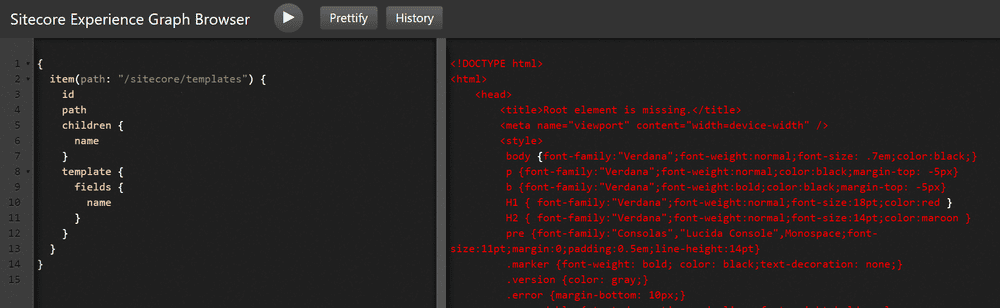
To solve the issue, append sc_mode=normal to the URL query parameters.
Error when trying to edit items in Sitecore
After creating a new user in the Sitecore Editor Role, attempting to edit the JSS app items in Sitecore might warn that the user does not have read access rights.
The workaround is to set Workflow State Write for the System/Workflows/JSS development workflow item manually, enabling the Published state, which is final, to be editable. It allows the user to create a new version of an item for editing using the Lock and Edit option.
Rendering host timeout issue in Experience Editor
When opening a JSS app configured to use the HTTP rendering engine (such as a Next.js app) for the first time using the Experience Editor, you might get a timeout error from the rendering host with the message The operation has timed out. In the logs, you can might see the following:
To resolve the issue, edit the \App_Config\Sitecore\JavaScriptServices\Sitecore.JavaScriptServices.ViewEngine.Http.config file to increase the value of the RequestTimeoutMs setting. For example:
GraphQL query error when trying to start the Next.js app using a Sitecore instance with SXA
If you have an SXA integration with a JSS tenant and you deploy Next.js items into the JSS tenant, you might encounter a GraphQL query error when trying to start the Next.js app in production mode:
Error: Valid value for rootItemId not provided and failed to auto-resolve app root item.
This error occurs because the Next.js app and Next.js app items deployed into JSS tenant reference different templates, causing the query to fail.
To prevent the error, define a rootItemId for your instances of GraphQL services as follows:
/src/lib/sitemap-fetcher.ts./src/lib/dictionary-service-factory.ts.
Errors when generating GraphQL introspection data
If the GraphQL schema changes, you must regenerate GraphQL introspection data.
In the sample app, you regenerate introspection data using the command jss graphql:update.
The script invoked internally by this command depends on having the scjssconfig.json file populated. To generate the file you must connect your JSS app to Sitecore.
Vercel is unable to show data from a local Sitecore environment
If you are using ngrok to expose your local Sitecore endpoint to Vercel, verify that you are using the host-header flag. For example,
App fails to render on Vercel after 18.0.0 upgrade
If your app renders and builds correctly in your local development environment, but fails to render when deployed to Vercel, a possible reason for the issue might be an incorrect upgrade to version 18.0.0 or later.
When creating your Next.js application using the jss create command, based on the options you chose or the default values for --fetchWith and --prerender options, the script cleans up after itself.
When upgrading your Next.js application from JSS 16.0 to JSS 18.0, manually and copying the latest code from the repository, this automatic cleanup does not happen. Prior to version 18.0, [[...path]].SSR.tsx was located at src/pages_examples/. In version 18.0.0 and later, because of improvements to the jss create command, the source for the Next.js sample application holds both catch-all dynamic routes for the [...path] parameter in src/pages.
To resolve the rendering issue:
- Make sure you choose the right page source file and that you only have one catch-all, dynamic route in
src/pages- If using server-side rendering, keep
src/path/[[...path]].SSR.tsxand rename it to[[...path]].tsx - If using static generation, delete
src/path/[[...path]].SSR.tsx.
- If using server-side rendering, keep
- Redeploy your source code.
Known Issue: Error in Experience Editor when attempting to type in an empty text field
Typing in an empty text field creates the following error message:
This is a known issue in the Experience Editor, and we expect to fix it in a future release. It does not affect the functionality, and you can safely ignore it.
When you run Next.js in development mode, Next.js displays runtime errors in an overlay.
This issue does not occur when Next.js runs in production mode and does not affect Content Authors.